The Eutron ER-220 is an electronic cash register (ECR) designed for various sales and administrative purposes. This manual details its operation, programming, and maintenance, making it suitable for both daily use and technical setup.
Function Description:
The ER-220 ECR is equipped with a keyboard that provides access to sales, reading, resetting, and programming functions. It supports various operational modes, including:
- OFF Position: Deactivates the ECR.
- REGISTER (RG) Position: Allows for routine sales and storage functions.
- READING (X) Position: Enables retrieval of various reports at any time, such as Daily Report, Period Report, Period PLU, Period Tables, Time Zone, Clerk Daily, Clerk Period, Clerk Daily-All, Clerk Period-All, Salesperson Daily, Salesperson Period, Salesperson Daily-All, Salesperson Period-All, and Membership.
- CLOSURE (Z) Position: Used for end-of-day zeroing, resetting serial numbers, and printing totalizer reports. This position is crucial for daily closure.
- PROGRAMMING (SET) Position: Provides access to ECR programming and settings.
- MANAGE (MG) Position: Similar to the REG position but includes additional functions for stock management and chip card operations.
The ECR supports a comprehensive range of sales functions, including:
- Department Sales: Allows printing of sales transactions by department on the receipt, accumulating amounts in individual registers, and totaling them on the current receipt. Repeatedly pressing the department key repeats the registration of the last entered amount.
- PLU (Article) Sales: Enables recalling product descriptions and unit prices using a numerical code, with support for price variations.
- Sales Requiring Multiplication: Multiplies quantities by amounts for department sales or PLU sales, with a maximum of five internal figures or decimals for quantity.
- Sales Variation Function: Modifies receipt contents before completion, including correction operations, transfers, returns, discounts/increases, and cancellation on the subtotal.
- Cancelling Previous Entry: The
<VOID> key cancels the last entry, printing a corrected amount with an inverted sign.
- Correction Last Entry: The
<CORR> key transfers a previous sale for both departments and PLUs.
- Full Cancellation of Receipt: The
<CANCEL> key cancels the entire receipt, bringing the total back to zero and closing the transaction, requiring <ENTER> for confirmation.
- Returned Goods: The
<REFUND> key facilitates returns of merchandise for any amount in any department or PLU.
- Discount and Increase in Percentage: Applies a percentage discount or increase to the latest item sold or the subtotal, using the
<-%DISCOUNT> key. The percentage can be pre-programmed or typed.
- Net Discount and Increase: Allows for an absolute discount or surcharge by entering an amount and pressing
<NET DISCOUNT> or <NET SURCHARGE>.
- Concluding Transactions, Methods of Payment: Concludes sales transactions with various payment methods.
- Cash Payments: The
<CASH> key automatically processes cash payments, calculates and displays change, and prints the receipt.
- Paying by Cheques, Coupon, Credit Card or Credit: Supports closing sales with cheques, coupons, credit cards, or credit, assigning amounts to different product registers for auditing.
- Using Other Currency: The
<CURRENCY> key allows transactions in foreign currency, displaying the subtotal in the foreign currency and enabling payment in mixed currencies.
- Other Functions and Special Keys:
- SUBTOTAL Key: Displays and prints the subtotal amount of the transaction and, with a second press, the number of units sold.
- C Key: Corrects typed sequences and displayed information before registration and helps escape error conditions.
- FEED Key: Advances the receipt paper by one line.
- PRICE Key: Changes the unit price of the last entered item.
- Receipt Copy: Prints a complete copy of the last produced receipt by pressing the
<SUBTOTAL> key.
- Manage Position Operation: Allows functions exclusive to the MANAGE position, such as changing item prices.
- Previous Balance Function: Designed for restaurant applications, enabling operations like opening and adding sales to tables, transferring tables, printing order lists, and closing previous balances.
- Open and Add Sales: Opens a table and adds items, with support for discounts, corrections, voids, refunds, and cancellations.
- Add Sales to an Active Table: Adds items to an already active table.
- PB Transfer: Transfers all sales from one table to another, useful when customers change tables.
- Print: Prints order lists for any opened table without affecting sales.
- Close Previous Balance: Closes transactions for previous balances, with options for detailed printing.
- Closing with Printing Detailed Sales: Prints a detailed bill for the customer upon payment.
- Combining Previous Balances: Combines sales from multiple tables for a single payment.
- Cancel PB Closing: Cancels the closing of a table, making it active again for further orders.
- Reading and Zeroing: Provides various summarising reports for operational and administrative purposes, with options to simply read data or zero it. Reports include Daily, Period, PLU, Tables, Time Zone, Clerk, and Salesperson reports, with daily, period, and all-operator variations.
Important Technical Specifications:
- Model: ER-220
- Display:
- Operator: 4 lines x 16 characters backlit LCD
- Customer: 12 digits LED
- Keyboard: 35 keys
- Printer: 58mm thermal printer, 32 characters, Receipt
- Department Capacity: 60
- PLU Capacity: 3000
Usage Features:
- User-Friendly Interface: A special guide leads the user through operations, and the keyboard configuration can be customized.
- Error Messages: The ECR displays error messages on the screen or stops operation in case of correctable or system-blocking errors. These messages provide clear indications of issues such as invalid entries, printer errors, or memory overflows.
- Secret Codes: To prevent unauthorized zeroing and programming, key sequences (secret codes) can block access to X, Z, and SET positions.
- Paper Roll Management: The ECR indicates when the paper roll is running out with a red band and a "PAPER END!" message on the display. Instructions are provided for paper roll replacement and clearing paper blocks in the printer.
- Customer Display: All registers have a numeric display with one line by 12 digits, showing short descriptions, messages, and amounts.
Maintenance Features:
- General Advice: The manual emphasizes placing the ECR on a stable, horizontal surface, ensuring the customer display is visible, and frequently checking the main power cable.
- Authorized Service: Extraordinary maintenance and repairs must only be carried out by an authorized technical assistance center. The manufacturer disclaims responsibility for work done by non-authorized technicians or if non-original parts are used. Interference with internal workings or the fiscal seal is prohibited.
- Cleaning: The ECR requires minimal maintenance. Weekly dusting with a soft cloth is recommended. Screens can be cleaned with dust repellent products. Abrasive solvents or detergents should not be used, and spraying directly onto the machine is discouraged. A damp brush can be used to remove dirt from the keyboard.
- Installation: The machine should be placed on a stable surface away from heat or electromagnetic noise. Peripheral connections (keyboard, display, etc.) should not hinder operations or be near heavy-duty live cables.
- Earthing: Proper earthing is critical to prevent damage, and the manufacturer assumes no responsibility for issues arising from a lack of earthing.
- Power Connection: The ECR should not be connected to circuits powering heavy-duty machinery (e.g., fridges, motors). Regular checking of power and other cables ensures safety and proper operation.
- Accessories: Any connected accessories must be approved by the manufacturer and operated by qualified personnel using documentation available only to EUTRON Assistance Centres or authorized representatives.

 Need help?
 General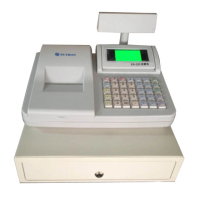

 To Next Page