E
-220 User Manual
POSITION MG: The MANAGE position is set by pressing keys <5> and <KEY> in
sequence. This position looks like REG position, but can perform stock and chip card
operating functions.
SECRET CODES FOR POSITIONS: X , Z , PG and MG
To prevent involuntary or unwanted zeroing and programming caused by unauthorised users, it
is possible to introduce a key sequence (secret code) that can block positions X, Z and SET.
For further details on this operations, refer to “Programming and use of the secret code in
programming manual
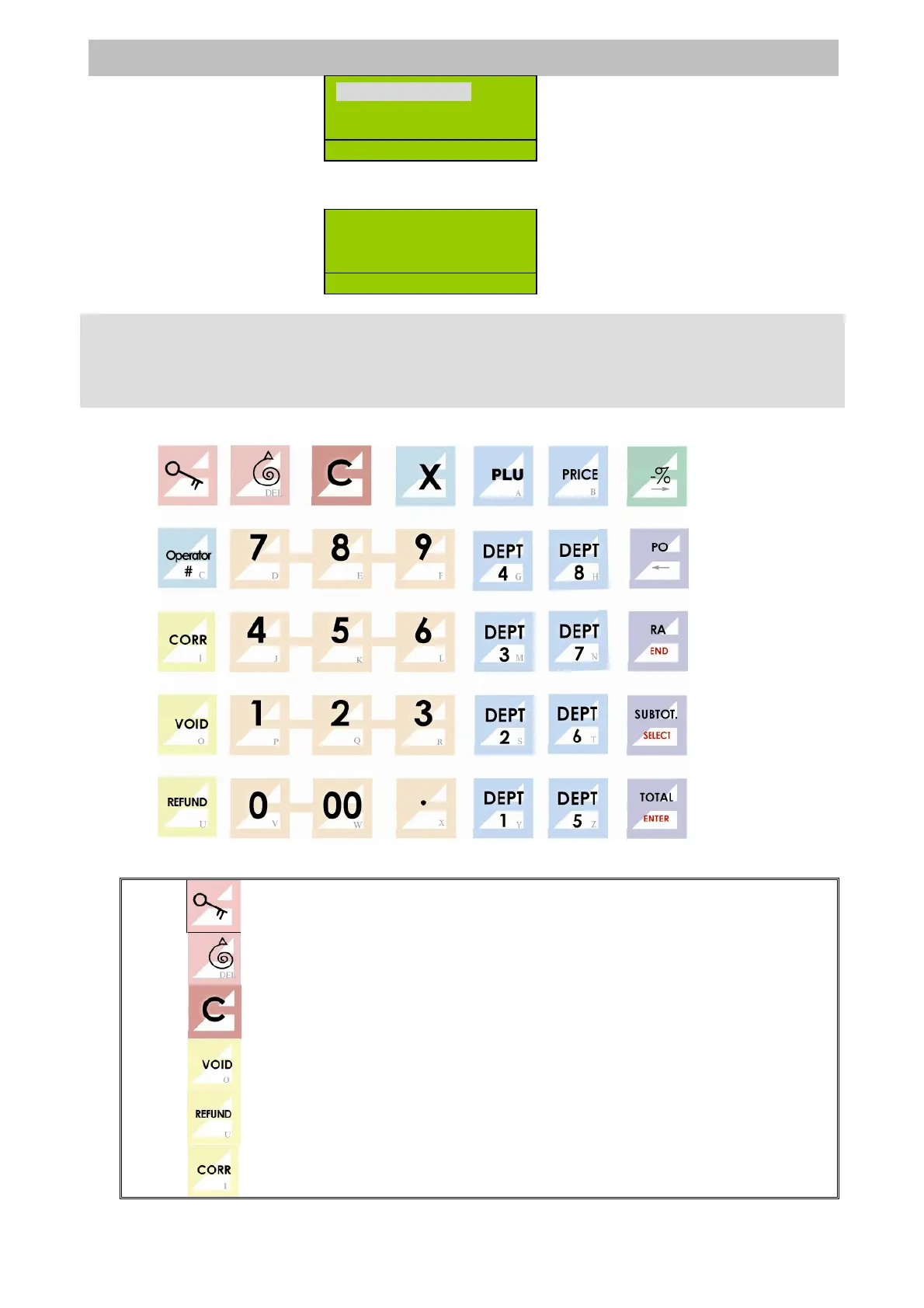
Default Keyboard Layout of ER-220 Series
5.2 KEY DESCRIPTIONS
Switch the working modes
Moves the receipt paper on.
Corrects setting and exits error messages.
Cancellation of one of the previous keystrokes.
Refund goods.
Void last sale.
1.GENERAL SET
2.DEPT/PLU…
3.COM/PRINT
P
M


 To Next Page