TIP: If you would like to feel a light pleasant aroma in your room, we
have come up with an aroma clip especially for you.
Visit evapolar.com/en/shop to make a purchase.
TIP: If for any reason you are unable to connect your device to a direct
power source (eg, while camping), you can use a power bank.
Visit evapolar.com/en/shop to make a purchase.
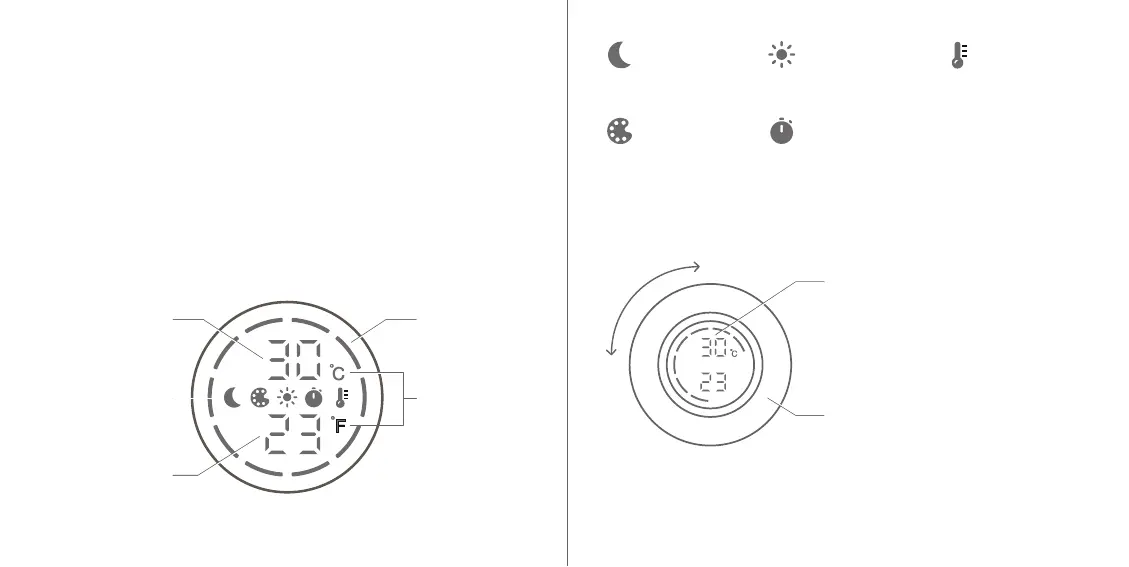
SCREEN ELEMENTS
CONTROL ELEMENTS
9 10
CONTROL PANEL & MENU
- Night mode
icon
- LED lighting
brightness icon
- Temperature
measurement
units icon
- LED lighting
colour icon
- Sleep timer icon
Airflow level
Temperature of
incoming air
Temperature
measurement
units
Temperature of
outgoing air
Menu items
TOUCHABLE SCREEN
Press and hold to turn the device
on/off.
Press once to access the menu.
Press again to confirm the selection.
CONTROL WHEEL
Increase/decrease the airflow by
rotating the control wheel. While
navigating the menu, the tempera-
ture readout is not shown.


 To Next Page