16
Using the Snugli Handle
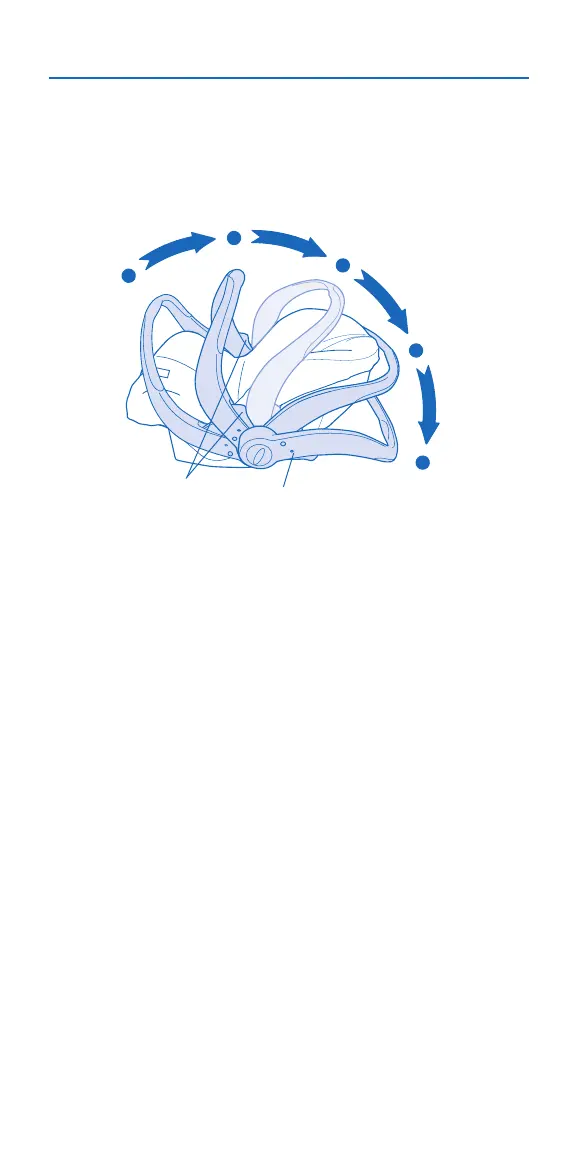
To change handle positions, squeeze both red
Handle Releases and rotate the handle to the desired
position. When the handle is locked into position,
the Lock Indicator will be green.
*IMPORTANT: NEVER use Positions 2 or 3 when
traveling in a vehicle.
Position 1 – This position can be used while traveling
in a vehicle (U.S). For Canadian Models, you MUST place
the handle in this position while traveling.
Position 2 – This position is ONLY to be used to carry
your child. NEVER use this position in a vehicle.
Position 3 – NEVER use this position to carry your child
in the carrier. NEVER use this position in the vehicle.
Position 4 – This position can be used while traveling
in a vehicle (U.S). For Canadian Models, you MUST place
the handle in Position 1 while traveling.
Position 5 – Place the handle in this position when you
set the carrier on the floor.
Handle
Releases
Lock Indicator
Position 1
Position 2*
Position 3*
Position 4
Position 5






 To Next Page