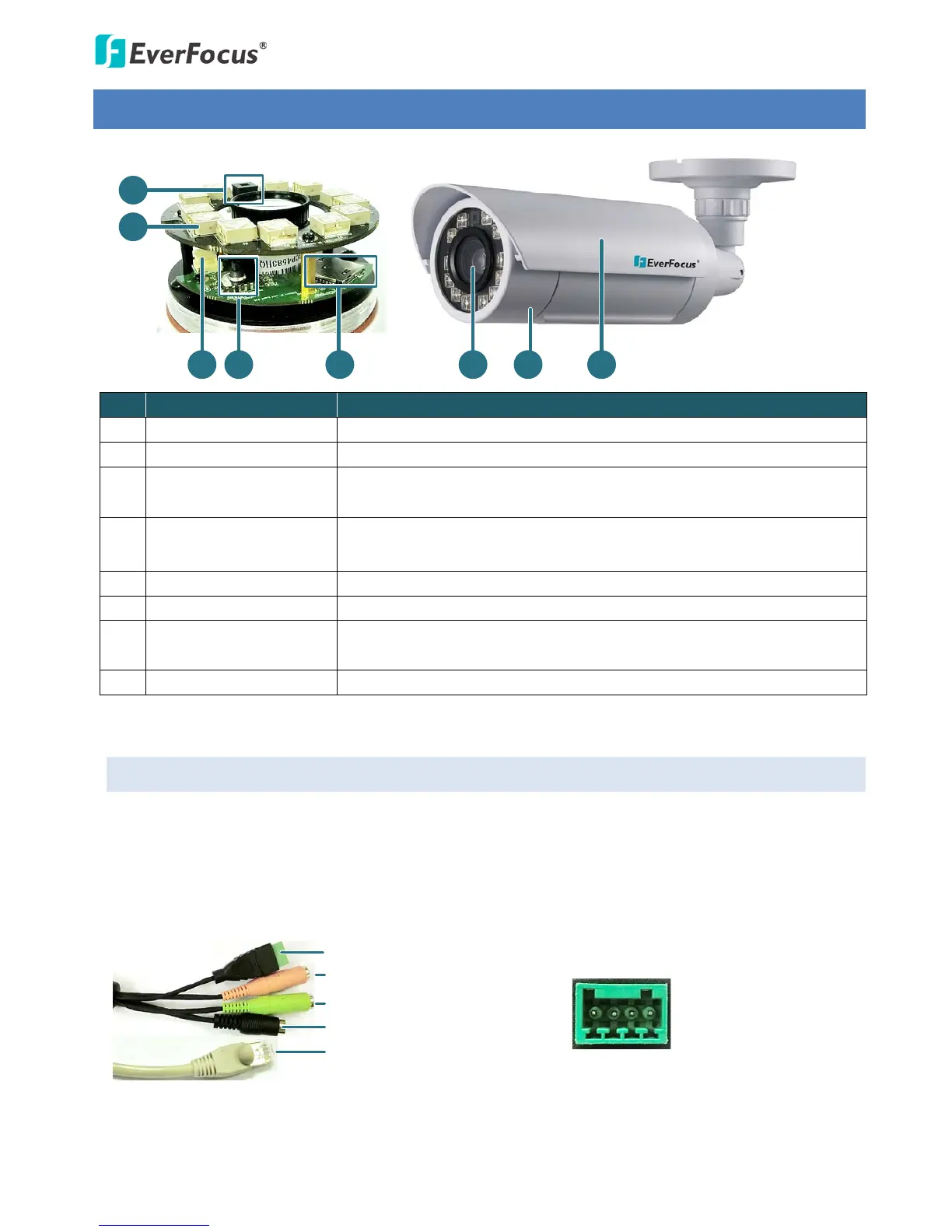
No. Name Description
1 Light Sensor Detects lights.
2 IR LEDs 12 IR LEDs for infrared illumination in night vision applications.
3 Video Test Output
Connects to a handheld test monitor for adjusting camera focus / zoom
/ angles.
4 5-Axis Button
For adjusting camera focus / zoom or restoring the camera to the
factory default. See 3.2 5-Axis Button for more details.
5 Micro SD / SDHC Slot Insert a micro SD / SDHC card (see Appendix for tested card brands).
6 Lens 10x optical zoom, auto focus, DC Iris, F1.8-360C.
7 Camera Cover
Remove the cover for using the 5-Axis Button, inserting a micro SD card
or connecting to a handheld test monitor.
8 Sunshield Protect the camera from the direct rays of the sun.
3.1 Cables
The Cables provide connections for Network, power, audio input / output and alarm input / output.
Note that the audio-in cable features a line-in 3.5mm jack (TRS). Be sure to prepare microphones with
TRS connector (see TRS Connector image below). Also, microphones with a (built-in) amplifier and
external power supply are required.



 To Next Page