EVGA X58 SLI CLASSIFIED Motherboard
35
Jumper Settings
PCIE Disable Jumper
For the ease of troubleshooting multiple video cards, or testing individual
video card’s overclocking, EVGA has implemented four jumpers you can
use to disable individual PCIE slots. You don’t need to remove any of your
video cards but simply disable the slot the particular card is in.
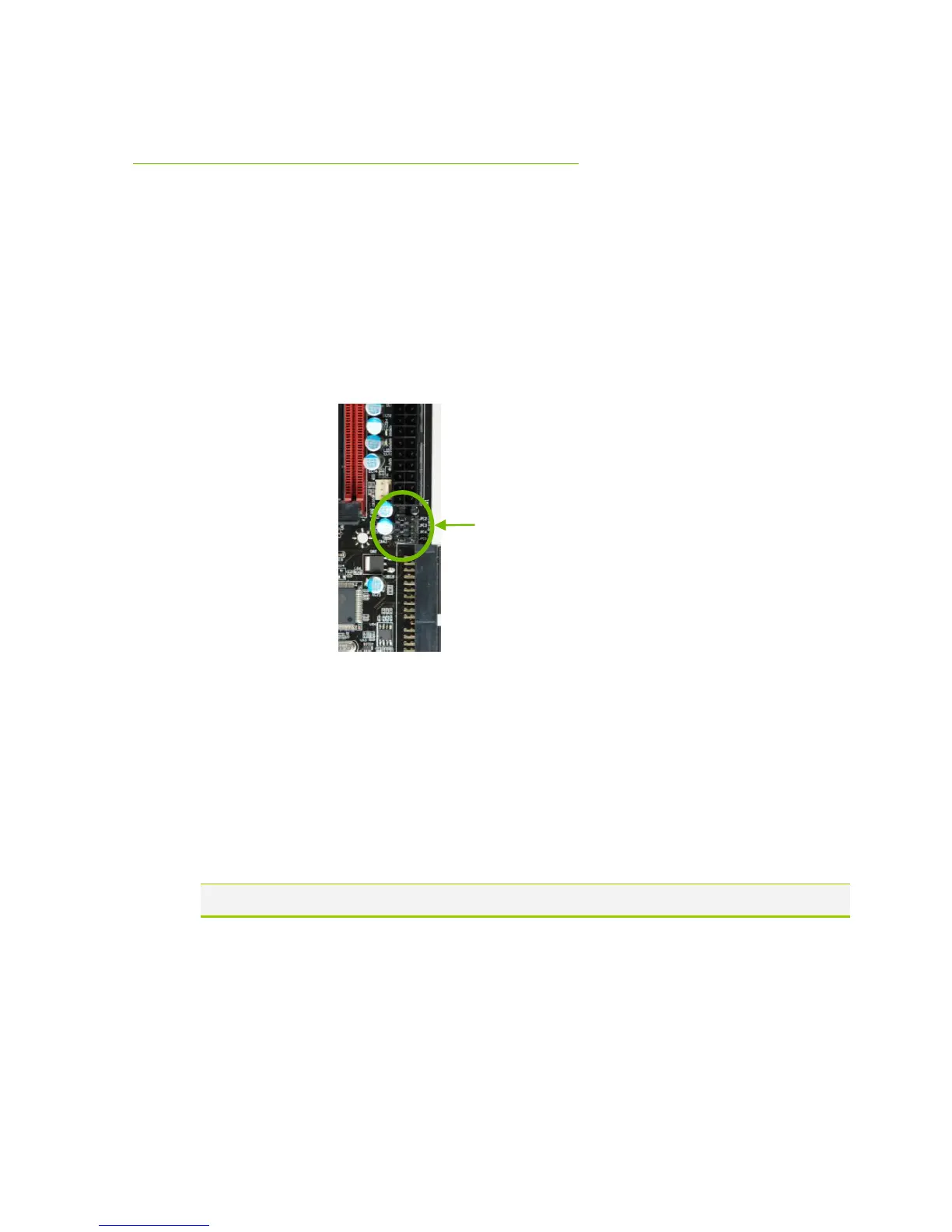
Above you see the location of the 4 jumpers, right below the 24pin ATX
Connector. In default shipping configurations, all slots are enabled with the
jumpers in the left position. From top to bottom, PCIE slots 2,3,4,5
respectively. To disable a PCIE Slot, move the jumper over to the right
position.
Example: Remove the Jumper cap of JPE2, PCIE Slot 2 is disabled while
the rest are enabled. The PCIE Disable Function can also be extended onto
the EVGA Control Panel (ECP).
Do this when the PC is turned off, NOT while it is running!



 To Next Page