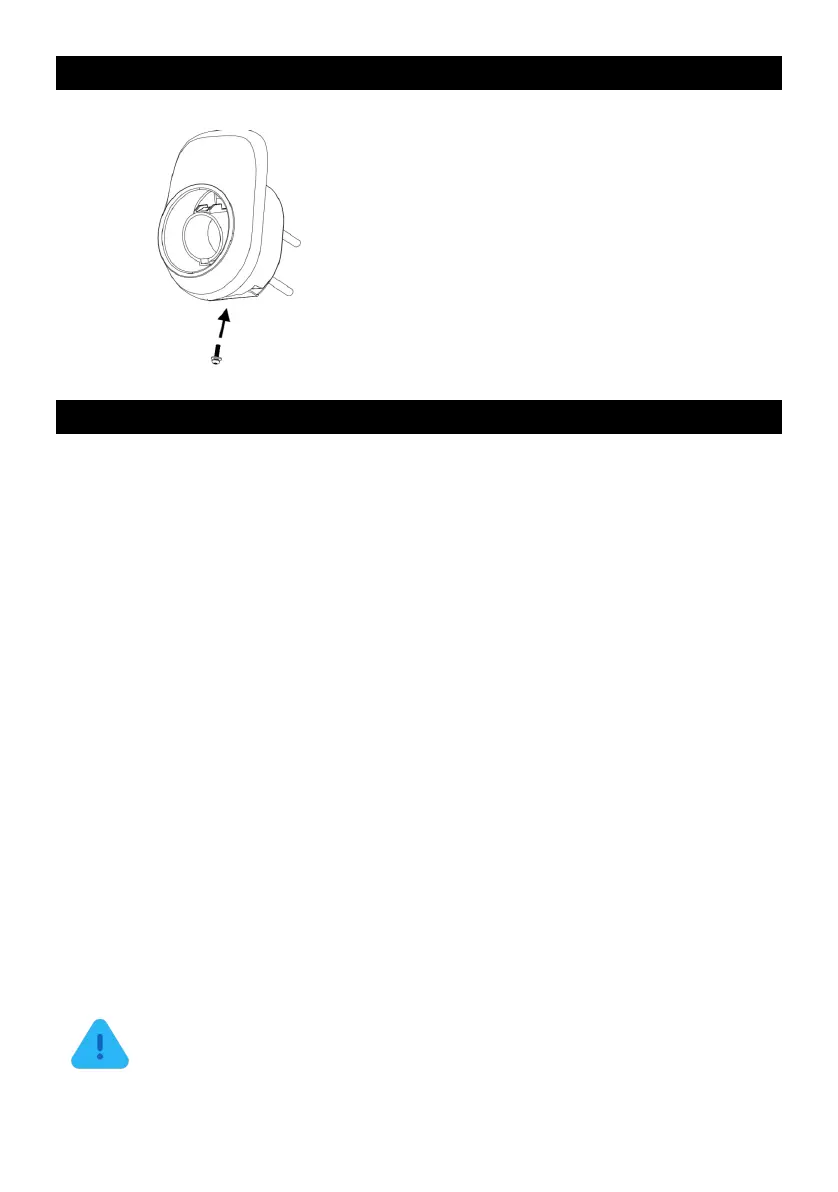
STEP 5
Align the rear notches of the Holster with the
wall-mounted bracket. Insert the Anti-Theft
Countersunk Head Screw through the screw
hole on the bottom side of the bracket.
Then, use the Allen Wrench provided in the
box to securely fasten the Holster to the
wall-mounted bracket.
Final Preparation
Important notes before EVIQO Smart EV Charger is ready to go:
1. To ensure proper cable management, extend the cable to its full length, allowing
any kinks or tension to be released. Afterwards, securely store the cable using the
holster for neat and organized storage. You can also store the cable on the
EVIQO Smart EV Charger as the faceplate has a special lip to hold the cable
loops.
2. Restore power to the circuit at the electrical breaker panel by switching on the
corresponding breaker.
3. After powering up the EVIQO Smart EV Charger following the installation, the
charging status Q-indicator will get solid green, indicating it is ready to charge. By
default the EVIQO Smart EV Charger is set for Plug & Charge mode – just plug in
the J1772 connector to your car and the charging session will start automatically.
4. The small vertical line is the connection indicator located below the Q-indicator.
After powering up, it will get flashing blue, indicating it has entered into a
configuration mode. Please note the configuration window is 15 minutes. Once
expired, restart the device. In this status the device is prepared for configuration
and pairing with the smartphone through the EVIQO mobile app.
ATTENTION: Once the EVIQO Smart EV Charger gets powered up for the
first time, it may go into the firmware update. This happens OTA (over-the-air),
usually in the afternoon. Once updated, the charger will reboot itself to save
the changes and briefly go offline. After rebooting, it will power back on and
get back online. Please note that in case of rebooting, the charging session
will be interrupted.


 To Next Page