16
5.Operation
Outlet water temperature
Press " " and hold for 0.5s.
Water in the top
of the tank
Heating mode
Standby screen
Running screen
5.3 Turning the unit ON and OFF
Press " " and hold for 0.5s in the standby screen of the wire controller to turn on the
unit. The main display now shows the water outlet temperature.
Press " " and hold for in the running screen of the wire controller to turn off the
unit. OFF.
Note: The ON/OFF button can only be used to turn on/off the unit in standby or running
screen of the wire controller.
0.5s
The main display now shows
5. Operation
15
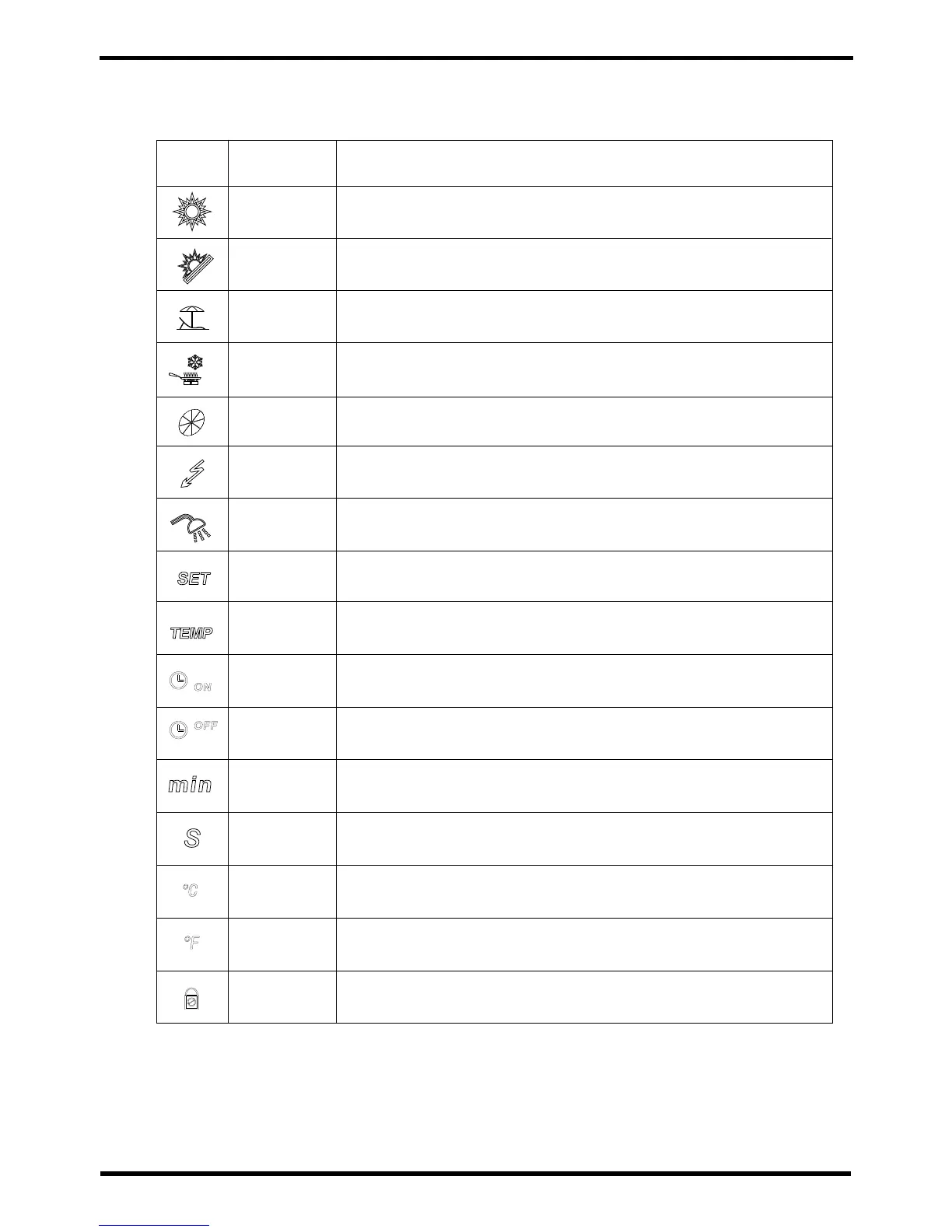
Hydroboost
heater
Fan
Shows that the Hydroboost electric heater is on.
Shows that the fan is on and the speed of the fan.
Set temperature
achieved
Shows that the water temperature has reached the target
point and the unit shut off automatically.
Timer & ON
Timer & OFF
Shows that the unit will be turned off by the timer
automatically.
Shows that the unit will be turned on by the timer
automatically.
Minute
Shows that the main display area displays the minute.
Second
Shows that the main display area displays the second.
Centigrade
Shows that the temperature in Main display area or Auxiliary
display area is in celcius.
Fahrenheit
Shows that the temperature in Main display area or Auxiliary
display area is in farenheight.
Parameter
setting
Shows that the parameter is adjustable.
Lock Shows that the keyboard is locked.
5.2 Icon Descriptions
Status
icon
What it means
Heating
Vacation
Shows that the unit is in heating mode.
Shows that the unit is in vacation mode.
heating.Eco
Temperature
Shows that the temperature is
(measured value).
non-adjustable
Shows that the unit is in cooling mode.
Cooling
Name
Shows that the unit is in e mode.co.heating


 To Next Page