5.Operation
18
Outlet water temperature
Time
Target temperature
¡ ¡
¡ ¡
Press or again to change
the target temperature.
Press
to confirm
or to
cancel, then
return to the
previous
interface.
Press once
to check the
target
temperature.
or
5.5 Target temperature checking and setting
In the standby or running interface, press " " or " " once to check the target temperature
of the outlet water. Press " " or " " again to change the target temperature. After making
the changes to the parameter, press " " to confirm or " " to cancel the changes, then
return to the previous interface. If no operations are performed on the keypad for 5s, the
controller exits the parameter modification menu by timeout and the changes are confirmed.
Example: Change the target temperature from 50deg to 55.5deg when the actual outlet water
temperature is 18deg.
5.6 Time setting
In the standby or running interface, do as follows to set the time when in heating mode. When
press " " once, the time parameter will flash. When press " " again, the hour parameter
will flash then press " " or " " to change it. After making the changes to the parameter,
press" " to confirm, then change the minute parameter as well as the date parameter in the
same way.
If no operations are performed on the keypad for 10s, the controller exits the parameter
modification menu by timeout and the changes are confirmed.
Note: Set the date in the same way when in vacation mode.
17
5. Operation
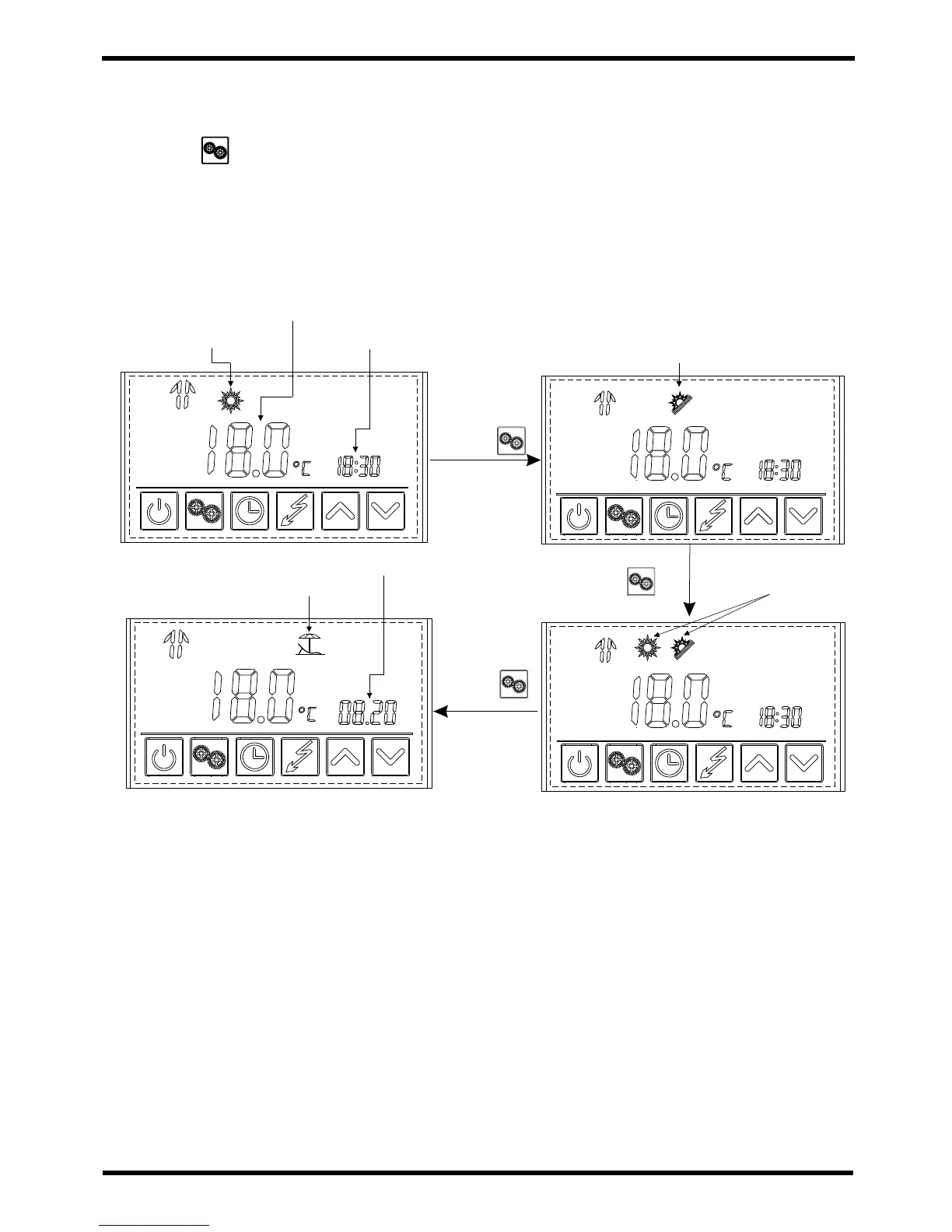
5.4 Mode selection
Press " " to select the mode from Heating ,Eco.heating , , Vacation in
standby or running
Intelligent
Heating mode
Outlet water
temperature
Time
Eco.heating mode
modeIntelligent
Press ¡
Vacation mode
Date
Press¡ ¡
Press ¡
Mode Descriptions
Eco Mode
This mode does not use the Hydropower element boost and is the most economical mode.
Start with this mode initially and if you encounter water which is cold or warm switch to
Intelligent mode.
Intelligent Mode
This mode analyses ambient temperature at 10am each day and decides the best operating
mode from Eco or Heating.
Heating Mode
This mode uses the heat pump as the main heat source. The Hydroboost starts after a 40min
delay to give high recovery rates. Use this mode if you have very high hot water usage. The
Hydroboost start times and temps are all fully customisable.
You can also manually switch on the Hydroboost element at any time by pressing the
Hydroboost button on the controller.
Setting the timer to allow the unit to run for longer periods will also help to ensure you never
run out of hot water.


 To Next Page