5. Operation
20
5.7 Timer setting
5.7.1 In the heating mode, two running periods can be set.
Press " " and hold for 2s to enter into the timer setting interface.
Running period 1: The symbol "ON 1" on the right side of the interface and the time
parameter flash at this time. Press " " again and the hour parameter flashes. Set the time
and confirm. Then "OFF 1" and the time parameter flash. Set the time following the previous
steps.
Running period 2: After Running period 1 is set, the controller will enter into the Running
period 2 setting interface. Set the start-up and shut-down time in the same way as Running
period 1.
Press " " to cancel any modifications during the setting.
Press " " and hold for 2s twice to set the "OFF 1" time directly or press " " " " when
the unit is already running.
Press " " cancel the setting when the hour parameter is flashing.
Heating mode
Outlet water temperature
Time
ON 1
Press and
hold for 2s.
OFF 1
Press " " and hold for 2s to enter
into the next setting without confirm
the previous one.
ON 2
Press " "
and hold for
2s to enter
into the next
setting without
confirming the
previous one.
P
r
e
ss
"
"
to
ca
nce
l
t
he
s
e
t
t
i
ng
5. Operation
19
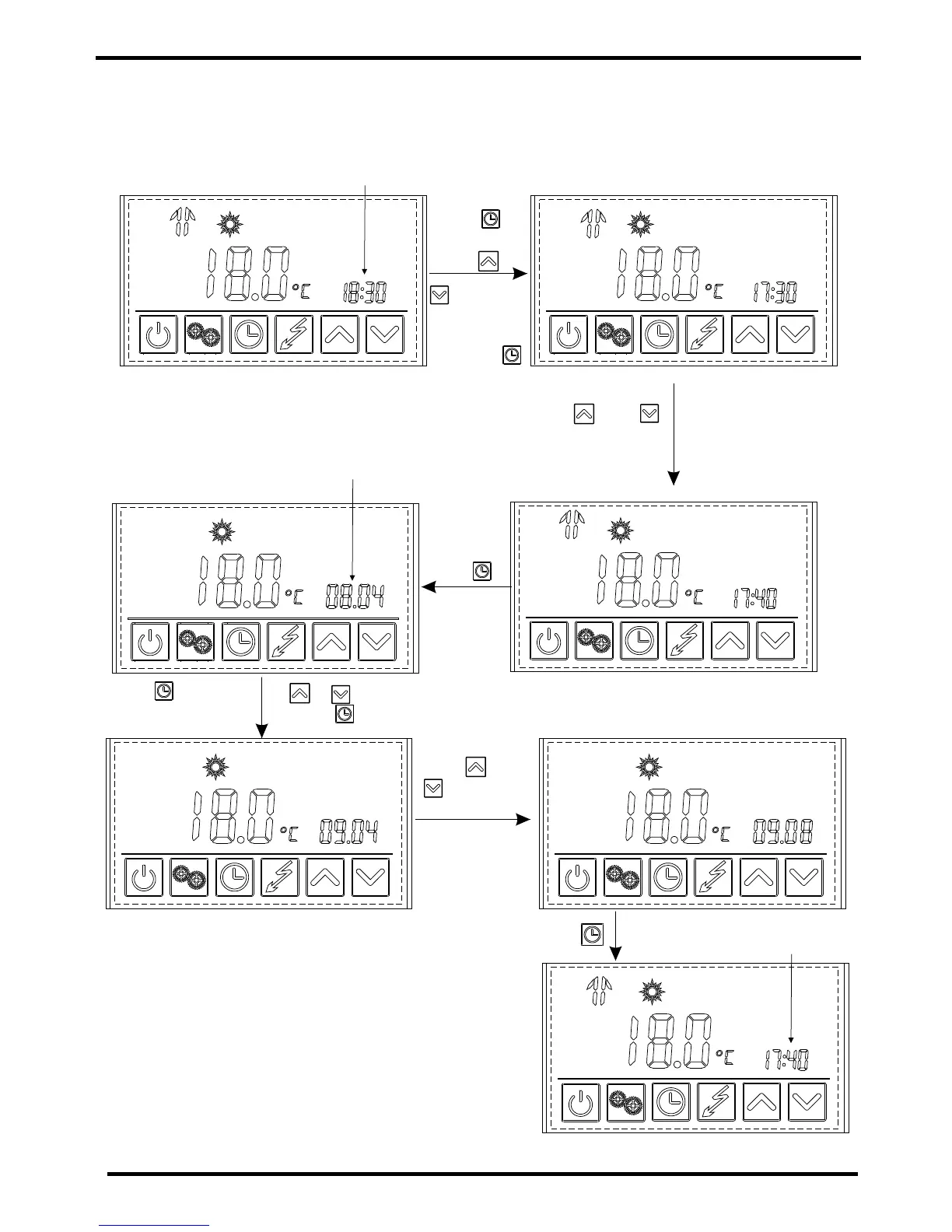
The new set time
Press " " to confirm.
The date is flashing
Press once then press or to change
the month parameter and press to confirm.
Press " " or
" " to change
the dayparameter.
Press" "
to confirm.
Time
Press
twice then
press or
to change
the hour
parameter
and press
to confirm.
Press " " or " " to change the minute
parameter.
Example: Change the time and date from 18:30 on August 4th to 17:40 on September 8th.


 To Next Page