Evolution
©Evolution Controls Inc
14-June-2021
EVO/
TM
ECM-ACU-PRO . CONTROLS INC. EVO/
TM
Configurator
EVO/
TM
Configurator User Guide V3.0 Evolution Controls Inc. Page 13 of 26
The information in this document is confidential and must not be disclosed to any third party without the written consent of Evolution
Controls Inc.
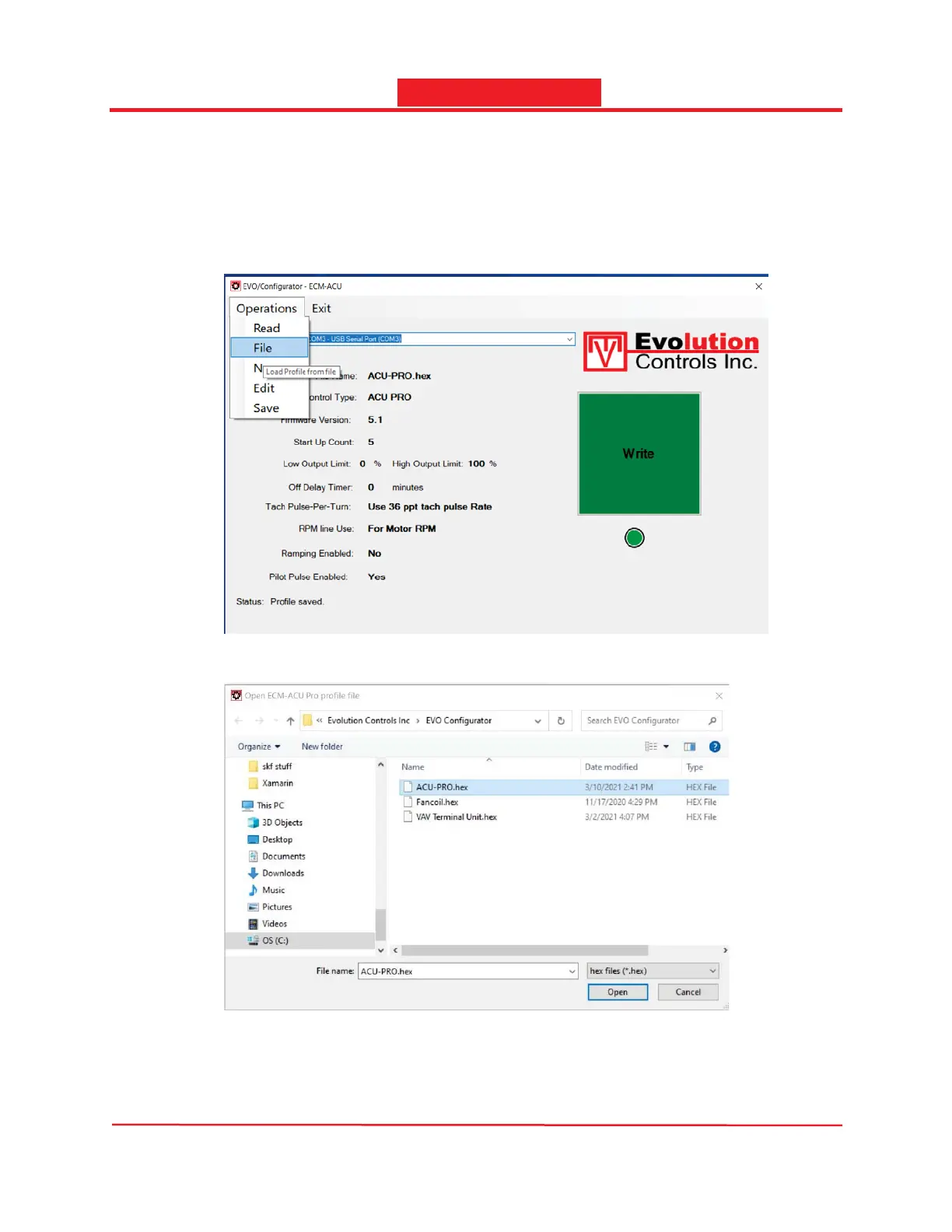
2. Import profile from an existing file
If you already have an existing profile, you can import the settings from the file into the EVO
Configurator using the File option in the Operations drop down menu. The imported profile can
be used as is or modified and then saved in a new profile.
- Select the File option from the Operations drop down menu
- Select the profile and press the Open button
- The EVO Configurator imports the settings from the file and displays the settings.
When the profile is imported from a file, the minor firmware version is ignored and displayed
as X.


 To Next Page