Evolution
©Evolution Controls Inc
14-June-2021
EVO/
TM
ECM-ACU-PRO . CONTROLS INC. EVO/
TM
Configurator
EVO/
TM
Configurator User Guide V3.0 Evolution Controls Inc. Page 24 of 26
The information in this document is confidential and must not be disclosed to any third party without the written consent of Evolution
Controls Inc.
Appendix A
1. Installation
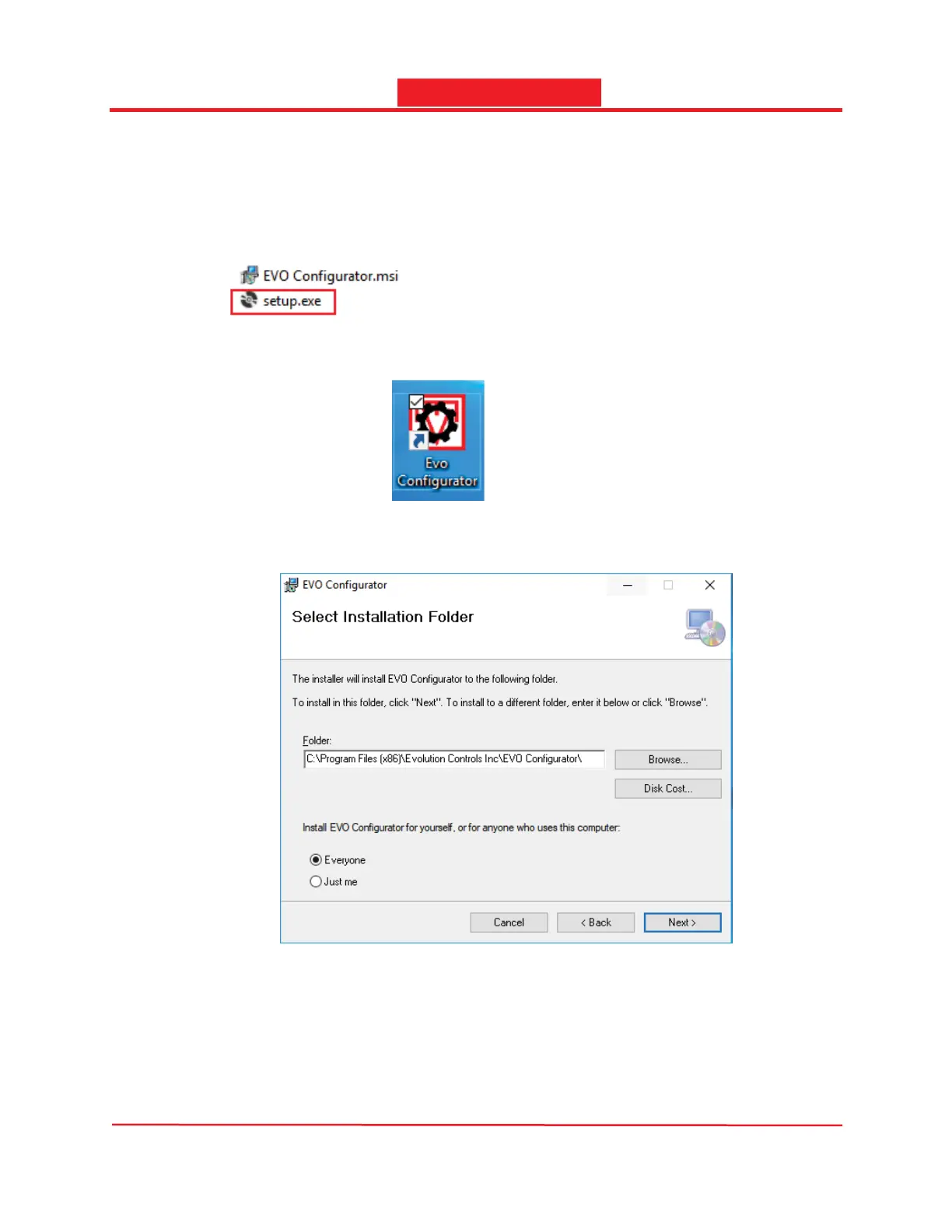
It is very easy to Install the EVO Configurator software. Just simply launch the provided setup.exe and
follow the instruction to install the software.
After the installation is finished, you will find the shortcut icon on the desktop.
In the Select Installation Folder step of the installation, if you accept the default folder path as shown
below, the configuration and profile files in the folder are write protected.
You will need to run the software in the administrator mode to add, delete or modify the configuration
and profile files in the default folder. After you finished modifying the files, exit the app and disable the
administrator mode to write protect the files. Follow the step in the next section to enable/disable
running the software in administrator mode. Do not install in the Program Files (x86) folder if you do not
want to run the app in administrator mode.


 To Next Page