Evolution
©Evolution Controls Inc
14-June-2021
EVO/
TM
ECM-ACU-PRO . CONTROLS INC. EVO/
TM
Configurator
EVO/
TM
Configurator User Guide V3.0 Evolution Controls Inc. Page 21 of 26
The information in this document is confidential and must not be disclosed to any third party without the written consent of Evolution
Controls Inc.
Configuring Target
- First import profile into the EVO Configurator software by one of the following options:
o by uploading profile from a target
o by importing profile from a file
o by creating a new profile
The Write button will turn green which indicates it is now enabled to download to a target
device.
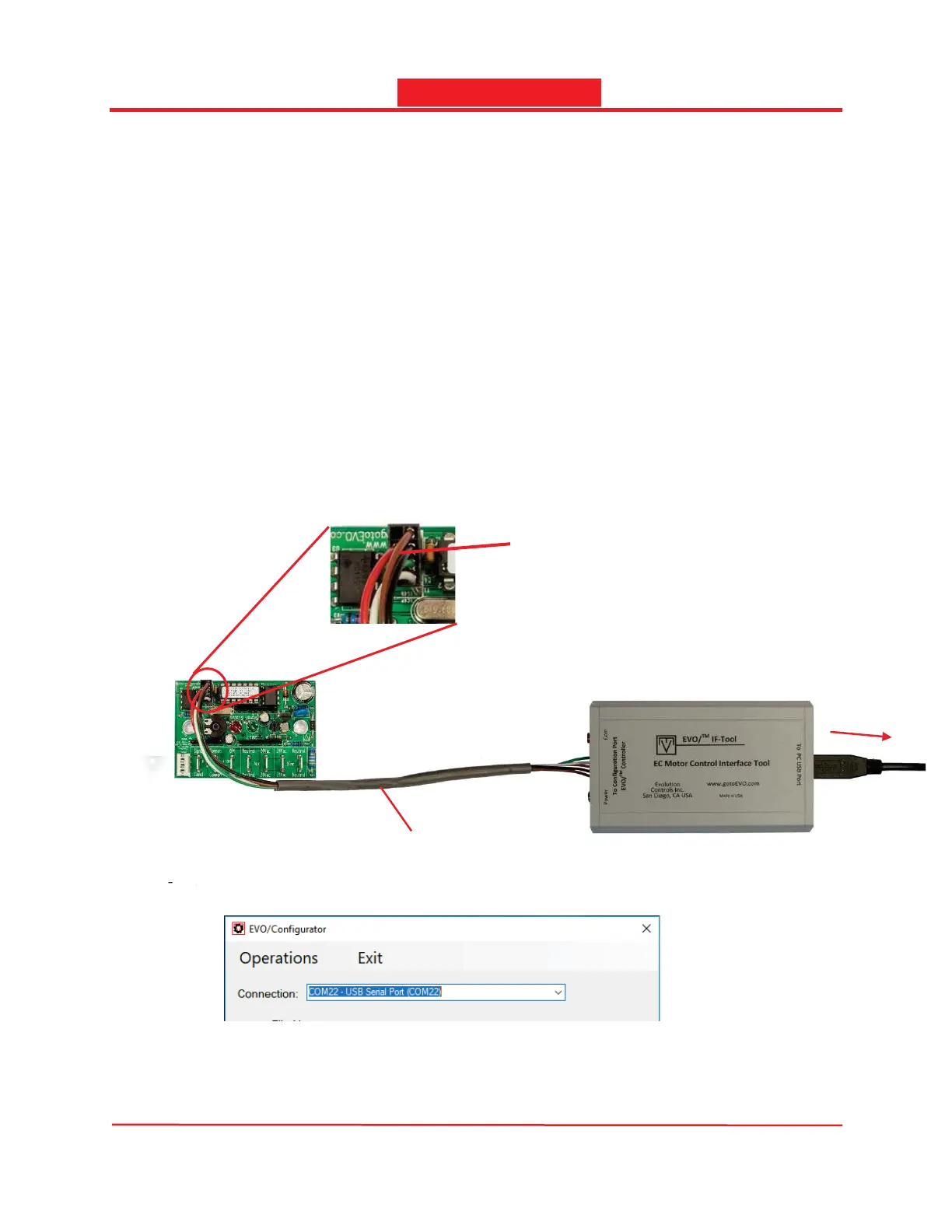
- Make sure the IF-Tool module and the ECM-ACU target are connected to the PC as shown
below. The ECM-ACU target may be configured before or after it has been installed in the
equipment. If the ECM-ACU target is not powered, the IF-Tool interface module will
automatically provide power for the upload.
Caution: Before installation, it is good practice to handle circuit boards by the edges without
touching the components or leads.
- Select the COM port in the Connection dropdown list.
The COM port number may vary from PC to PC so it may not be the same as shown above. If
there are multiple COM ports connected to your PC, you need to identify which COM port is
e
ect t
e COM port in t
e
nn
cti
n
ropdown
ist.
EVO/IF-CBL
Insert the connector with the
brown wire next to the white
square
To PC


 To Next Page