User’s Manual
42
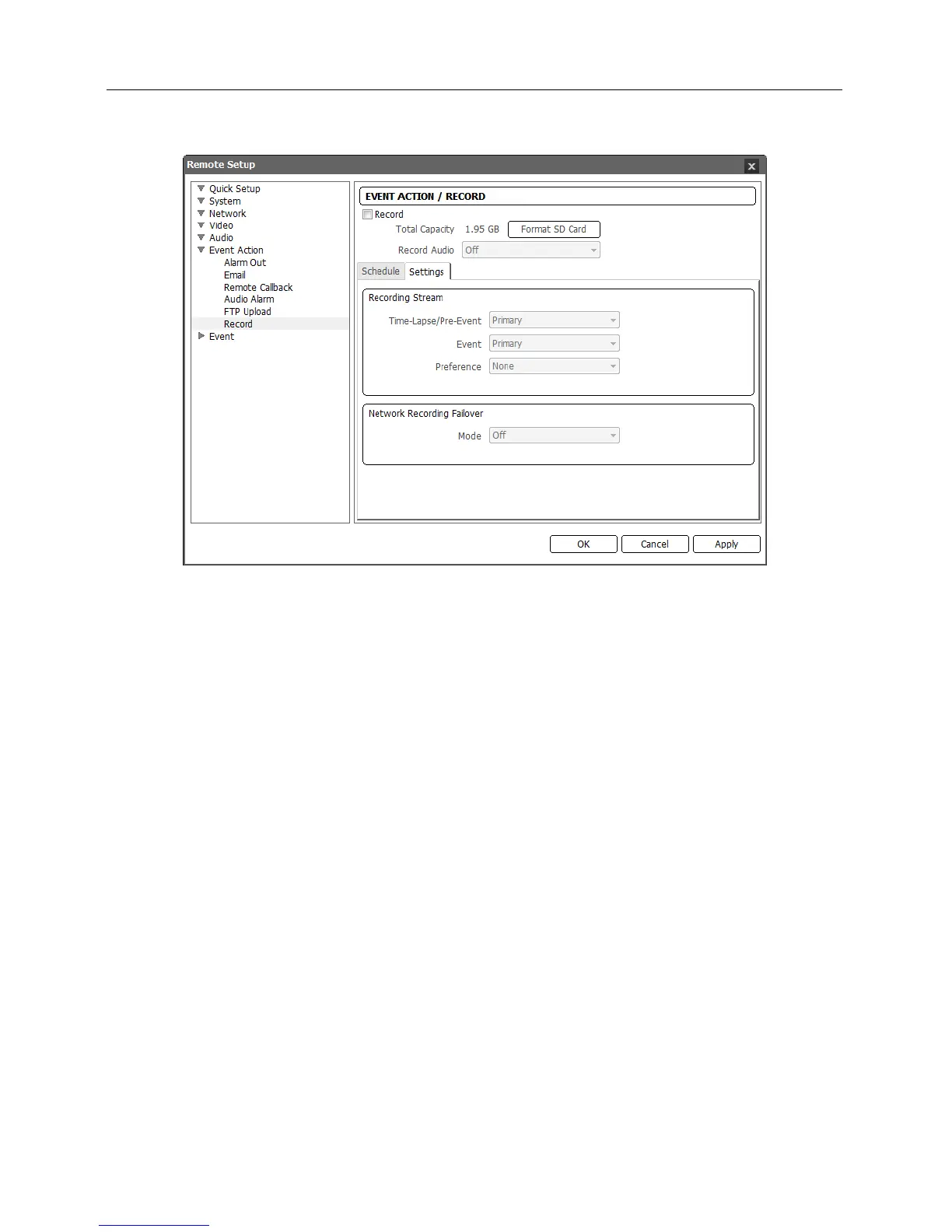
Settings: Click the tab to set up recording settings.
Recording Stream: Select a stream to use for recording.
− Time-Lapse/Pre-Event, Event: Allows using a different stream depending on the recording
mode.
Time-Lapse/Pre-Event: Select the stream to use for recording when in the time-lapse
recording mode or for pre-event recording when in the event recording mode.
Event: Select the stream to use for post-event recording when in the event recording mode.
− Preference: Sets up the priority of a stream to use for recording.
SD Recording: Records video by using the Time-Lapse/Pre-Event and Event streams set
above.
Network Recording: Records video by using the recording stream set in a remote program.
If a recording stream is not set up in a remote program, it uses the Default Record Stream
set during the Video – Streaming setup.
None: Records video by using whichever stream offers higher resolution between the SD
Recording stream and Network Recording stream.
Network Recording Failover – Mode: Set up the network recording failover mode. It allows
recording video on the SD memory card when recording using a remote program fails. It records
video using the stream set during the Recording Stream – Event setup above. If the recording
mode is set to Always – Time-Lapse in the Schedule tab, this will not be supported.
− Off: Disables the network recording failover.
− Always: Records video continuously regardless of the recording schedule until recording using
a remote program works.
− On SD Schedule: Records video according to the recording schedule set in the Schedule
tab until recording using a remote program works.



 To Next Page