
 Need help?
Do you have a question about the EWM Picotig 200 puls TG and is the answer not in the manual?
Guidance on understanding and observing safety notes and warning notices within the manual.
Defines symbols used in the manual for technical aspects, status indicators, and operations.
Details risks from electrical voltage, radiation, heat, noise, smoke, gases, and improper operation.
Covers safe handling, setup, and connection requirements for the machine and accessories.
Describes the welding procedures supported by the machine, including TIG DC and MMA.
Specifies the software version applicable to the operating instructions.
Lists other documents relevant to the machine, including warranty and declaration of conformity.
States that the document is part of a larger set of instructions for the welding system.
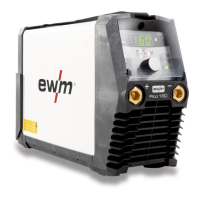
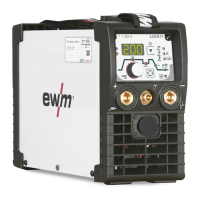
Identifies and describes the components and connection sockets on the front panel.
Identifies and describes the components and connection sockets on the rear panel.
Details the control panel, display, buttons, and rotary dials for operating the machine.
Explains the calibration, parameter display, and error code indications on the machine's display.
Covers safe handling, setup, and connection requirements for the machine and accessories.
Details requirements for sufficient ventilation to maintain performance and prevent damage.
Instructions for correct and secure connection of the workpiece lead to prevent burns.
Specifies temperature and humidity limits for operation, transport, and storage.
Guidelines for unrolling, shortening, and laying welding leads to prevent hazards.
Warns about risks from stray currents and provides measures to prevent damage and fire.
Details hazards of improper connection and requirements for safe electrical hook-up.
Instructions for connecting the welding torch and workpiece lead for TIG welding.
Guides on connecting the shielding gas cylinder and pressure regulator.
Explains HF ignition and Liftarc processes for starting the welding arc.
Describes how to select welding tasks and complete basic settings.
Details how to set sequence parameters using the push-button and rotary knob.
Describes different torch versions and how to set operating elements via torch modes.
Explains the concept of average value pulse welding and its parameters.
Details advanced parameters and settings available in the TIG expert menu.
Instructions for connecting electrode holder and workpiece lead for MMA welding.
Completes basic settings for MMA welding; optimum values are predefined.
Explains the hot start function for secure arc ignition and initial heating.
Describes how arcforce prevents electrode sticking in the weld pool.
Details the antistick feature that prevents the electrode from annealing.
Explains average value pulse welding and its parameters for MMA processes.
Details advanced parameters and settings available in the MMA expert menu.
Describes functions of the RTF1 19POL remote control for welding current and operation.
Describes functions of the RT1 19POL remote control for welding current adjustment.
Explains how to activate and deactivate the power-saving mode.
Details the machine calibration procedure performed upon startup.
Instruction for exiting the machine configuration menu.
Accesses settings for welding torch functions and operating modes.
Allows setting of torch modes to customize operating elements and functions.
Controls the speed of current changes when using up/down speed functions.
Provides settings for machine functions and parameter display.
Aligns machine power to mains fuse to prevent tripping, with selectable levels.
Sets the time to activate power-saving mode in case of inactivity.
Configures re-ignition settings after an arc interruption.
Enables modulated waviness for improved arc detection for welding helmets.
Provides access to the service menu, requiring agreement with authorized personnel.
Covers safety precautions for electrical voltage and general maintenance requirements.
Instructions for cleaning outer surfaces, cooling fins, and checking coolant.
Details the importance and maintenance of the dirt filter for cooling air.
Outlines daily, monthly, and annual maintenance tasks and inspection requirements.
Provides guidelines for proper recycling and disposal of the machine's components.
Provides a systematic checklist for identifying and resolving common welding faults.
Lists error messages displayed by the machine and their possible causes and remedies.
Instructions for restoring all customized welding parameters to their original factory defaults.
Explains how to query the machine control software version for service staff.
Aligns machine power to mains fuse to prevent tripping, with selectable levels.
Provides detailed performance specifications, operating voltage, duty cycle, and physical data.
Lists available transport vehicles and accessories for the machine.
Details optional items like dirt filters and protective covers.
Lists various remote controls and necessary connection/extension cables.
Includes general accessories like pressure regulators and gas hoses.
Provides detailed setting ranges for TIG and MMA welding parameters.
Lists basic parameters and their settings that are not dependent on the welding process.
Provides contact information and a QR code to find sales and service partners.
 General
| Input Voltage | 230 V |
|---|---|
| Weight | 7.9 kg |
| TIG Functionality | Yes |
| Pulsing Functionality | Yes |
| Mains Frequency | 50/60 Hz |
| Mains Fuse (slow-blowing) | 16 A |
| Protection Class | IP23 |
| Power Supply | Single-phase |
| Pulse Duty Cycle | 10% - 90% |
| Output Current Range (TIG) | 5 A - 200 A |
| Pulse Frequency Range | 0.5 Hz |


 To Next Page