Page 5
eWON500™
The Transparent Gateway
ver 1.0
9/11/05
User Guide
The ModbusRTU/ModbusTCP gateway configuration
Hardware configuration
• Set up eWON™ dip switches to RS485 mode (with or without polarization depending on your network type) -Refer to
the Troubleshooting section for dipswitch explanations (Checking the serial link
).
• Connect the
serial cable between your eWON500™ and the PLC
IO server configuration
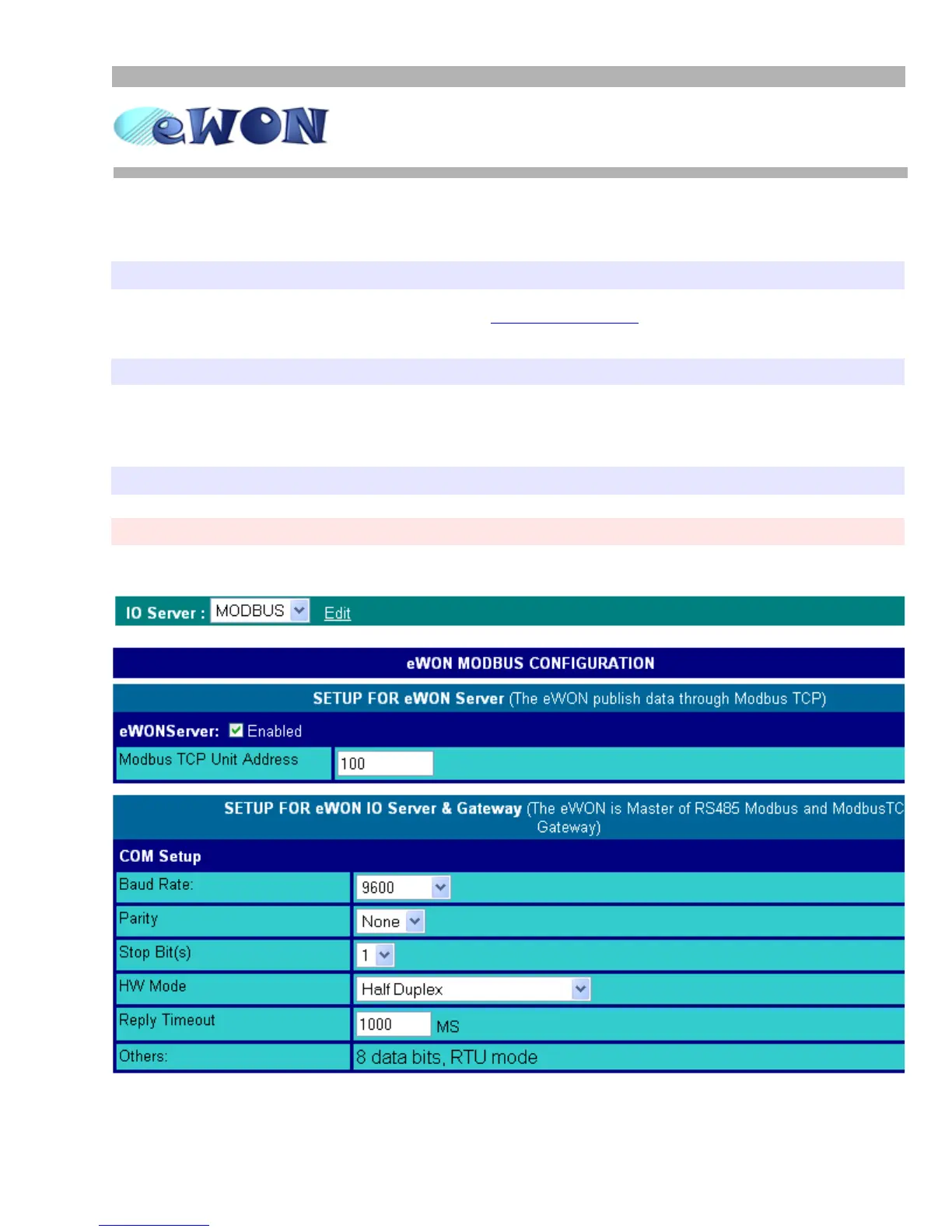
• Go to the MODBUS IO server page: Configuration/IO Server Config/MODBUS/Edit
• Set the Baud Rate, Parity and Stop Bit(s) according to your device, and HW Mode to Half Duplex
•Let
Reply Timeout empty (default value applied)
PLC software configuration
• From your PLC management software, configure the software with the eWON IP address as destination node
You are now connected to your PLC through your eWON500™
• Please refer to the Troubleshooting section from this document in case of an issue


 To Next Page