4.6 Mounting GhosT-OLED to walls or furniture
GhosT-OLED Full Kit and Half Kit are designed to make installations easier and faster. Before
you start installing the screen, make sure you follow the instructions provided in this
manual.
Note: Different mounting points must be used depending if the Full Kit is used in table
mode or in straight mode
Note: GHOST55-TK-V1 can be mounted to the surface it stands on. Alternatively it can be
mounted directly to the GhosT-OLED Full Kit (not Half Kit)
Note: If Ghost-OLED products are mounted inside housings it’s important ensure a proper
ventilation. Refer to chapter 1.6 Operating conditions and to chapter 4.6.2
Ventilation information
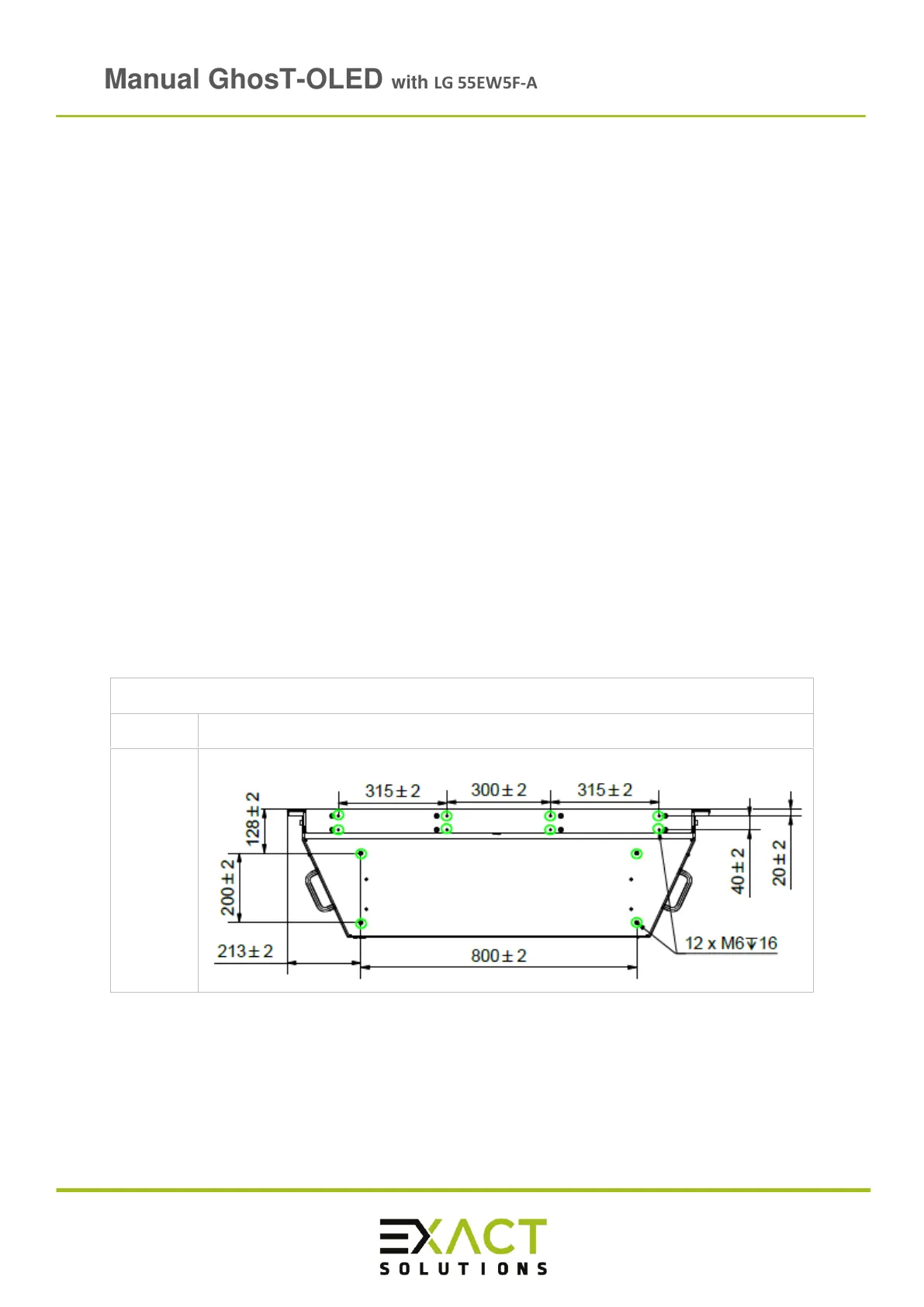
4.6.1 Screw hole pattern of all GhosT-OLED versions
Note: The thread depth in GhosT-OLED housing is 16 mm
Note: All screw holes that are displayed in the following patterns need to be used. They
are marked in green and they differ depending on the product. If you have any
question, please contact us
*
1
The showed screw hole pattern for GhosT-OLED Full Kit only applies to GHOST55-FK-V2
and GHOST55-FK-TC, if you need Information regarding GHOST55-FK-V1 please contact
us for the appropriate drawing



 To Next Page