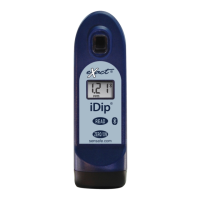
What does 'HI' mean on eXact Measuring Instruments iDip LCD while reading?
- KKathy ThorntonAug 27, 2025
If your eXact iDip displays 'HI' on the LCD while reading, it means the result is above the detection level. To verify, rerun the test.
What does 'HI' mean on eXact Measuring Instruments iDip LCD while reading?
If your eXact iDip displays 'HI' on the LCD while reading, it means the result is above the detection level. To verify, rerun the test.
What to do if eXact Measuring Instruments iDip LCD shows 'Er2'?
If the LCD of your eXact iDip shows 'Er2', it indicates there's no connection to the app or the connection was lost. Try connecting or reconnecting to the iDip to resolve this.
How to fix a dim screen on eXact Measuring Instruments iDip?
A dim screen on your eXact iDip measuring instrument is likely due to a low battery. Replace the batteries to resolve this issue.
Why does my eXact Measuring Instruments iDip show 'LO' on the LCD while zeroing?
If your eXact iDip displays 'LO' on the LCD during zeroing, this could be due to several reasons. First, try replacing the batteries, as a low battery can cause this issue. Other potential causes include a dirty cell, which you may need to clean, or a cloudy sample, which you can address by diluting the sample or using a sieve. In rare cases, it could indicate a bad LED, in which case you should contact ITS.
| Geometry | 45°/0° |
|---|---|
| Measurement Spot | 4mm |
| Spectral Range | 400-700nm |
| Inter-Instrument Agreement | ΔE*ab ≤ 0.4 |
| Repeatability | ΔE*ab ≤ 0.03 |
| Wireless Communication | Bluetooth |
| Resolution | 0.01 |
| Display | Color LCD touchscreen |
| Power Supply | Lithium Ion |
| Operating Temperature | 10°C |
| Storage Temperature | -20°C to 50°C |
Lists essential items for setup, including batteries and a screwdriver.
Lists items that come with the eXact iDip® photometer, such as a brush and guide.
Details the 2-year warranty policy, including registration and coverage limitations.
Provides guidance for achieving the best possible test results and avoiding errors.
Describes the physical parts of the eXact iDip® photometer and their functions.
Step-by-step instructions for properly installing AAA batteries in the photometer.
Instructions for obtaining and installing the mobile application from app stores.
Lists compatible mobile phones and tablets for use with the eXact iDip® system.
Solutions for common error messages and device problems encountered during use.
Information for contacting customer service for further assistance and support.
Overview of the app's layout, including menus, history, customers, and store sections.
Covers changing timeout duration, viewing GPS location, About section, and FAQs.
Details sorting and accessing historical test results by customer, date, or test type.
Instructions for adding and managing customer profiles and contacts within the app.
Explains app features for scheduling, purchasing tests, and managing test results.
Procedures for adding notes to results and clearing previous test data.
Step-by-step guide to choosing a customer before conducting a water test.
Instructions for pairing the photometer with a smart device using Bluetooth.
Covers filling the sample cell and zeroing the meter before taking a measurement.
Step to choose the specific water quality test to be performed.
Details of the strip-based testing procedure for various water parameters.
Details of the liquid reagent testing procedure, including drop additions.
Introduces alternative testing methodologies not covered by standard procedures.
Introduces methods that automatically calculate results based on multiple tests.
Step-by-step guide for executing a test using an eXact® Strip Micro.
Step-by-step guide for executing a test using liquid reagents.
Procedures for obtaining calculated values like Magnesium Hardness and LSI.
Procedures for saving, adding sites, and adding notes to test results.
Steps for sharing individual or multiple test results via email.
Instructions for posting test results to social media platforms like Facebook or Twitter.
Guide to visualizing past test locations on a map interface.
Information on factors affecting test accuracy and methods to mitigate them.
Explains wireless technology and the design of the photometer's sample cell.
Covers compliance with standards like USEPA and recognition like the R&D 100 Award.
Discusses the device's accuracy, method verification, and the 2-year warranty.
Description of refill kits containing various test reagents for easy ordering.
Details on protective cases designed for smartphones and tablets.
Information on storage cases for the photometer and available starter kits.
Explains the meaning and benefits of NSF/ANSI 50 certification for water quality devices.
List of tests and corresponding reagents available for the eXact iDip® 570 model.
List of specific SPA tests and their associated reagents and part numbers.
Continuation of comprehensive listings for eXact iDip® tests and reagents.