User Manual
Excel Extice
Page 12
Number of blinks Fault Scooter condition Remarks
1
Charge battery
Driving possible
Battery voltage lowered to less than 23.3
V, charge batteries soon
2 Battery voltage too low Driving not possible
Battery voltage lowered to less than 16.5
V, charge batteries immediately
3 Battery voltage too low Driving not possible
Battery voltage increased higher than 32 V.
Probably defect charger.
4 Current limit time out Driving not possible
Detector detected shortcut in the motor.
Warn dealer.
5 Brake fault Driving not possible Check if freewheel is connected
6 Gas pot not in neutral at power up Driving not possible Contact dealer
7 Speed pot error Driving not possible Contact dealer
8 Motor volts error Driving not possible Contact dealer
9 Other internal error Driving not possible Contact dealer
10 Push too fast fault Driving not possible Turn off the scooter and restart
Number of blinks Fault Scooter condition Remarks
Charging plug
To charge the batteries use a charger which guards the process and is convenient to charge the fitted
batteries. Your battery charger should be equipped with a 3-pole plug which fits into the charging plug
in the tiller.
Making a transfer
Make sure the Excite is always turned off and in freewheel position before making a transfer.
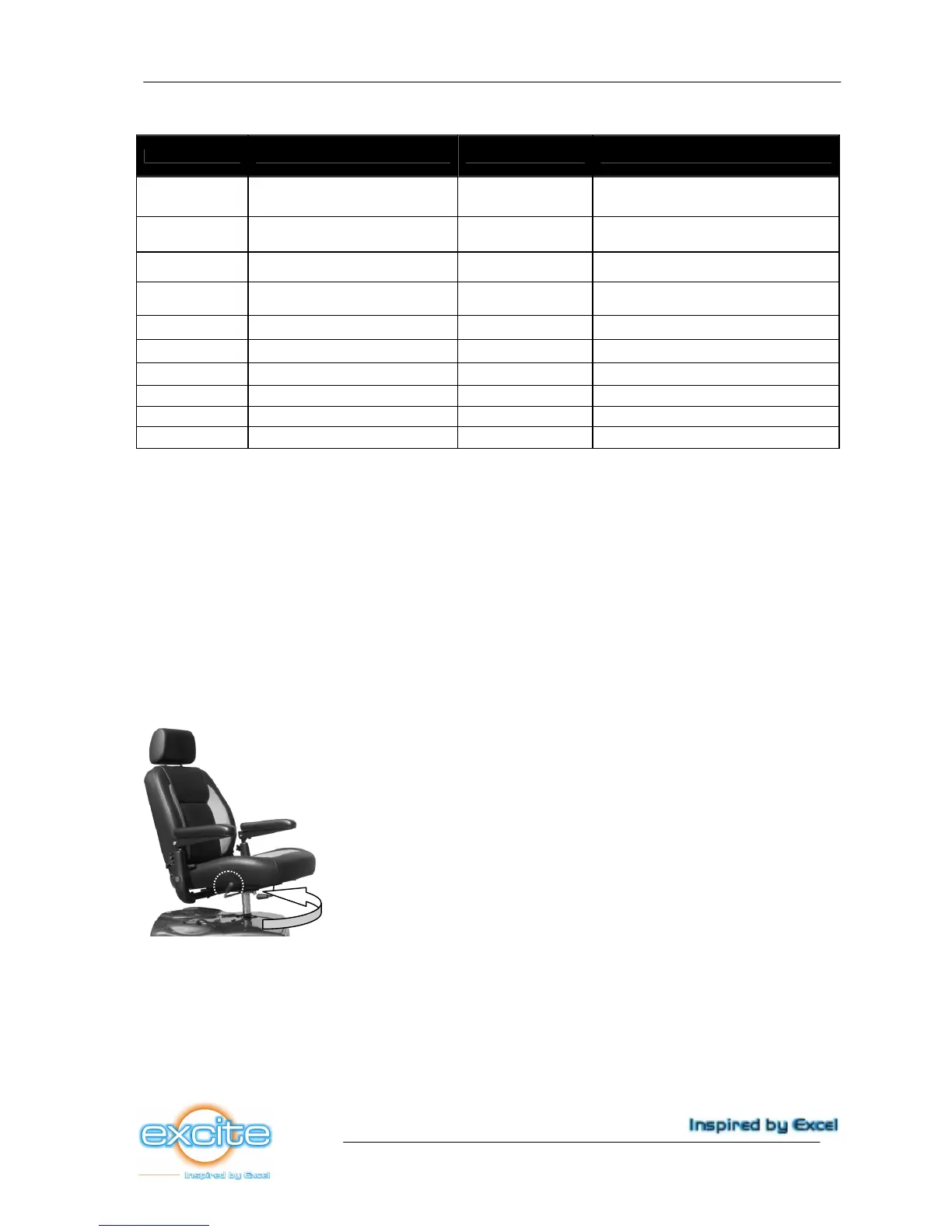
• move the rotion lever upwards to unlock the chair (picture 32)
• next, turn the chair 90º left or right. The chair will automatically lock on every 45º if you release
the rotation lever (picture 32)
take place on the chair and turn it back to the starting position. The chair is fitted with flipbackward
armrests. These can be flipped away to be able to make an easy side transfer. Always make sure to
flip the armrests back in the original position when seated.
Picture 32
Driving
The Naviagor can be powered up with the ignition key on the right side of the tiller. After a brief selftest
the Excite is ready to drive. By pulling the right side of the gas lever (at thumb control pushing), the
Excite moves forward. The closer you pull the lever towards you, the faster the scooter will drive. If
you release the lever the Excite will stop. For reversing please stop the scooter first. Now pull the left
side of the gas lever (a thumb control push).



 To Next Page