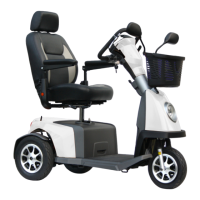
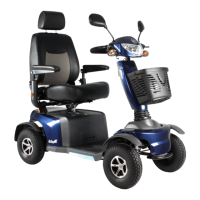
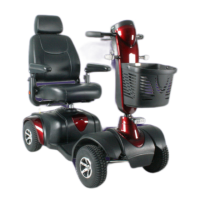
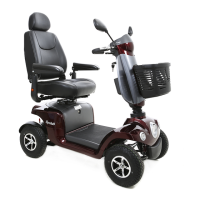
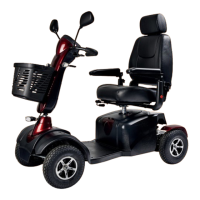
The Excel Outback is a mobility scooter designed for outdoor use, offering maximum comfort and enhanced mobility. It is a quality product from Van Os Medical B.V., manufactured by Quality Life Technologies, and is designed with a focus on continuous quality and reliability.
Function Description:
The Excel Outback is a four-wheeled mobility scooter intended for outdoor use. Its primary function is to provide personal mobility, allowing users to travel independently and comfortably. It features a robust design with LED lighting and brake lights for safety, and a canopy for protection from the elements. The scooter is operated via a wig-wag system, allowing for both forward and backward movement, and is equipped with an automatic braking system that engages when the control lever is released.
Important Technical Specifications:
- Dimensions:
- Seat width: 53 cm
- Seat depth: 48 cm
- Seat height: 44 cm
- Total width: 78 cm
- Total length: 147 cm
- Total height: 169 cm
- Weight Capacity:
- Maximum user weight: 200 kg
- Total weight (scooter): 192/208 kg
- Performance:
- Max. speed: 15/20 km/h (indicative, measured under ideal conditions)
- Range: up to 54 km (indicative, measured under ideal conditions)
- Power System:
- Batteries: 90/120 Ah
- Charger: 8 Ah
- Tyres: Four pneumatic tyres with a recommended pressure of 2.5 bar per tyre.
- Safety Features: Anti-tip wheels, electromagnetic brakes, LED front lights, rear lights, hazard lights, and horn.
- Maximum Safe Angle of Inclination: 10 degrees for slopes and kerbs.
- Maximum Kerb Height: 4 cm.
Usage Features:
The Excel Outback is designed with several adjustable features to enhance user comfort and control:
- Dashboard: A well-arranged dashboard provides essential information and controls.
- Speed Buttons: Two buttons (hare and turtle icons) allow users to increase or decrease speed, indicated by dashes on the display.
- Horn: Buttons on both sides of the dashboard activate the horn.
- Lighting: A dedicated button turns the LED lighting on and off for visibility.
- Hazard Lights: A button activates all hazard lights and a beep to signal danger.
- Battery Indicator: Displays battery capacity with 10 bars, advising users to recharge when at 20% (2 bars) to prolong battery life.
- Indicators (Turn Signals): Buttons activate turn signals with a flashing light and chime.
- Higher/Lower Speed (H/L Button): Allows switching between high (H) and low (L) speed settings, effectively halving the speed in L mode.
- Mode and Set Buttons: Used to change display settings such as units for speed, distance, and temperature (km/miles, Celsius/Fahrenheit), and clock format (24-hour/AM/PM).
- Steering Column: Infinitely adjustable in angle for optimal driving comfort. It can be pulled towards or pushed away from the user using a black lever on the left side of the handlebar. The upper part of the steering column (where the dashboard is located) is also adjustable using a red-ended lever on the right side.
- Armrests: Height-adjustable, foldable, and removable. They can be folded up by pulling them upwards, adjusted for height by loosening a black knob on the back, and adjusted for width by loosening a black button under the seat.
- Seat: A comfortable, height-adjustable, 360-degree swivel seat with a headrest.
- Headrest: Adjustable for height by pressing a black button on the back of the headrest.
- Swivel Function: A lever (A) under the seat on the right side unlocks the seat for rotation.
- Sliding Function: A lever (B) under the seat on the right side allows the seat to slide forwards or backwards.
- Backrest Angle: Adjustable using a black lever between the chair and armrest on the right side.
- Freewheel: The scooter has two positions: driving and freewheel. The driving position (indicated by a person riding a scooter) activates electromagnetic brakes, preventing movement without power. The freewheel position (indicated by a person walking next to a scooter) allows the scooter to be pushed manually when switched off. A lever next to the freewheel lever is used to switch between these positions.
- Lumbar Support: Adjustable via a 'ratchet' lever on the left side of the backrest, providing extra support to the lower back.
Maintenance Features:
Regular maintenance is crucial for the longevity and optimal performance of the Excel Outback.
- General Maintenance:
- Annual inspection by a qualified Excel Mobility dealer is recommended.
- Self-maintenance can extend the scooter's life and ease of use.
- Tyres:
- Regularly check for wear and replace if advanced.
- Weekly check of pneumatic tyre pressure (2.5 bar recommended).
- Clean tyres with car shampoo and a damp cloth; avoid solvents.
- Body:
- Wash the scooter once a week with car shampoo and a damp cloth to prevent dirt buildup and paint damage.
- Dry thoroughly after cleaning or rain.
- Treat paintwork with wax regularly, avoiding dissolving or abrasive waxes, harmful chemicals, or silicone spray.
- Upholstery:
- Regularly inspect for holes, tears, or worn spots.
- Check upholstery holes in the trim for tightness and wear.
- Contact the dealer for any repairs to the upholstery.
- Cleaning:
- Clean upholstery, chassis, and plastic components with mild soap and water; avoid aggressive abrasives, high-pressure, or steam cleaners.
- Periodic Maintenance Schedule (Self-Performed):
- Every week: Check tyre pressure.
- Every month: Check upholstery for damage/wear, ensure armrests fold smoothly (spray kink points with silicone spray), and ensure the seat rotates smoothly (grease with silicone spray if needed).
- Every quarter: Check tyre tread for wear.
Warnings and Safety:
- Always read and understand the user manual completely before use.
- Do not use the scooter if components are missing or damaged.
- Check brakes before driving.
- Avoid sudden changes in direction and reduce speed on turns.
- Stop completely before changing between forward and backward driving.
- Ensure the scooter is on a flat surface when getting in and out.
- The seat should always face forward when driving.
- Use an elevator for higher levels, never stairs or escalators.
- Never drive backward down a slope.
- Avoid uneven surfaces (sand, gravel, rough terrain) and wet, slippery surfaces.
- Never go up or down a slope at an angle.
- Never carry passengers.
- Do not use the scooter if it is not working properly or if parts are missing.
- Do not ride on slopes or kerbs exceeding the scooter's capacity (max. 10 degrees inclination, 4 cm kerb height).
- Do not exceed the maximum user weight (200 kg).
- Do not use the scooter under the influence of alcohol, drugs, or heavy medication.
- Structural changes to the scooter will void the warranty and product liability.
- Never put the scooter in neutral on a slope.
- Ensure the freewheel is in the driving position before use.
- Only use the supplied charger; other chargers will void the warranty and may damage batteries.
- Avoid driving on slopes covered with snow, ice, wet grass, or other hazardous materials.
- Slowly release the throttle when descending a slope faster than safely manageable to engage brakes.
- Be aware of Electromagnetic Interference (EMI) / Radio Frequency Interference (RFI) susceptibility. Avoid using personal electronic communication devices while operating the scooter, be careful around cell/radio/TV towers, and switch off the scooter if standing still for extended periods.
- Never attempt repairs yourself, as this will void the warranty.
The Excel Outback is designed to provide a safe, comfortable, and reliable mobility solution, with detailed instructions for operation and maintenance to ensure its optimal performance and user safety.

 Need help?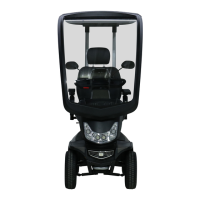

 To Next Page
 General