13
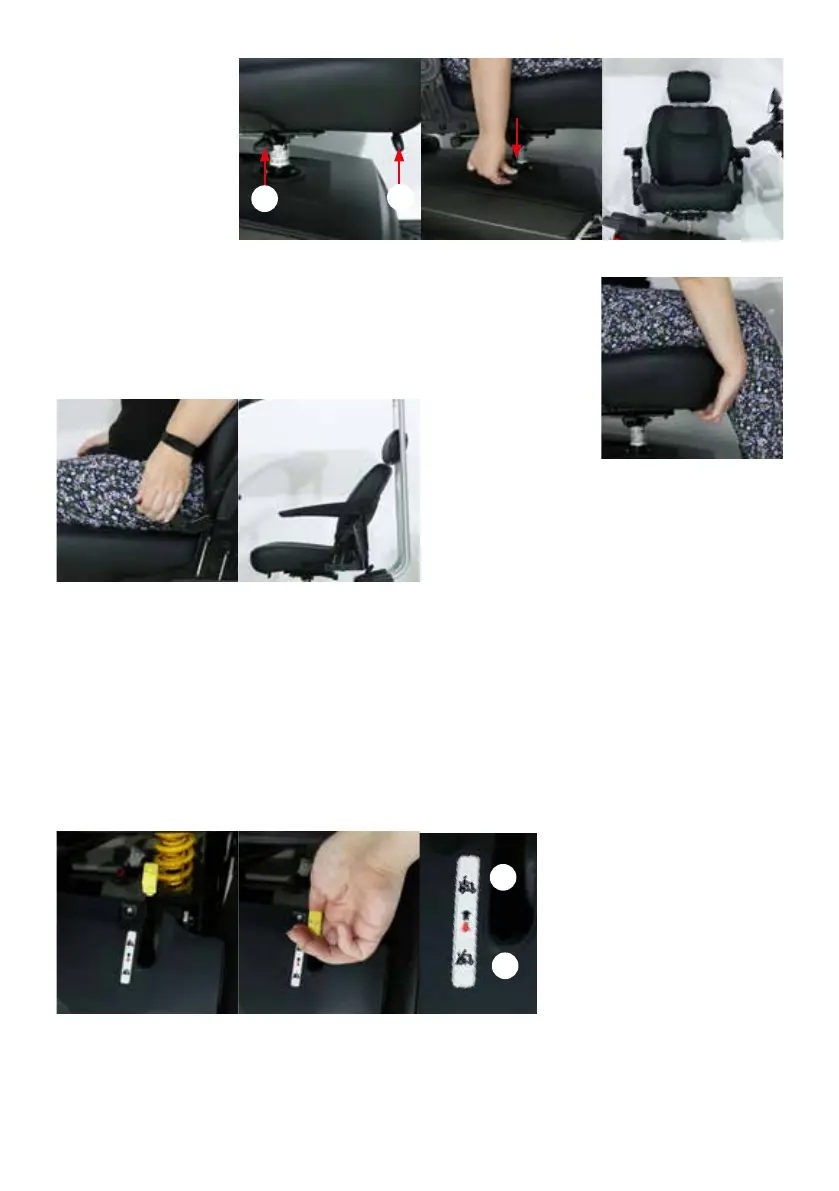
The 360-degree rotating seat
has the advantage that you
can easily get in and out.
Under the seat on the right
side is a lever (Photo 19, lever
A) with which you can rotate
the chair. By pushing the lever
down (Photo 20), the seat is
unlocked and you can rotate
the seat. Releasing the lever
locks the seat.
You can slide the seat of
the Excel Outback forwards or backwards. You can do this using the lever. The lever is
mounted on the right side of the seat (Photo 19, lever B). You need to pull the lever up
towards you (Photo 22) and then you can slide the seat forwards or backwards. Once the
desired position is reached, you can release the lever.
The backrest of the chair
is adjustable in angle. On
the right side of the seat is
a black lever between the
chair and armrest (Photo
23). To adjust the angle of
the backrest, pull up on this lever while seated in the seat.
You can choose the angle you want by pushing with your
back or tilting forward while keeping the handle pulled up.
Now you can adjust the angle of the backrest. As soon as
the backrest is in the desired position, release the lever.
It is possible to adjust the height of the seat. However, you cannot do this yourself. For this you should contact your
authorised Excel Mobility dealer.
5.6 The freewheel
The Excel Outback has two positions, namely the driving position and the freewheel position. On the sticker next to the
freewheel lever, the driving position is indicated by a picture of a person riding the scooter (A). The freewheel position
is indicated by a picture of a person walking next to the scooter and pushing it forward (B). The scooter must always
be in the driving position when you want to use the scooter. The freewheel position makes it possible to move the
scooter without the scooter being switched on. This makes it possible to push the scooter. You must push the lever to
the desired position to engage the freewheel or drive position. In the driving position, the electromagnetic brakes are
activated. At that moment the scooter can no longer be pushed and you can drive your scooter.
EXCEL OUTBACK | Photo 19 EXCEL OUTBACK | Photo 20
EXCEL OUTBACK | Photo 21
EXCEL OUTBACK | Photo 22
EXCEL OUTBACK | Photo 23
EXCEL OUTBACK | Photo 24
EXCEL OUTBACK | Photo 25 EXCEL OUTBACK | Photo 26
A
B
A
B


 To Next Page