User Manual | Excel Galaxy II
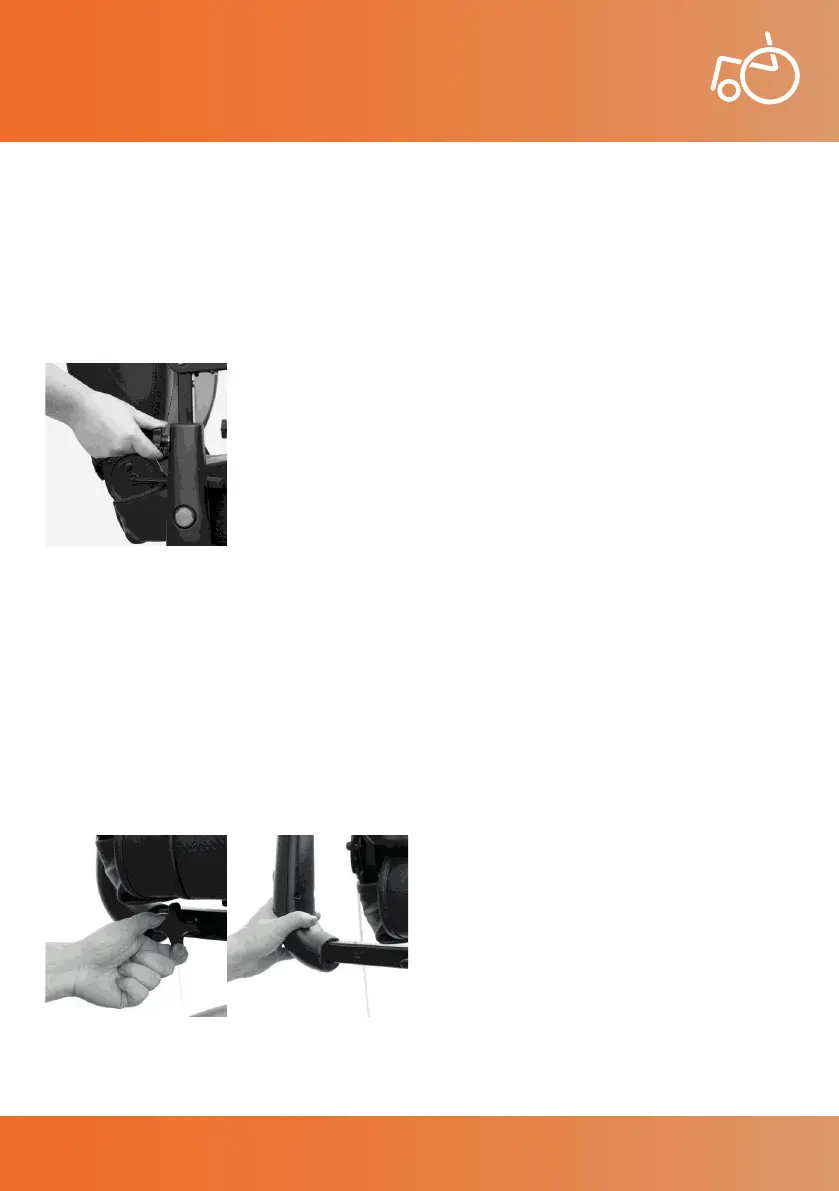
Not only can the armrests of the Excel Galaxy II be ipped up, they can also be adjusted in height. To
adjust the height of the armrests, unscrew the star knob on the back of each armrest (see photo 5) until
the arms have loosened. Then pull or push each arm up or down to adjust the armrest height. When
the desired armrest height has been achieved, re-screw the star knobs until the armrests are xed in
position.
6.4.1 Armrest Height Adjustment
16
Photo 5 Armrest height adjustment
The Excel Galaxy II armrests can also be adjusted in width. To adjust the width of the armrests, unscrew
the star knob under each armrest until the arms have loosened (see photo 6). Then pull or push each
armrest out or in to adjust the armrest width. The armrests should slide outwards, widening the gap
between the armrest and chair seat (see photo 7). When the desired armrest width has been achieved,
rescrew the star knobs until the armrests are xed in position.
The armrests can also be removed completely. To remove the armrests, after loosening the star knob,
slide out the armrests all the way.
6.4.2 Armrest Width Adjustment
Photo 6 Width adjustment
Star knob
Photo 7 Width adjustment
© 2019 Excel, part of Van Os Medical Ltd. | Excel House | Ashbrooke Park | Lincoln Way | Sherburn-in-Elmet | North Yorkshire | LS25 6PJ
T: +44 (0) 1977 681 400 | E: sales@vanosmedical.com | W: www.vanosmedical.co.uk
User Manual | Excel Galaxy II


 To Next Page