BH3 Series (02024013) ZSME300000289
EXCELL PRECISION CO., LTD.
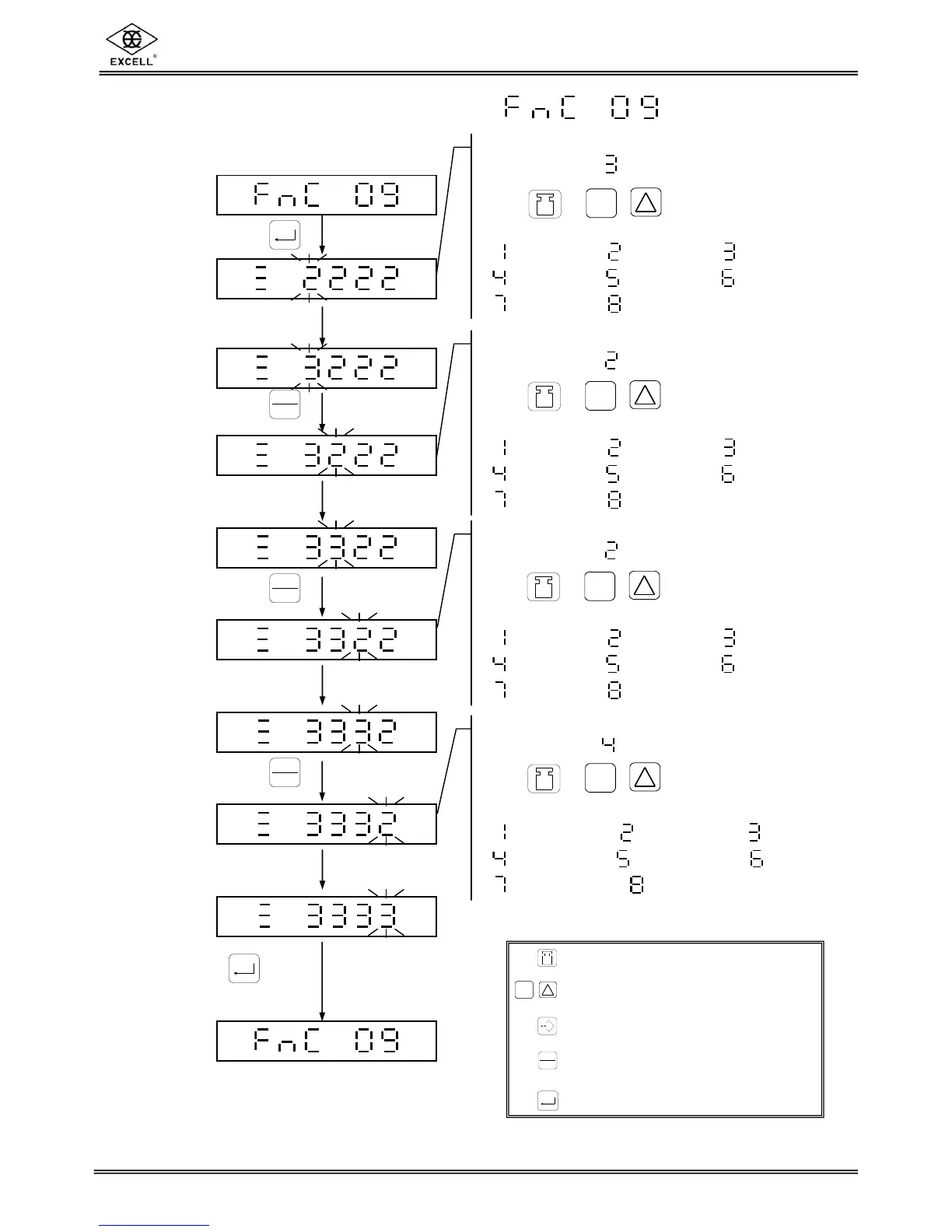
Press key
to finish setting.
3-1-9 Zero Tracking Range Setting
Zero Tracking Range Setting
( default value: 3/4 d )
Press
or
/
key to select parameter.
1/4 d 2/4 d 3/4 d
1 d 5/4 d 6/4 d
7/4 d 2 d
Zero Indication Range Setting
( default value: 2/4 d )
Press
or
/
key to select parameter.
1/4 d 2/4 d 3/4 d
1 d 5/4 d 6/4 d
7/4 d 2 d
Stable Range Determination Setting
( default value: 2/4 d )
Press
or
/
key to select parameter.
1/4 d 2/4 d 3/4 d
1 d 5/4 d 6/4 d
7/4 d 2 d
Stable Times Determination Setting
( default value: 8 counts )
Press
or
/
key to select parameter.
2 counts 4 counts 6 counts
8 counts 10 counts 12 counts
14 counts 16 counts
Upward digit selecting (0-9)
Downward digit selecting (9-0)
Move the cursor leftward
Move the cursor rightward
Confirmation key



 To Next Page