13
STEP 3
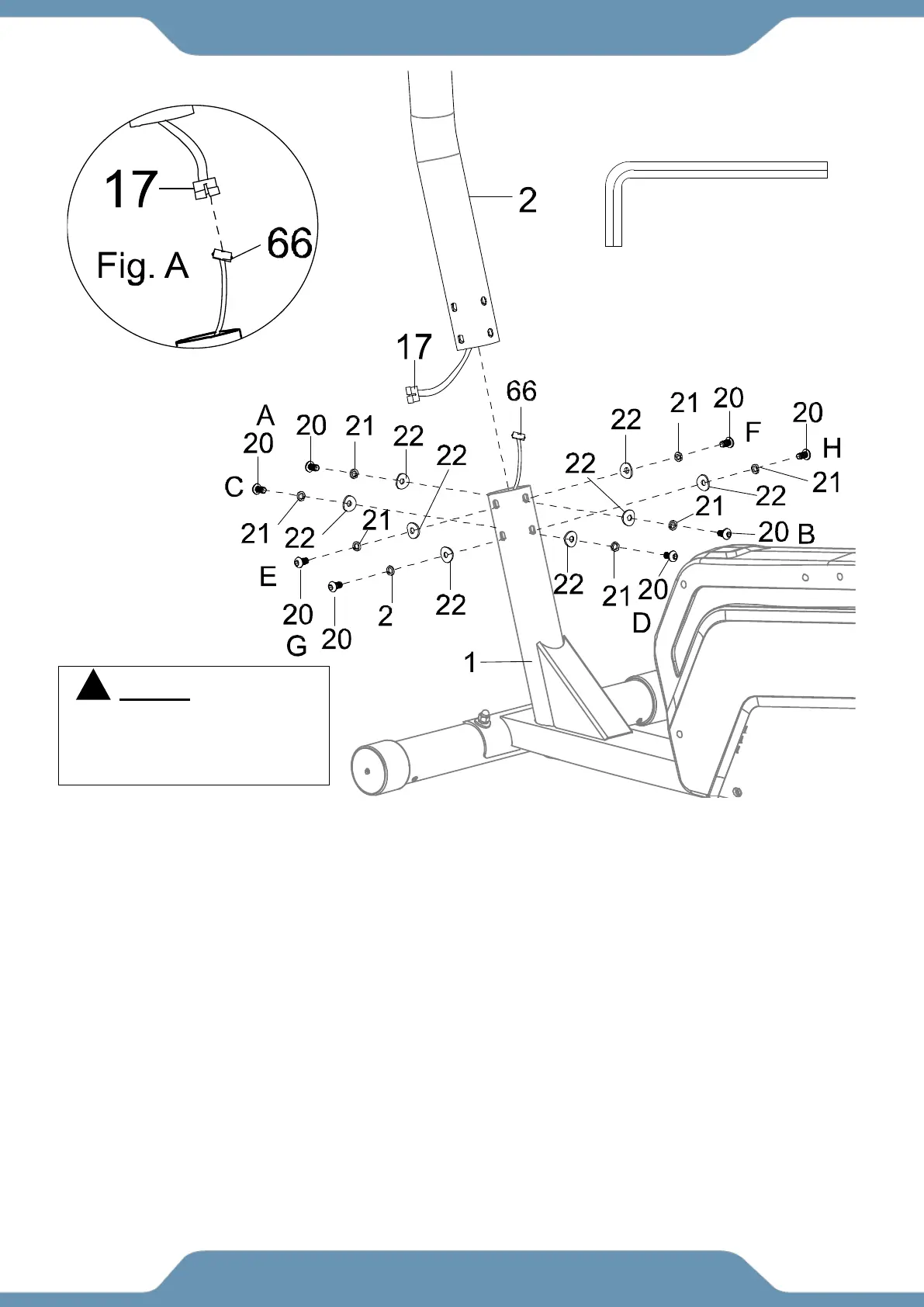
3a. Removing The Hardware From The Front Post –Use the 6mm Allen Wrench to remove the
eight Hex Bolts (20), eight Spring Washers (21), and eight Big Curved Washers (22) from the
Front Post (2).
3b. Connecting The Console Wires –Connect the Console Wire (17) from the Front Post (2) to
the Lower Console Wire (66) coming out from the Main Frame (1) as shown in Figure A.
3c. Installing The Front Post –Guide the wires into the Main Frame (1) as you insert the Front
Post (2) into the Main Frame (1); make sure the wires are not pinched and stay connected. Place
the Front Post (2) onto the Main Frame (1). Reinstall the previously removed hardware: eight Hex
Bolts (20), eight Spring Washers (21), and eight Big Curved Washers (22) and securely tighten
the bolts in sequence using the 6mm Allen Wrench provided.
MUST TIGHTEN
IN SEQUENCE:
A,B,C,D,E,F,G,H.



 To Next Page