15
STEP 5
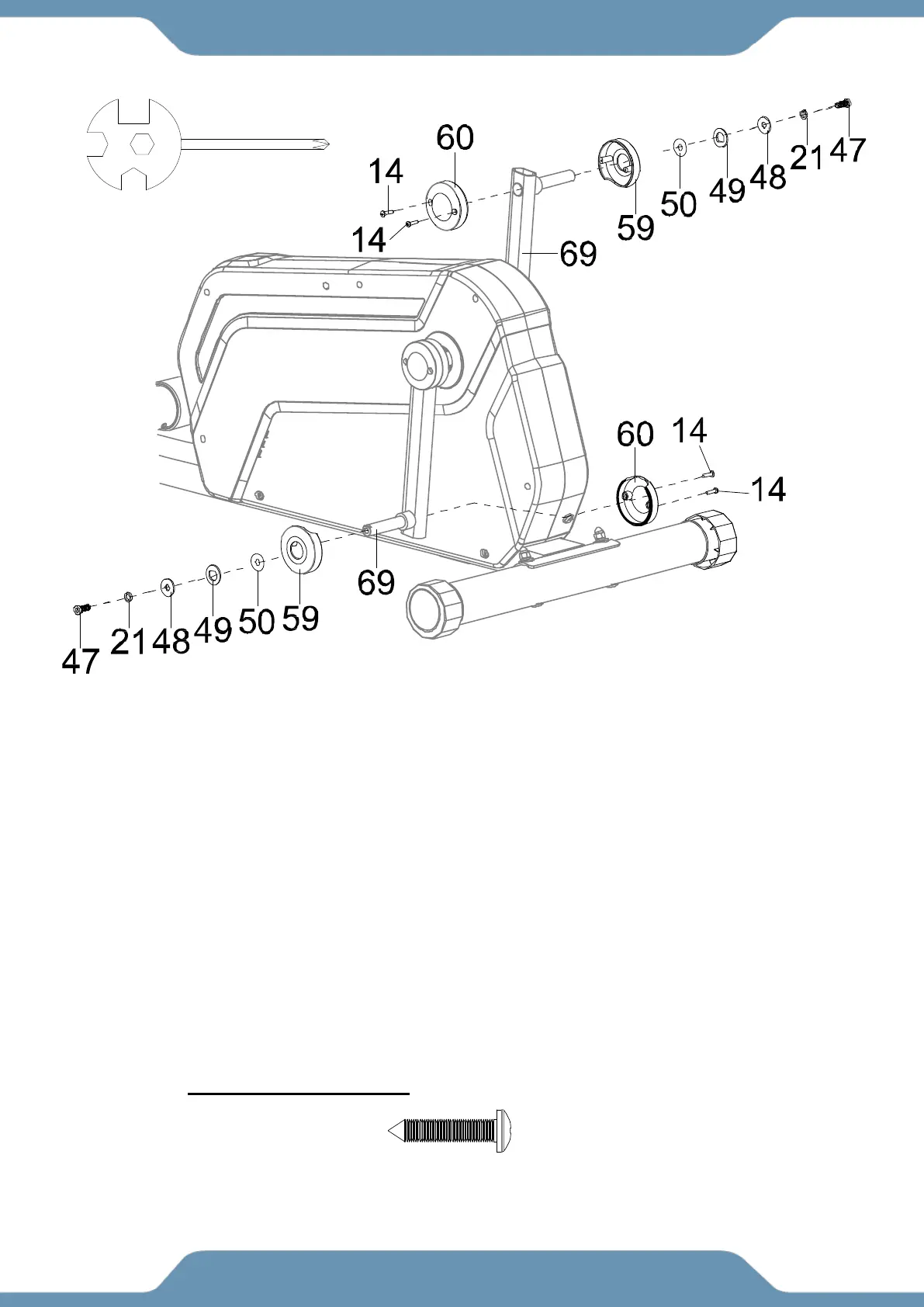
5a. Removing Hardware-Remove the two Flat Hex Bolts (47), two Spring Washers (21), two
Big Flat Washers (48), two Wave Washers (50), and two D Washers (49) from the both Cranks
(69). Keep this hardware for steps 6 & 7.
5b. Installing the Crank Covers Ⅰ and Ⅱ (59) & (60)-Slide one Crank Cover Ⅰ(59)
all the way down the shaft of the Left side of Crank (69). Hold one Crank Cover Ⅱ(60)
onto the backside of the Left side of Crank (69). Attach the Crank CoverⅠ (59) to the Crank
Cover Ⅱ(60) with two Self-Tapping Phillips Screws (14). Tighten the screws with the Multi Hex
Tool with Phillips Screwdriver provided.
5c. Repeat the same assembly step for installing the second set of Crank Covers Ⅰ and Ⅱ
(59) & (60) on to the the right side Crank (69).
(14) Self-Tapping
Phillips Screws
4 PCS
Multi Hex Tool with Phillips
Screwdriver



 To Next Page