18
STEP 8
Note: The parts are marked with an “R” for right side and “L” for left side.
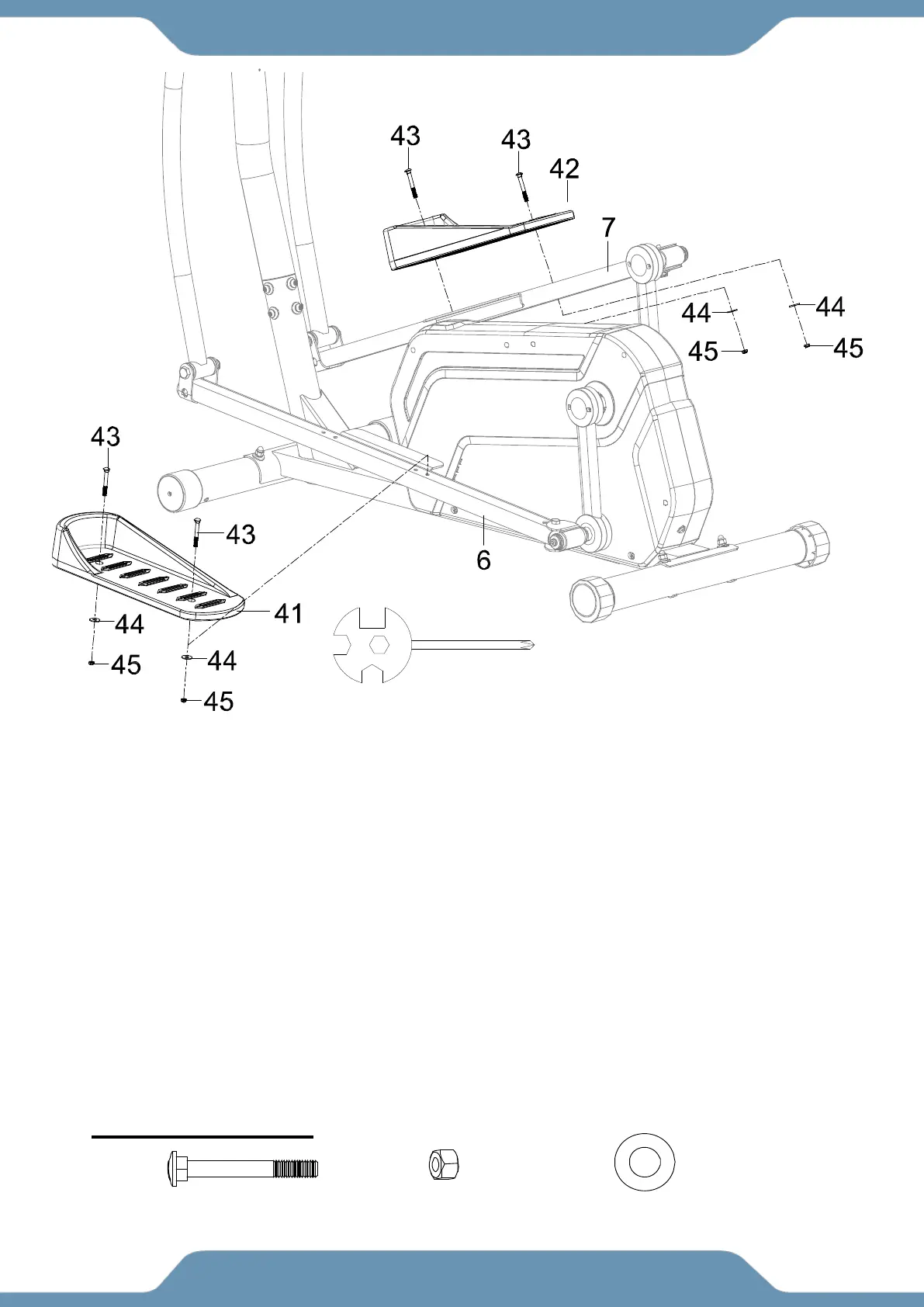
8a. Installing The Left Pedal – Install the Left Pedal (41) onto the Left Foot Bar (6) and align the
holes. Insert two Carriage Bolts (43) into the Left Pedal (41). Attach two Flat Washers (44), and
two Anti-Loosen Hex Nuts (45) to the threaded side of the two Carriage Bolts (43). Tighten the
hardware with the Multi Hex Tool with Phillips Screwdriver.
8b. Installing The Right Foot Pedal: Repeat the same assembly steps to install the Right Foot
Pedal (42) onto the Right Foot Bar (7).
NOTE: There are four holes on the Left/Right Foot Bars (6, 7) which allow for two different
Left/Right Foot Pedal (41/42) positions. Once the unit is completely assembled you can test which
position suits you best. Both Left/Right Foot Pedal (41/42) should be installed in the same position
on both sides.
Multi Hex Tool with Phillips
Screwdriver
4PCS
Hex Nut 4PCS



 To Next Page