19
STEP 9
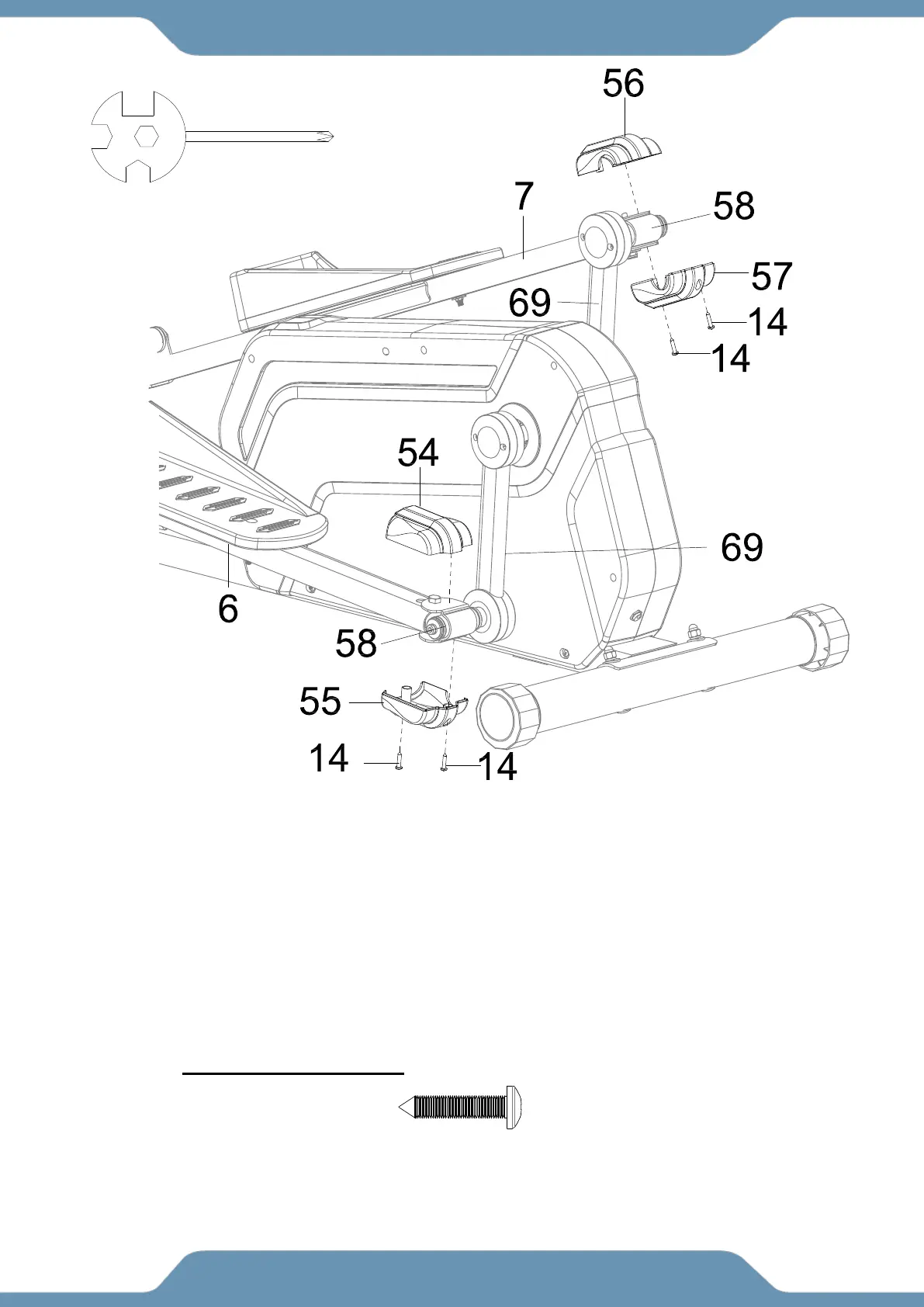
9a. Installing the U Shape Bracket Covers –Turn the Left U Shape Bracket Covers Ⅰ/Ⅱ
(54,55) so that the cut outs on the side are facing the Crank (69). Insert the posts of the Left U
Shape Bracket Covers Ⅰ/Ⅱ (54,55) into the hole at the rear of the Left Foot Bars (6) and
enclose the U Shape Brackets (58). Attach the Left U Shape Bracket Covers Ⅰ/Ⅱ (54,55)
around the U Shaped Bracket (58) with two Self-Tapping Phillips Screws (14). Tighten the
hardware with the Multi Hex Tool with Phillips Screwdriver until firm and secure.
9b. Repeat the same assembly step for the Right U Shape Bracket Covers Ⅰ/Ⅱ (57/58) .
(14) Self-Tapping
Phillips Screws
4 PCS
Multi Hex Tool with Phillips
Screwdriver



 To Next Page