20
STEP 10
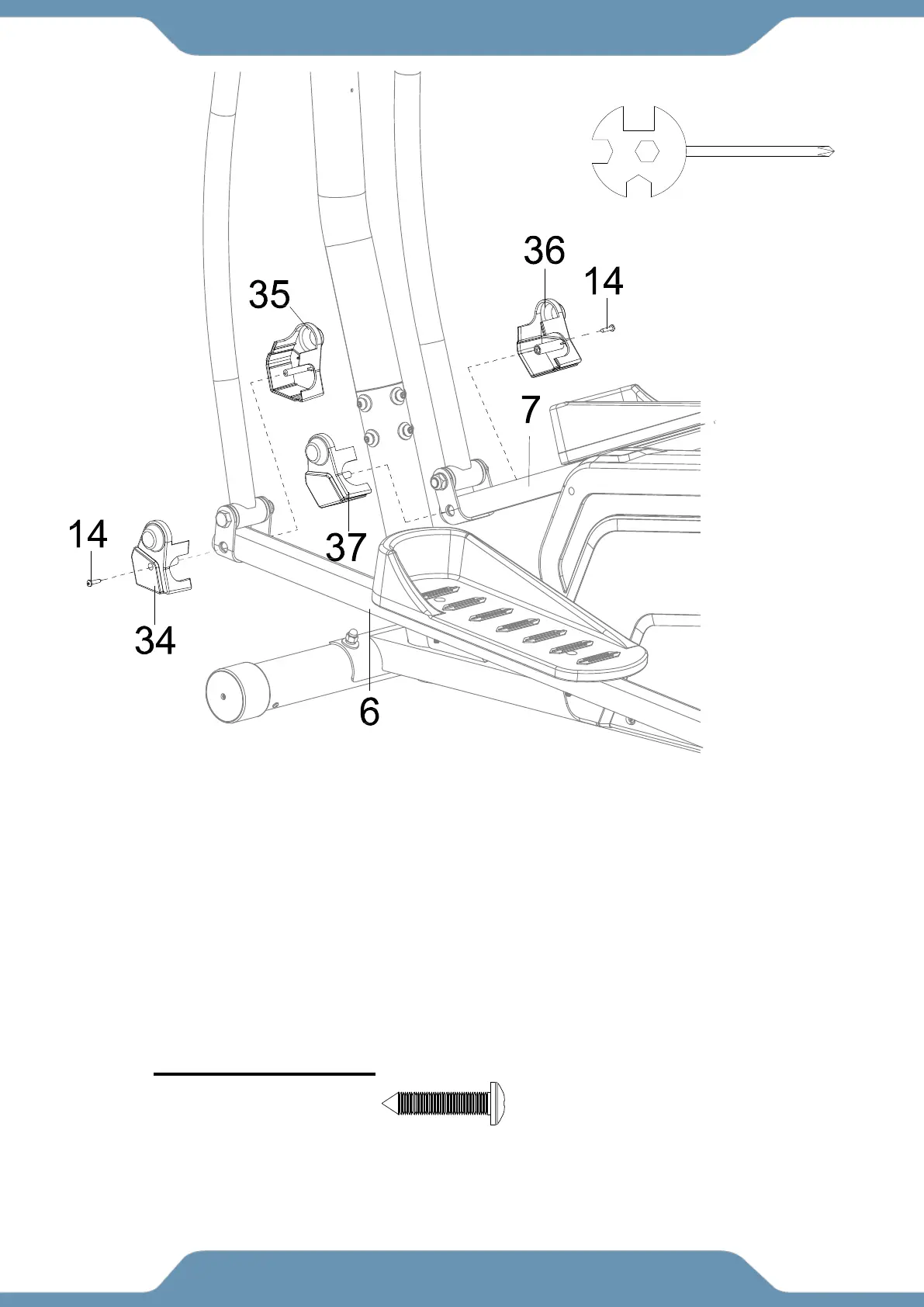
10a. Installing the Foot Bar Covers – Insert the posts of the Left Foot Bar Covers Ⅰ/Ⅱ
(34/35) into the holes at the front of the Left Foot Bar (6). Enclose the bracket of the Left Foot
Bar (6) with the Left Foot Bar Covers Ⅰ/Ⅱ (34/35). Attach the Left Foot Bar Covers Ⅰ/Ⅱ
(34/35) around the bracket of the Left Foot Bar (6) with with one Self-Tapping Phillips
Screws (14). Tighten the hardware using the Multi Hex Tool with Phillips Screwdriver until
firm and secure.
10b. Repeat the same assembly step for the Right Foot Bar Covers Ⅰ/Ⅱ (36/37) and the
Right Foot Bar (7).
Multi Hex Tool with Phillips
Screwdriver
(14) Self-Tapping
Phillips Screws
2 PCS



 To Next Page