23
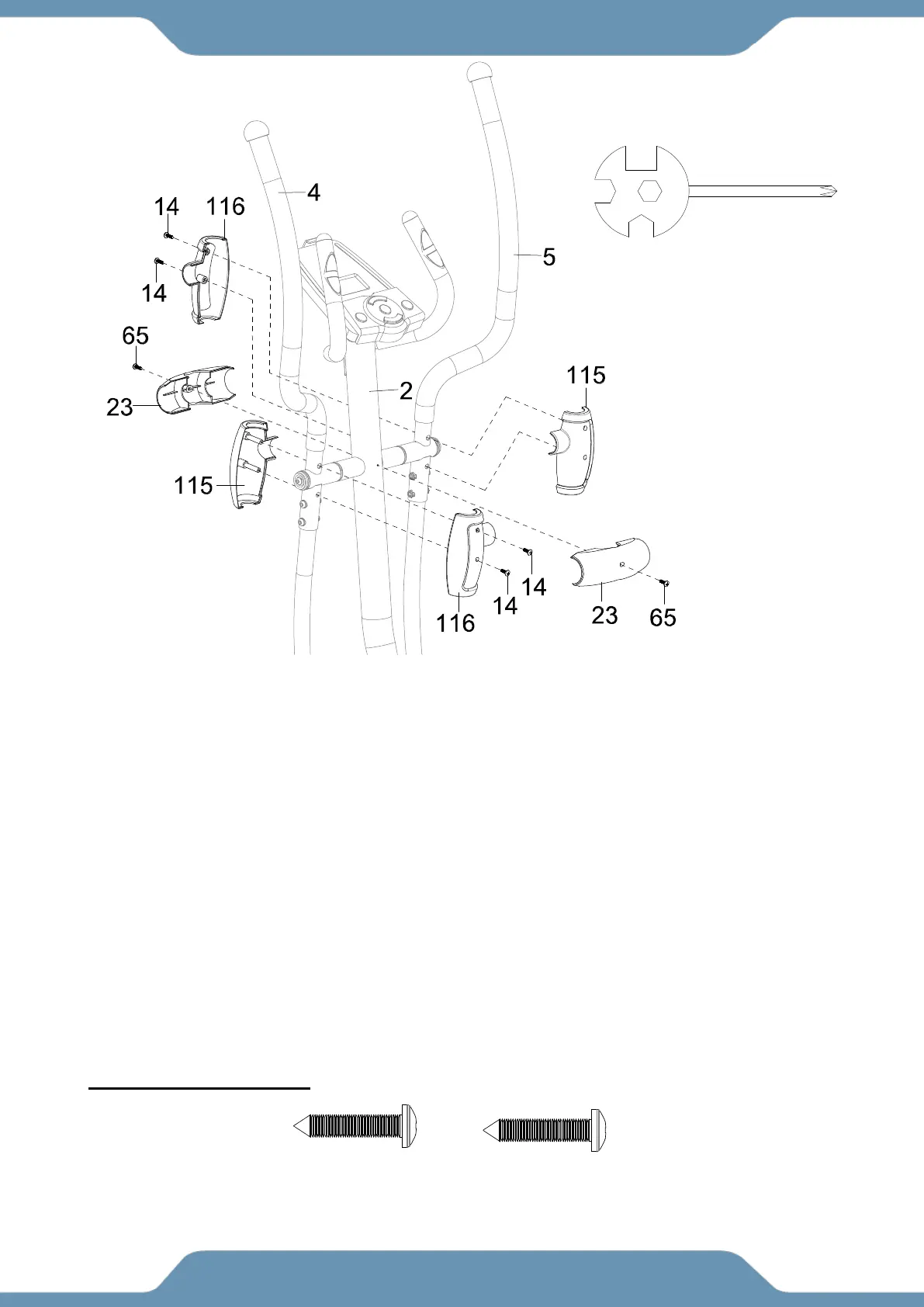
STEP 13
13a. Installing the Left Hand Post Covers – Insert one set of the Front and Rear Hand Post
Cover (115) & (116) onto the Left Hand Post (4). Attach the Front and Rear Hand Post Cover
(115) & (116) with two Self-Tapping Phillips Screws (14). Tighten the hardware using the
Multi-Hex Tool with Phillips Screwdriver provided.
13b. Installing the Right Hand Post Covers – Repeat this for the Right Hand Post (5) and the
second set of the Front and Rear Hand Post Cover (115) & (116).
13c. Installing the Front Post Covers – Enclose the cross of the Front Post (2) with two Front
Post Covers (23). Attach the Post Covers (23) to the Front Post (2) with two Self Drilling
Screws (65). Before fully tightening the Self Drilling Screws (65), make sure the edged of the two
Front Post Covers (23) are flush when clamped together. Tighten the hardware with the
Multi-Hex Tool with Phillips Screwdriver provided.
(14) Self-Tapping
Phillips Screws
4 PCS
Multi Hex Tool with Phillips
Screwdriver
(65) Self-Drilling
Phillips Screws
2 PCS



 To Next Page