- 23 -
5. Functions on main interface
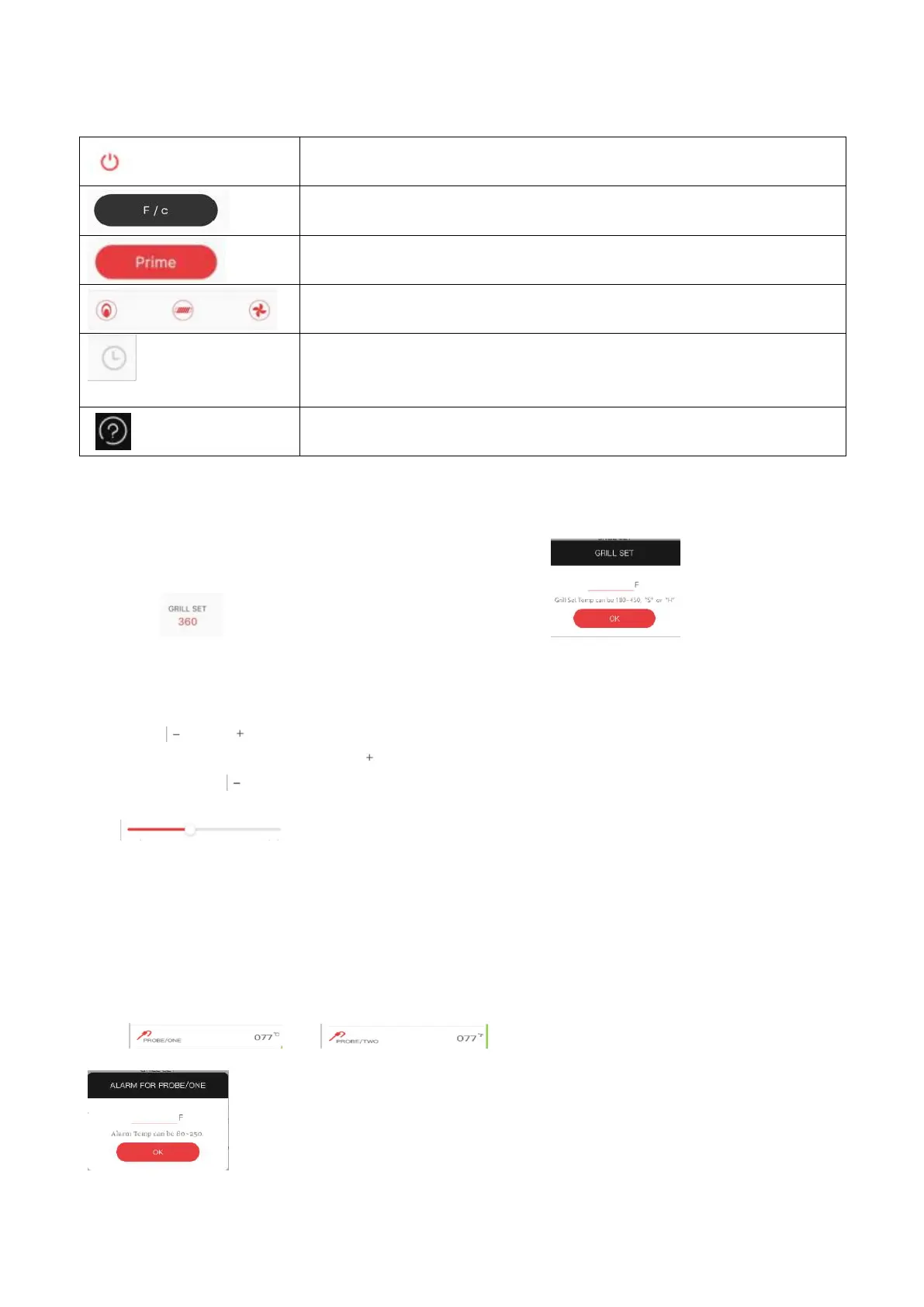
This button can switch between Celsius and Fahrenheit.
Push this button can start the forced feeding. The PID screen "Prime"
will become red.
These are not touchable icons, they will display same status as on PID
screen.
Timer Alarm: users can set the cooking time (period), and when the
cooking time is up, the phone will keep ringing. Timing time up to 12
hours.
You can find Manuals, Assembly Video and Customer Support in this
help button.
6. How to set temperature:You can choose anyone from 3 versions below.
6.1 Click , you can set the temperature of the grill , you can follow the
instructions in gray and set from 180°F to 450°F. Under 180°F shows "smoke", above 450° F is
"high".
6.2 Click and to adjust the temperature,the temperature will increase 5°F by each press and
increase 25°F by long press (2s) of , and it will decrease 5°F by each press and decrease 25°F by
long press (2s) of .
6.3 There are two ways to use the slider.
You can touch any point on the slider and the dot will slide to the position.
Press the finger on the slider to move left and right, and determine the value according to the last
position of the finger.
7. How to set meat probe temperature
Click or can set the temperature of the meat probe.
You can follow the instructions in gray and set form 80°F to 250°F. Exceeding
the setting range will be invalid.



 To Next Page