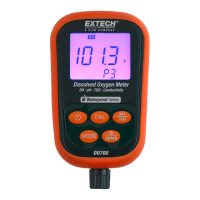
The Extech DO700 is a versatile digital meter designed for comprehensive water quality analysis, capable of measuring Dissolved Oxygen (DO), Conductivity, Total Dissolved Solids (TDS), pH, mV, Salinity, Resistivity, and temperature. This multi-parameter device is engineered for accuracy and ease of use, featuring a built-in microprocessor that enables automatic calibration, automatic temperature compensation, data storage, and self-diagnostics. Its digital filter enhances measurement speed and precision. The meter boasts a backlit LCD display for clear readings and is designed to be dust-proof and waterproof, meeting IP57 standards, ensuring reliable performance in various environmental conditions.
Function Description:
- Dissolved Oxygen (DO) Measurement: The DO700 utilizes a state-of-the-art DO electrode equipped with both temperature and salinity sensors. It offers automatic temperature and salinity compensation, along with manual barometric pressure compensation, to ensure accurate DO readings in mg/L (ppm) or percentage (%). The meter can measure DO from 0 to 40.00 mg/L (ppm) or 0 to 200.0%.
- pH Measurement: The device supports pH measurements from -2.00 to 19.99 pH. It can recognize up to 13 types of pH standard buffer solutions and includes two specialized pH modes for distilled water and distilled water mixed with ammonia. These modes provide general slope compensation and non-linearity solution temperature compensation, making the meter suitable for applications in electric power and petrochemical industries. The pH resolution can be set to 0.1 or 0.01 pH.
- Conductivity Measurement: The DO700 measures conductivity across multiple ranges, from 0.00 to 19.99 µS/cm up to 20.0 to 199.9 mS/cm. It features automatic frequency conversion and voltage regulation to extend the conductivity electrode range. A one-point conductivity calibration allows measurements from 0 to 100 mS/cm, and the meter can recognize up to 8 types of conductivity standards. It also offers automatic non-linear temperature compensation for distilled water with conductivity values below 10 µS/cm, significantly improving accuracy for microelectronics and pharmaceutical applications.
- TDS (Total Dissolved Solids) Measurement: TDS measurements range from 0 to 100 g/L. These readings are derived from conductivity measurements using a specific conversion method.
- Salinity Measurement: The meter provides salinity measurements from 0 to 100 ppt, also derived from conductivity.
- Resistivity Measurement: Resistivity can be measured from 0 to 100 Mohms.
- Temperature Measurement: Temperature is measured from 0 to 100°C (32 to 212°F) with automatic temperature compensation (ATC) for pH and conductivity, and 0 to 45°C (32 to 112°F) for DO.
- Data Logging: The meter can store up to 100 readings for DO, pH, mV, and conductivity, totaling 400 data points. Stored data includes the serial number, measurement, and unit of measure.
Important Technical Specifications:
- pH:
- Measuring range: -2.00 to 19.99 pH
- Resolution: 0.1/0.01 pH
- Accuracy: Meter only: ±0.01pH; with probe: ±0.02pH
- Input current: ≤2×10⁻¹² A
- Input impedance: ≥1×10¹² Ω
- Stability: ±0.01 pH/3h
- Temp. Compensation range: 0 to 100°C (32 to 212°F); Automatic (ATC)
- mV:
- Measuring range: -1999 mV to 0 to 1999mV
- Resolution: 1mV
- Accuracy: Meter: ±0.1% FS
- Conductivity:
- Measuring ranges: 0.00 to 19.99 µS/cm, 20.0 to 199.9 µS/cm, 200 to 1999 µS/cm, 2.00 to 19.99 mS/cm, 20.0 to 199.9 mS/cm
- Resolution: 0.01/0.1/1 µS/cm and 0.01/0.1mS/cm
- Accuracy: Meter only: ±1% F.S.; with probe: ±2% F.S.
- Electrode constant: 0.1 / 1 / 10 cm⁻¹
- Reference temperatures: 25, 20, and 18°C (77, 68, and 64°F)
- Temp. Compensation range: 0 to 50°C (32 to 122°F); Automatic (ATC)
- TDS:
- Measuring range: 0 to 100 g/L
- Dissolved Oxygen:
- Measuring range: (0 to 40.00) mg/L (ppm), (0 to 200.0) %
- Resolution: 0.1/0.01 mg/L (ppm), 1/0.1%
- Accuracy: Meter: ±0.10 mg/L; with electrode: ±0.40 mg/L
- Response time: ≤30 s (25°C, 90% response)
- Residual current: ≤0.1 mg/L
- Temp. compensation range: 0 to 45°C (32 to 112°F); Automatic (ATC)
- Salinity compensation range: 0 to 45 ppt; Automatic
- Barometric pressure: 66 to 200 kPa (Manual compensation)
- Electrode type: Polarogram type
- General:
- Data storage: 400 data groups
- Power: Two 'AA' batteries (1.5V)
- Meter size: 65 x 120 x 31mm (2.6 x 4.7 x 1.2")
- Meter weight: 180g (6.3 oz)
- Case size: 360 x 270 x 76mm (14.1 x 10.6 x 3")
- Case weight: 1.6kg (3.4 lbs)
- IP rating: IP57 Dustproof and waterproof
- Operating temperature: 5 to 35°C (41 to 95°F)
- Operating humidity: ≤85%
Usage Features:
- Intuitive Keypad: The meter features a user-friendly keypad with dedicated keys for ON/OFF, Calibration (CAL), Mode, Backlight/ENTER, and Memory Store/Recall (M+/RM).
- Backlit LCD Display: The LCD provides clear readings and includes icons for measurement type, stable measurement, calibration status, and low battery. The backlight can be toggled on/off or set to automatically turn off after 0, 1, 3, or 6 minutes.
- Automatic Power Off: The meter can be configured to automatically power off after 0, 10, or 20 minutes of inactivity to conserve battery life. For DO mode, the default auto power off time is zero (defeated).
- Programmable Parameters: Various parameters can be programmed to customize the meter's operation, including pH buffer solution series, distilled water temperature compensation, temperature units, backlight time, auto power off time, conductivity solution series, electrode constant selection, reference temperature, temperature compensation coefficient, and electrode constant calibration.
- Calibration Flexibility:
- pH: Supports 1, 2, or 3-point calibration using standard buffer solutions (4.00pH, 7.00pH, 10.01pH).
- Conductivity: Offers a unique one-point calibration feature, allowing users to select the calibration solution closest to the expected measurement value. The meter is factory calibrated and can generally be used out of the box.
- Dissolved Oxygen: Calibrated using the percentage (%) unit of measure in a calibration solution. Zero oxygen calibration is also possible when the electrode or cap is replaced or after extended use.
- Salinity: Equipped with automatic salinity compensation and factory calibrated, manual salinity calibration is typically not required unless the electrode is replaced or has been in service for a long time.
- Barometric Pressure: Features manual barometric pressure adjustment for accurate DO compensation.
- Data Storage and Recall: Momentary presses of the M+/RM key store readings, while pressing and holding for 2 seconds recalls saved readings. The CAL or M+/RM buttons can be used to scroll through stored data.
- Factory Reset: The meter can be reset to its factory default settings via a programmable parameter (P7 for pH, P9 for conductivity, P7 for DO).
Maintenance Features:
- Electrode Care:
- pH Electrode: Keep the electrode clean and dry, especially the glass bulb and junction. Rinse with distilled water before and after each measurement. Avoid cleaning the glass bulb with tissue. If the soak solution is turbid or moldy, replace it.
- Conductivity Electrode: Keep the electrode clean. Rinse with sample solution. The black platinum surface should not be polished; clean with distilled water, or with hot water and detergent/alcohol for organic buildup.
- DO Electrode: Keep the surface of the DO electrode moist with the supplied storage sponge. The salinity electrode's black platinum surface should not be rubbed or wiped; clean by swirling in water or with lukewarm water and detergent/alcohol for organic matter.
- Membrane Cap Replacement (DO Electrode): Replace the membrane cap if electrode response time increases, displayed values are incorrect/abnormal, or the membrane is damaged/cracked. The process involves cleaning the electrode, polishing the cathode, injecting electrolyte into a new cap, and carefully attaching the cap to avoid air bubbles.
- Calibration Intervals: Calibration intervals depend on the sample, electrode performance, and required accuracy. For high accuracy, calibrate immediately before use. For general accuracy, calibration can be performed weekly. Recalibration is necessary for new probes, after long periods of disuse, after measuring extreme pH solutions, or if the sample temperature differs significantly from the calibration solution temperature.
- Troubleshooting: Error messages (ERR-1, ERR-2 for pH) indicate issues like air bubbles or inaccurate buffers. For abnormal readings, recalibration is recommended, and if problems persist, electrode replacement or factory reset may be necessary.

 Need help?
 General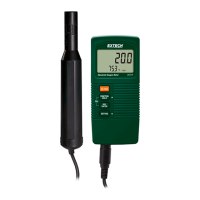



 To Next Page