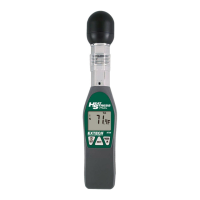
The Extech HT30 is a Heat Stress WBGT (Wet Bulb Globe Temperature) Meter designed to measure and display the Heat Stress Index (WBGT), which indicates how hot it feels when humidity, temperature, air movement, and direct or radiant sunlight are combined. This device is particularly useful for assessing environmental conditions that could lead to heat-related illnesses.
Function Description:
The primary function of the HT30 is to provide a comprehensive assessment of heat stress. It measures several key parameters:
- Wet Bulb Globe Temperature (WBGT): This is the core measurement, calculated from other parameters, and represents the perceived heat stress.
- Black Globe Temperature (TG): This sensor monitors the effects of direct solar radiation on an exposed surface, providing insight into radiant heat.
- Air Temperature (TA): Measures the ambient air temperature.
- Relative Humidity (RH): Measures the moisture content in the air.
The meter displays these measurements on an LCD screen, allowing users to select the desired display mode (WBGT, TA, TG, or RH). It can measure the WBGT index with or without direct sun exposure, indicated by "IN" (full sun) or "OUT" (no sun/indoors) icons respectively.
Important Technical Specifications:
- WBGT Measurement Range: 0°C to 50°C (32°F to 122°F). The WBGT value is calculated from measured parameters.
- TG Black Globe Temperature Range: 0°C to 80°C (32°F to 176°F).
- TG Accuracy (Indoor): ±2°C (4°F)
- TG Accuracy (Outdoor): ±3°C (5.5°F)
- TA Air Temperature Range: 0°C to 50°C (32°F to 122°F).
- TA Accuracy: ±1°C (1.8°F)
- Relative Humidity (RH) Range: 0 to 100%RH.
- RH Accuracy: ±3% (at 25°C, 10 to 95%RH)
- Resolution: 0.1°F/°C; 0.1%RH for humidity.
- Operating Temperature: 0°C to 50°C (32°F to 122°F).
- Operating Humidity: Max. 80% RH.
- Power Supply: Two AAA batteries.
- Battery Life: Approximately 1000 hours.
- Dimensions:
- Meter: 254 x 48.7 x 29.4mm (10x1.9x1.1")
- Black Ball: 40mm, 35mm (1.57 Dia., 1.37H)
- Weight: 136g (4.8oz).
- Optional Accessories: PC software and cable (407752) for data acquisition.
- OUT of the Sun (Indoors): WBGT = 0.7 x WB + 0.3 x TG
- IN full Sun (Outdoors): WBGT = 0.7 x WB + 0.2 x TG + 0.1 x TA
- Where WB = Wet bulb temperature (calculated from temperature and humidity), TG = Globe temperature, and TA = Air temperature.
Usage Features:
- Easy Operation: Powered on/off with a single button. A protective sensor cover slides down for measurements.
- Display Mode Selection: Users can cycle through WBGT, TA, TG, and RH display modes using the MODE/▲ button.
- Temperature Unit Selection: Switch between °F and °C by simultaneously pressing and releasing the MODE/▲ and NEXT buttons.
- Sun Exposure Setting: Alternate between "IN" (full sun) and "OUT" (no sun) settings by holding down the MODE/▲ button for more than 1 second.
- Heat Stress Alarm: The HT30 features a user-settable audible alarm. When the WBGT reaches the preset level (range: 68.0 to 99.0°F / 20.0 to 37.2°C), the meter will beep continuously until the temperature drops below the alarm level or the meter is turned off. The alarm setup mode allows users to increment digits and set the desired alarm threshold.
- Auto Power Off: To conserve battery life, the meter automatically turns off after approximately 20 minutes. This feature can be disabled by holding down the /SET and MODE/▲ buttons for 2 seconds when powering on. The meter will display "n" to indicate auto power off is disabled, but it will reset to auto power off mode upon being powered off.
- RS-232 PC Interface: A 3.5mm phono jack allows connection to a PC using optional Extech software (Part Number 407752). This enables streaming data from the meter to the PC for data acquisition and analysis.
Maintenance Features:
- Battery Replacement: A low battery indicator appears on the LCD when it's time to replace the two AAA batteries. The battery compartment is located on the rear of the meter for easy access.
- Error Messages: The display shows error messages (e.g., E2 for under range, E3 for over range, E4 for in error, E11 for RH Calibration error, E33 for Circuit error) if the meter fails an internal diagnostic test, aiding in troubleshooting.
- Calibration: The meter is shipped fully tested and calibrated, ensuring reliable service with proper use.
- Disposal: Users are legally bound to return used batteries and accumulators to collection points. The device itself should be disposed of according to valid legal stipulations at the end of its lifecycle.
The HT30 is a robust instrument designed for professionals and individuals who need to monitor heat stress conditions accurately, providing critical information for safety and performance in various environments, including athletic training and industrial settings.

 Need help?
 General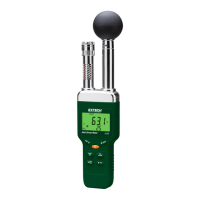


 To Next Page