EN8
CFI EXTEL CONNECT - V1
7. The application will ask you to name your device.
Warning The password cannot be changed for the time being. You will be able to change it
when previewing the first video stream (see Interface function chapter)
8. Wait for a few minutes and your telephone and monitor will connect
c.PairingyourdoorkeeperwithaniPhoneforthersttime
Download the Extel Connect application from the Apple Store
1
20 sec connection
OK
2 3
4 5 6 7
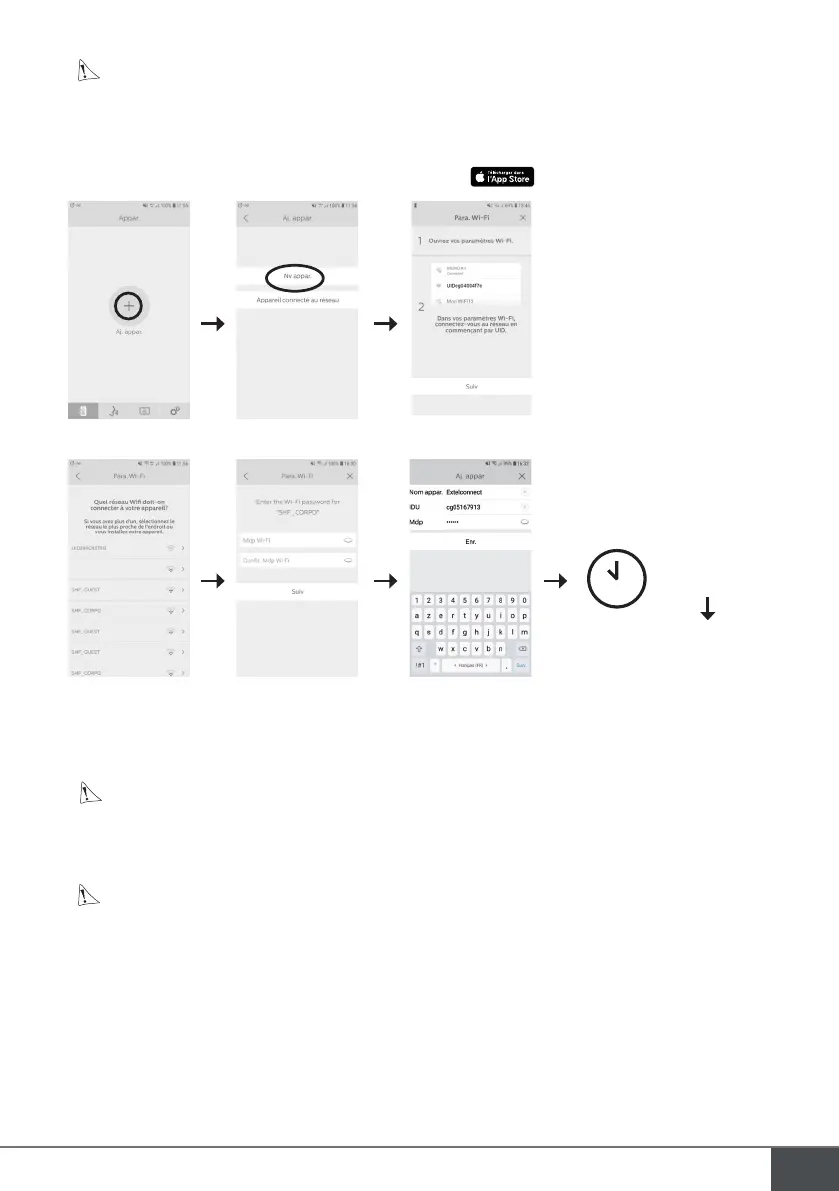
1. After the application has been started, it suggests you add a device by pressing the + in the centre of the
screen.
2. Select New device. To move to the next step, your telephone must authorise access to your telephone’s loca-
tion. If you are asked, grant access to the Extel Connect application.
3. Exit the application and go into the smartphone Wifi settings. Connect to the Wifi starting with ‘UIDcg…’.
Warning You telephone will show that the doorkeeper Wifi does not provide internet access. This is
normal. Return to the application and press next.
4. The application asks you which Wifi network the video doorkeeper can be connected to. Select your network.
5. Enter your home’s Wifi password.
6. The application will ask you to name your device.
Warning The password cannot be changed for the time being. You will be able to change it when pre-
viewing the first video stream (see Interface function chapter).
7. Wait for a few minutes and your telephone and monitor will connect.
d. Connecting your telephone to a videophone that is already connected or add a tel-
ephonetoamonitorthatisalreadycongured
1. After the application has been started, it suggests you add a device by pressing the + in the centre of the
screen
2. Select Device already connected to the network
3. You can connect an existing videophone in 2 ways



 To Next Page