CFI EXTEL O’PLUS - 10/2015 - V1
GB5
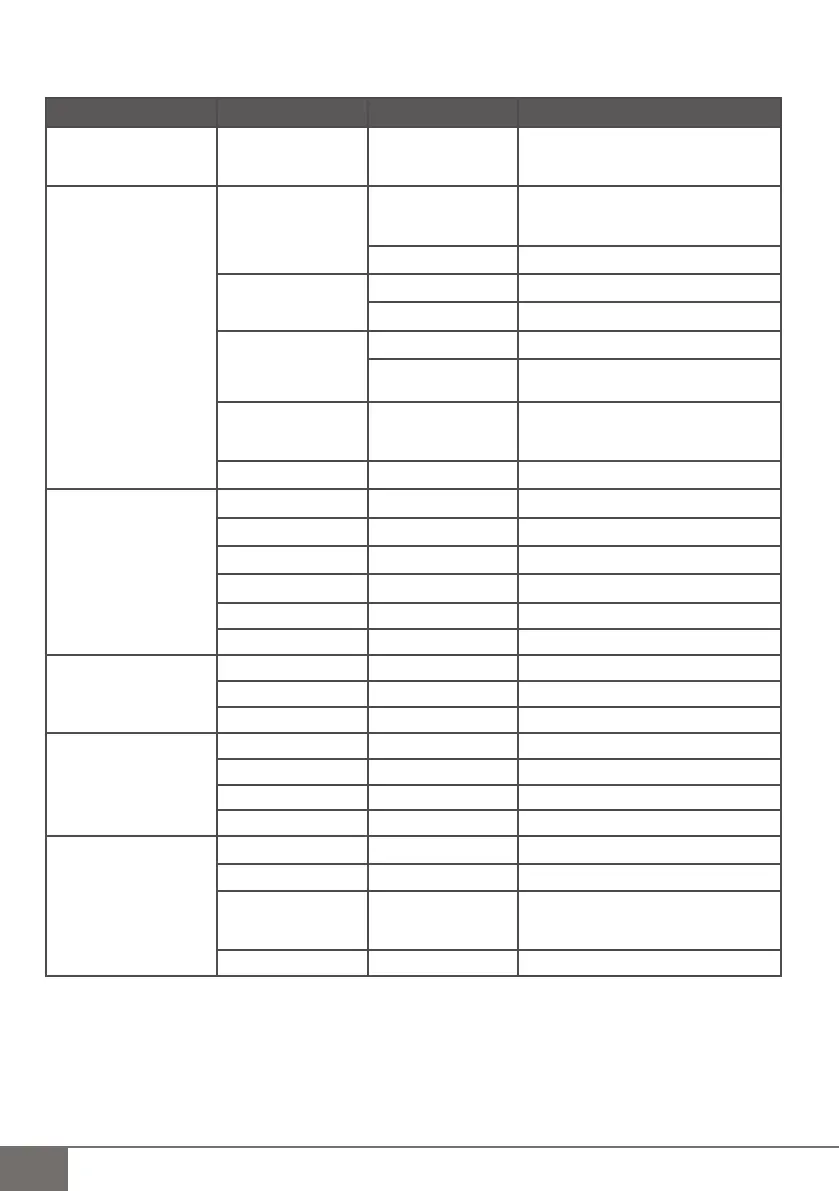
c. MENU list and description (fi g. G)
Main page sub page 1 sub page 2 option
1 - Playback Video/Picture fi les > Date under fi le
> Time under fi le
> Video or picture fi les
To delete the current fi le :
Playback mode, Press Menu >
Delete fi le > NO/YES
2 - Record
Manual Capture Setting
◀Manual▶
◀Take 1/2/3/5 photos▶
◀ 5s/10s/30s/1min Video▶
Exit
Loop recording Enable ON/OFF
Exit
SD Format NO
YES Formatting....
Format Finish
SD Info Size : ...MB
Size used : ...MB
Size remain : ...MB
Exit
3 - Select Cam
CAM1 Unpair/Paired
CAM2 Unpair/Paired
CAM3 Unpair/Paired
CAM4 Unpair/Paired
Quad view
✓
Exit
4 - Contrast / Brightness
Constrast
◀0/9▶
Brightness
◀0/9▶
Exit
5 - Recording Shedule
Enable
◀ON/OFF▶
Start Time 00:00
End Time 00:00
Exit
6 - Motion Detection Enable
◀ON/OFF▶
Sensitivity
◀Low/High/Standard▶
Capture
◀5s /10s /30s/1min
video▶
◀Take 1/3/5 photos▶
Exit



 To Next Page