CFI EXTEL O’PLUS - 10/2015 - V1
NL5
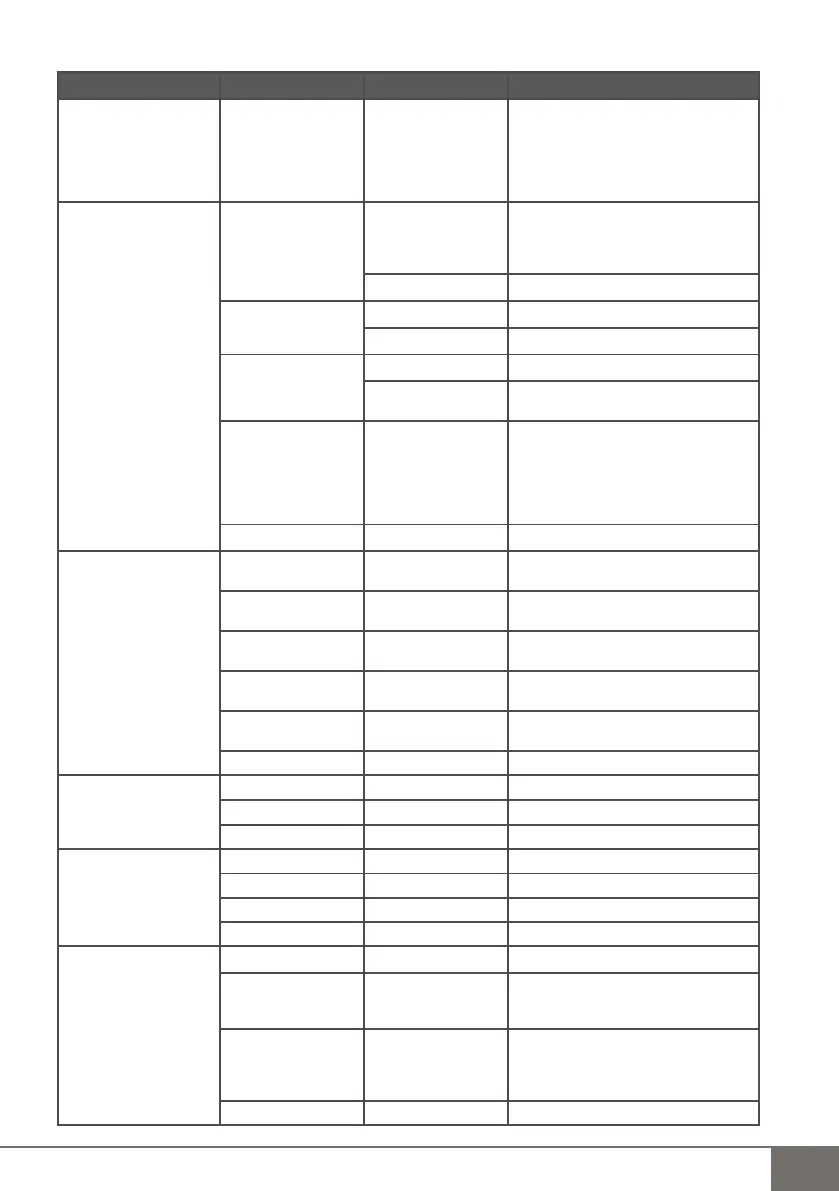
c.Lijst en beschrijving van het MENU
(fi g.G)
Hoofdmenu submenu 1 submenu 2 monitor
1 - Playback / Afspelen Video/Picture fi les
Video/Foto
Video- of fotomap
> Date under fi le
> op datum
> Time under fi le
> op tijd
> Video or picture fi les
> video-/fotobestand
To delete the current fi le :
Playback mode, Press Menu >
Delete fi le > NO/YES
Om het huidige bestand te verwijderen:
Drukt u, in de afspeelmodus, op Menu >
Delete fi le > JA/NEE
2 - Record / Registreren
Manual Capture
Handmatige opname
Setting
Parameters
◀Manual▶ / ◀Handmatig▶
◀Take 1/2/3/5 photos▶
◀1/3/5 foto's nemen▶
◀5s /10s /30s/1min video▶
Exit / Sluiten
Loop recording
Lusvorm
Enable / Activering ON/OFF
Exit / Sluiten
SD Format
Formattering SD
NO - NEE
YES - JA Formatting....
Format Finish
Info SD/
SD Info
Size : ...MB
Grootte: ...MB
Size used : ...MB
Gebruikt: ...MB
Size remain : ...MB
Resterend: ...MB
Exit / Sluiten
3 - Select Cam
Selectie van camera
CAM1 Unpair/Paired - Niet
gekoppeld/Gekoppeld
CAM2 Unpair/Paired - Niet
gekoppeld/Gekoppeld
CAM3 Unpair/Paired - Niet
gekoppeld/Gekoppeld
CAM4 Unpair/Paired - Niet
gekoppeld/Gekoppeld
Quad view
Quad-modus
✓
Exit / Sluiten
4 - Contrast / Brightness
Contrast / Helderheid
Contrast
◀0/9▶
Brightness / Helderheid
◀0/9▶
Exit / Sluiten
5 - Recording Shedule
Registratieprogramma
Enable / Activering
◀ON/OFF▶
Start Time / Beginuur 0:00
End Time / Einduur 0:00
Exit / Sluiten
6 - Motion Detection
Bewegingsdetectie
Enable / Activering
◀ON/OFF▶
Sensitivity
Gevoeligheid
◀Low/High/Standard▶
◀Hoog/Gemiddeld/
Laag▶
Capture
Opname
◀5s /10s /30s/1min
video▶
◀Take 1/3/5 photos▶
◀1/3/5 foto's nemen▶
Exit / Sluiten



 To Next Page