5GB
CFI EXTEL TOPTEL200- 02/2010 - V1
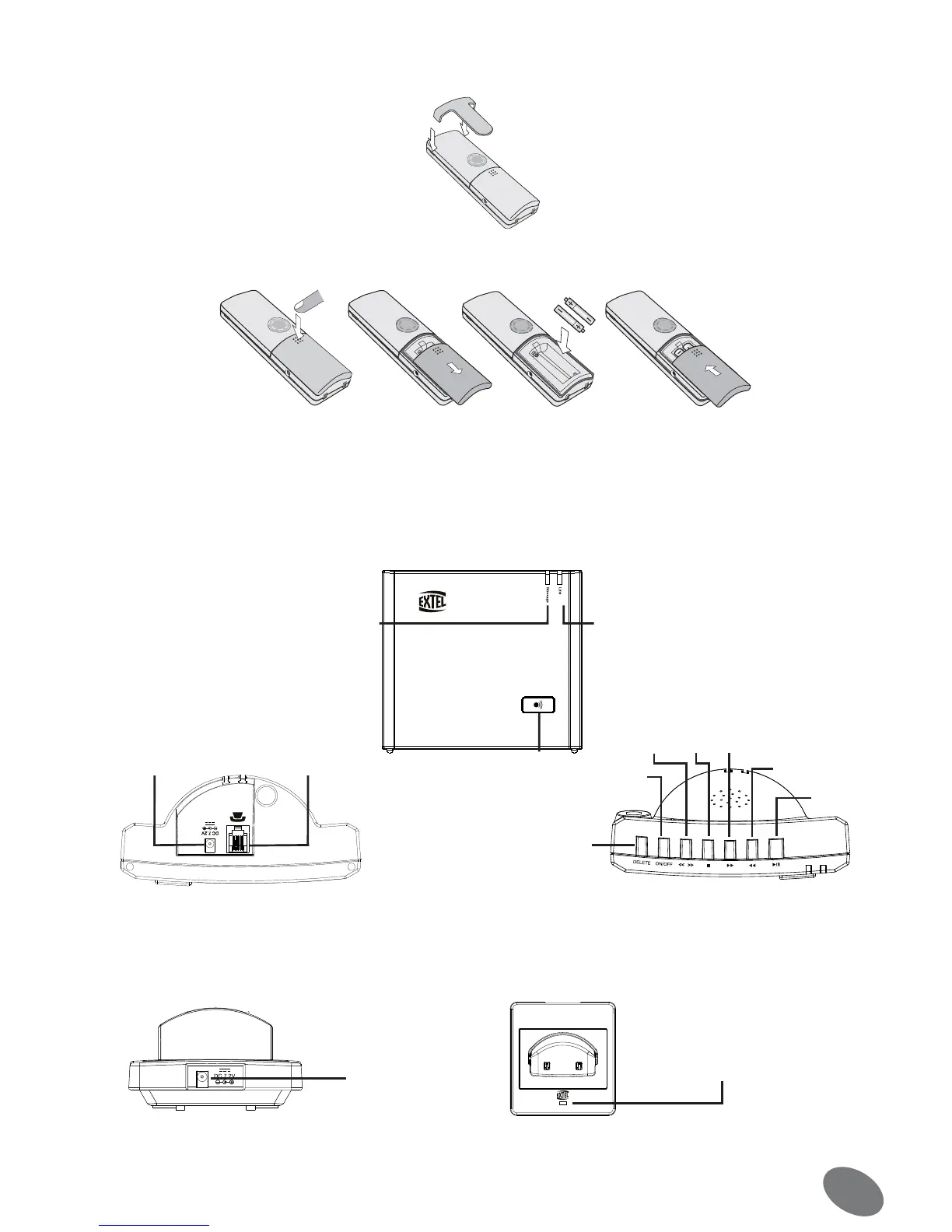
The belt clip can be attached to the back of the telephone. Position the clip on the back of the handset and press
down until it clicks into place in the two side notches.
• Inserting the rechargeable batteries
Open the cover on the back of the phone and insert the rechargeable batteries.
ATTENTION: Ensure the batteries are inserted to the correct polarities
Only use the original batteries: “Using the wrong batteries may invalidate your guarantee”
b. Base station
• Presentation of the base station
Operating elements and connections of the base station.
• Presentation of the charging station
Operating elements and connections of the charging station.
Red LED indicator of telephone link
Call key
«Paging»
Plug for the
network adapter
Plug for te-
lephone cable
Green LED indicator of automatic
answering machine (flashing when there
are messages)
Delete
Turn
on/off
Volume
Stop Fast Forward
Return
Listening to
the messages
Bottom side of the station higher side of the station
Led of indication
of load
Back of the charging station
Front of the charging station
charging plug


 To Next Page