3-2 Px Series Application Switch Installation and Configuration Guide
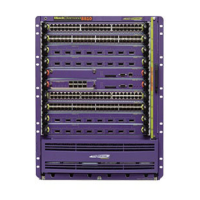
Caution: You can install I/O modules only in slots 1 through 16 in the
BlackDiamond 6816 or slots 1 through 8 in the BlackDiamond 6808. I/O modules
do not fit in slots A, B, C, or D. Forceful insertion can damage the I/O module.
2 Attach the ESD strap that is provided to your wrist and connect the metal end to the
ground receptacle that is located on the top-left corner of the switch front panel.
3 For the BlackDiamond 6816, ensure that the module is horizontal with the module
name to the left and that the ejector/injector handles are extended.
For the BlackDiamond 6808, ensure that the module is vertical with the module
name at the top and that the ejector/injector handles are extended.
4 Slide the module into the appropriate slot of the chassis (slots 1 through 16 in the
BlackDiamond 6816 or slots 1 through 8 in the BlackDiamond 6808), until it makes
contact with the backplane.
As the module begins to seat in the chassis, the ejector/injector handles begin to
close.
5 To close the ejector/injector handles, use both hands simultaneously to push the
handles toward the center of the module.
6 To secure the module, tighten the two screws using a #1 Phillips screwdriver.
Note: Tighten the screws before inserting additional modules. Otherwise, you
might unseat modules that you have not secured.
7 Repeat this procedure for additional modules, if applicable.
8 Leave the ESD strap permanently connected to the chassis, so that it is always
available when you need to handle ESD-sensitive components.
Removing I/O Modules
All BlackDiamond 6800 series modules (MSM64i and I/O modules) are hot-swappable.
You do not need to power off the system to remove a module.
To remove an I/O module:
1 Attach the ESD strap that is provided to your wrist and connect the metal end to the
ground receptacle that is located on the top-left corner of the switch front panel.
2 Use a #1 Phillips screwdriver to unscrew the two captive screws.


 To Next Page
 Loading...