4
MLC Plus 50/100/200 Series • Setup Guide (Continued)
Front panel features
Extron
DISPLAY
ON
PC
VIDEO
OFF
VOL
VOL
ON
OFF
PC
VOL
VOL VIDEO
E
RESET
Extron
DISPLAY
ON
PC
VIDEO
OFF
LAPTOP
MUTE
VOLUME
ON
OFF
PC
VIDEO
MUTE
LAPTOP
E
RESET
E
RESET
PC
DOC
CAM
VGA
ON
OFF
MUTE
LAPTOP
HDMI
SCREEN
UP
SCREEN
DOWN
Extron
DISPLAY
VOLUME
ON
OFF
PC
DOC
CAM
VGA
MUTE
LAPTOP
HDMI
SCREEN
UP
SCREEN
DOWN
MAC: 00-05-A6-XX-XX-XX
S/N: ####### E######
00-05-A6-XX-XX-XX
Mounting Holes (x4)
Mounting Holes (x6)
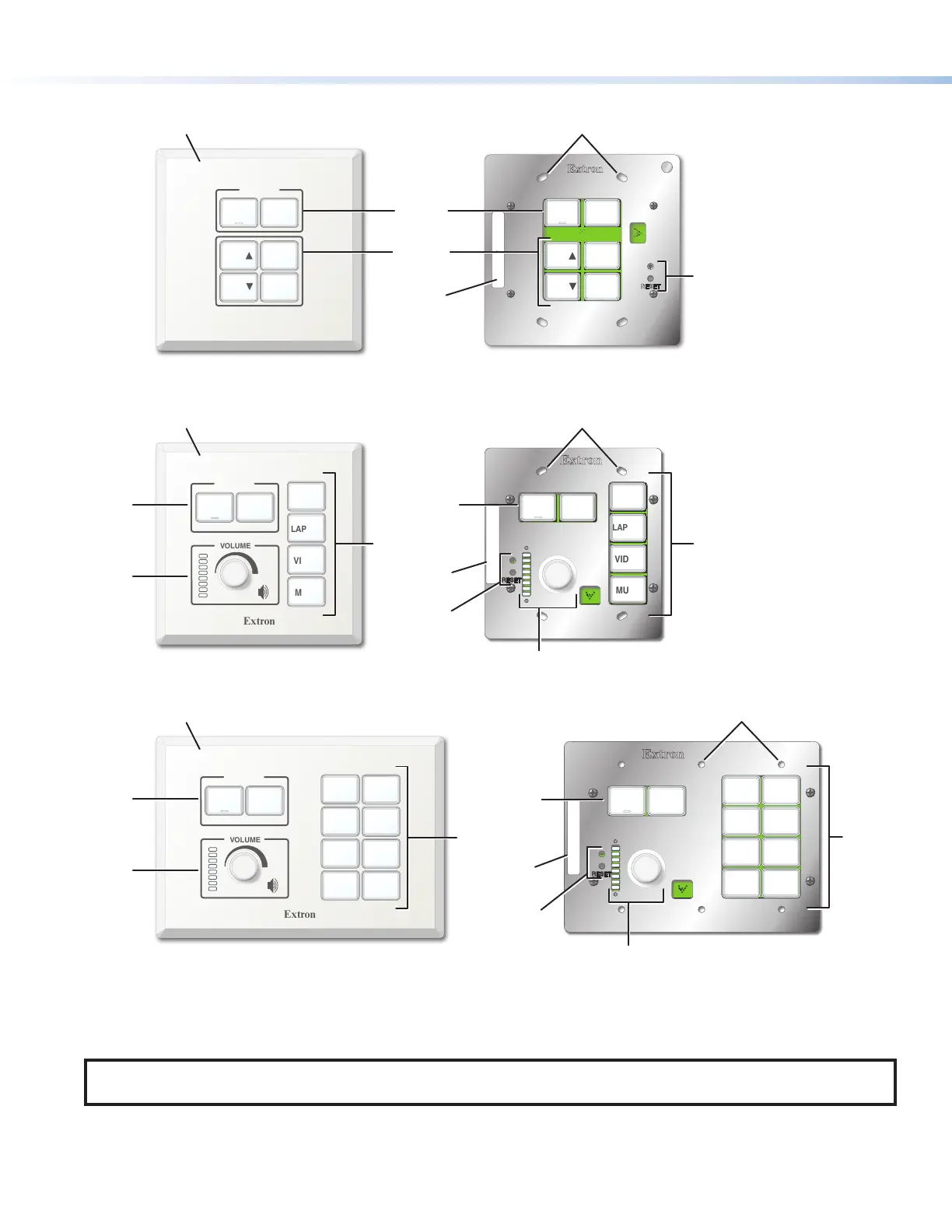
MLC Plus 50 Front Panel With Faceplate
MLC Plus 50 Front Panel
Without Faceplate
Display
Power
Buttons
Function
Buttons
Function
Buttons
Reset
LED and
Button
Reset
LED and
Button
MAC
Address
MAC
Address
Reset
LED and
Button
MAC
Address
MAC: 00-05-A6-XX-XX-XX
S/N: ####### E######
00-05-A6-XX-XX-XX
MLC Plus 100 Front Panel With Faceplate
MLC Plus 100 Front Panel
Without Faceplate
Display
Power
Buttons
Display
Power
Buttons
Volume
LEDs
and
Knob
Volume
LEDs
and
Knob
Volume
LEDs and
Knob
Function
Buttons
Faceplate
Faceplate
MLC Plus 200 Front Panel With Faceplate
Display
Power
Buttons
Function
Buttons
Function
Buttons
MAC: 00-05-A6-XX-XX-XX
S/N: ####### E######
00-05-A6-XX-XX-XX
Display
Power
Buttons
Volume
LEDs and
Knob
MLC Plus 200 Front Panel
Without Faceplate
Figure 3. MLCPlus50/100/200Series Front Panels With (Left) and Without (Right) Faceplates
NOTE: The AAP models are identical to the corresponding non-AAP models except that they also have room to mount from
one to four AAP devices within the faceplate to the right of the controller.



 To Next Page