6
MLC Plus 50/100/200 Series • Setup Guide (Continued)
Control and power — LAN (Ethernet) and PoE
Pins:
12345678
Insert
Twisted Pair
Wires
MLC
Side
Panel
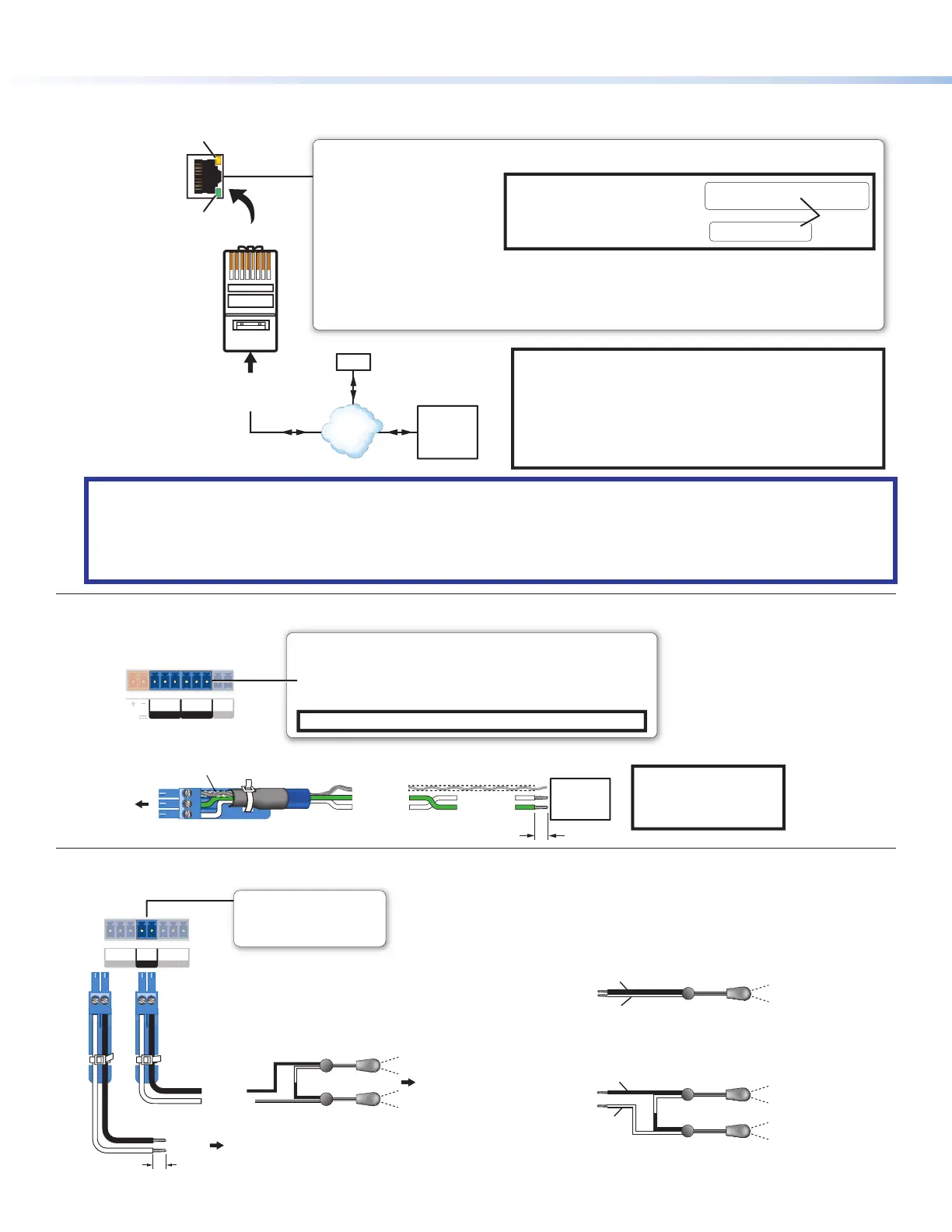
LAN/PoE (Ethernet and Power Over Ethernet)
Connect to an Ethernet network. This port must be congured.
Ethernet
NOTE:
MAC address information
(00-05-A6-##-##-##) is
located on the front panel
(behind the faceplate).
IMPORTANT NOTES:
• The factory congured passwords for this device have been
set to the device serial number. Passwords are case
sensitive. Performing a “Reset to Factory Defaults” reset
(see Reset Modes: a Brief Summary on page ) sets the
passwords to
extron.
• DHCP is off by default
PC
Lights green
to indicate a network
connection.
ctivity LED: Blinks yellow
to indicate data is being
sent or received.
TCP/IP
Network
Extron
Devices
(Switchers,
Scalers)
Default protocol:
• MLC IP address: 192.168.254.250
• Gateway IP address: 0.0.0.0
• Subnet mask: 255.255.255.0
• DNS address: 127.0.0.1
• DHCP: off
• Link speed and duplex level:
autodetected
• Data rates: 10/100/1000Base-T
Use this port to upload conguration
les and rmware.
Power over Ethernet (PoE):
• If PoE is available, the MLC Plus uses PoE.
• If PoE is dropped (disconnects), the
controller switches seamlessly to the
external 12 VDC power supply, if it is
installed.
MAC: 00-05-A6-XX-XX-XX
S/N: ####### E######
00-05-A6-XX-XX-XX
MAC: 00-05-A6-XX-XX-XX
S/N: ####### E######
MAC
Address
Default login credentials:
• Username: admin or user
• Initial password:
unit serial number
• Password after a “Reset to
Factory Defaults”: extron
ATTENTION:
• Power over Ethernet (PoE) is intended for indoor use only. It is to be connected only to networks or circuits that are not
routed to the outside plant or building.
• L’alimentation via Ethernet (PoE) est destinée à une utilisation en intérieur uniquement. Elle doit être connectée
seulement à des réseaux ou des circuits qui ne sont pas routés au réseau ou au bâtiment extérieur.
Control, bidirectional — serial (COM)
Tx Rx
G
Tx Rx
G
OWER
.4
COM 1 COM 2
NOTE: If you use cable
that has a drain wire,
tie the drain wire to
ground at both ends.
Strip wires
RS-232-
Controllable
Device
Transmit
Receive
Receive (Rx)
Transmit (Tx)
Ground
Rx
G
Tx
3-pole COM
(RS-232)
Select protocol via software. COM port default protocol:
• 9600 baud
• 8 data bits • 1 stop bit
• no parity • no ow control
NOTE: These COM ports support software ow control only.
Serial (COM) Ports
Rear Panel
3-pole
Heat Shrink
Over Shield Wires
Control — IR output
T
x
GS
M 2 V
LIR
Rear
Panel
S
G
(-)
(+)
(-)
(+)
(+)
(-)
To the
a Projector,
Display, or
Source Device
Two Single IR Emitters
Ground
IR Output
Ground
IR Output
Unidirectional IR
or
To Projector, Panel Display, or the Wired
IR Remote of a Source Device
IR Output Port
Output options:
• IR (30 kHz to 300 kHz,
with or without carrier signals)
(+)
(−)
(−)
(+)
IR Signal (+)
Ground (−)
Two Single IR Emitters
(see Reset Modes: a Brief Summary on page11
Rev. C: Updated
cables from CTLP
to STP 20-2P.
Corrected transmit-
receive wiring in
COM port wiring
diagram. Updated
note box styles and
cable jacket style
Ground (−)
IR Signal (+)



 To Next Page