5
Rear and side panel features
NOTE: For rear panel features and cabling, the MLCPlus100, MLCPlus100AAP, MLCPlus200, and MLCPlus200AAP
are identical, so in this section the MLCPlus100 represents all of those models. The rear panel of the MLCPlus50 has one
COM port instead of two, and does not have a volume control port, but it is otherwise the same as the other models.
LAN
/
PoE
POWER
12V
0.3A MAX
Tx Rx
G12CGS
COM 1 IR
GIN
D IN RELAYS
POWER
12V
0.3A MAX
Tx Rx
G
Tx Rx
2CGCVGS
COM 1 COM 2 VOLIR
GIN
D IN RELAYS
MLC Plus 100 Rear Panel
MLC Plus 50 Rear Panel
MLC Plus 100
Right Side
LAN/ PoE
input
(RS-232)
output Relays
input
Power
input
COM
(RS-232)
IR
output Relays
Digital
input
Volume
control
LAN/PoE
(Ethernet)
connector
and LEDs
LAN/PoE
(Ethernet)
connector
and LEDs
Grounding
screw
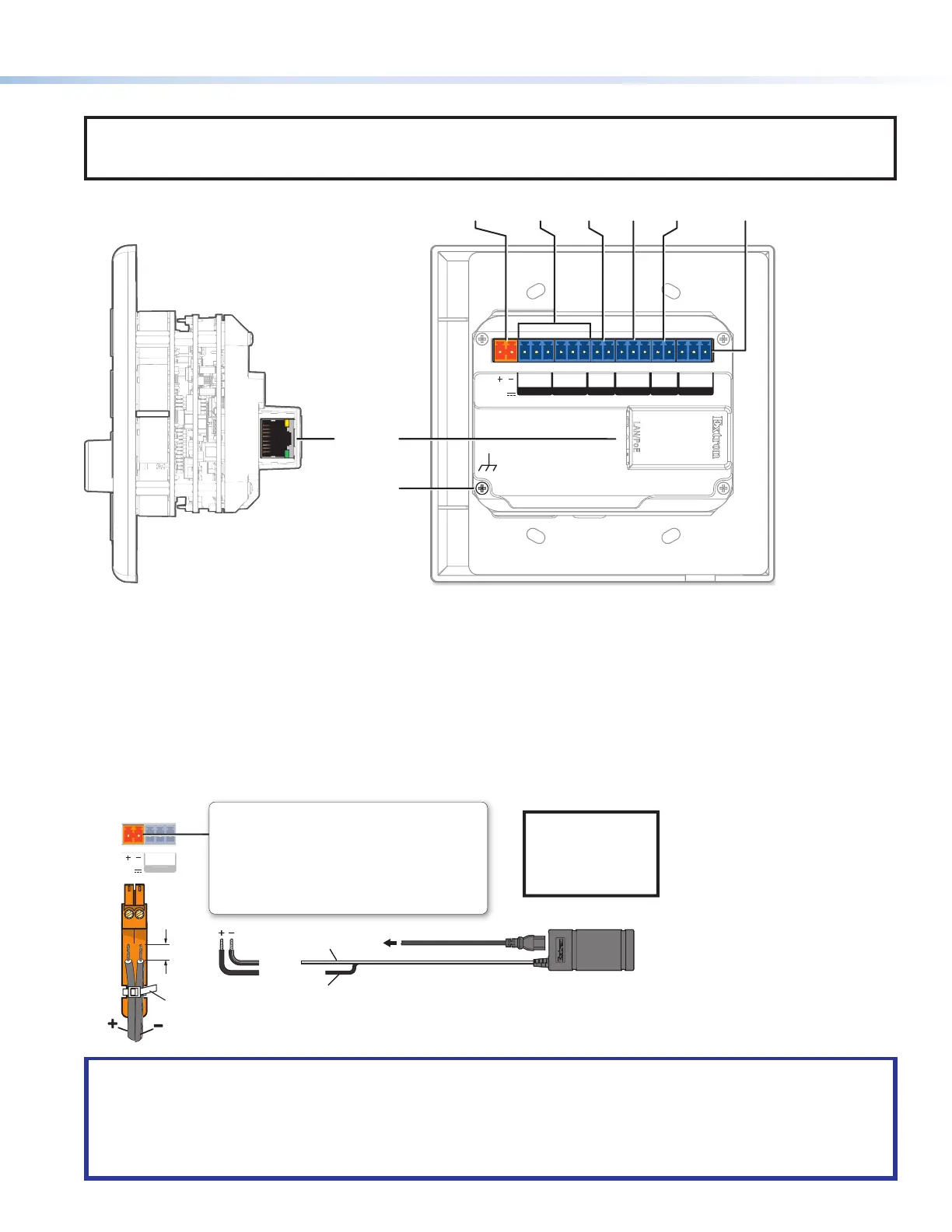
Figure 4. MLCPlus50/100/200Series Side (Left) and Rear Panel (Right) Features
Cabling and features
Attach cables using the following wiring diagrams as a guide. Full details are available in the MLCPlus50/100/200 Series User Guide.
Power
The MLCPlus supports Power over Ethernet (PoE) (see Control and power — LAN (Ethernet) and PoE on the next page).
Alternatively, you can power the controller using an optional Extron 12 VDC, 0.5 A desktop power supply, as shown below.
x
POWER
12V
0.3A MAX
OM 1
Ground
all devices.
– Return
+12 VDC input
Ridged
Smooth
External
Power Supply
(12 VDC, 0.5 A max.)
To
AC
power
Tie Wrap
3/16"
(5 mm)
Max.
Rear Panel
Power Input, External Power Supply (optional)
• Front panel buttons
blink during boot-up.
• Once the MLC Plus
is powered and
operational, the
buttons are lit
according to
conguration.
• Connect to an Extron 12 VDC,
0.5 A power supply.
• If PoE is available, the MLC Plus
uses PoE.
• If PoE is dropped (disconnects), the
controller switches seamlessly to
the external 12 VDC power supply,
if it is installed at this port.
NOTE:
Check the
polarity of the
power supply
before connecting
it to the controller.
ATTENTION:
• Always use a power supply provided by or specified by Extron. Use of an unauthorized power supply voids all
regulatory compliance certification and may cause damage to the supply and the end product.
• Utilisez toujours une source d’alimentation fournie ou recommandée par Extron. L’utilisation d’une source d’alimentation
non autorisée annule toute certification de conformité réglementaire, et peut endommager la source d’alimentation que
l’unité.
Rev. B, 01/25/18:
Updated power supply from 1.0 A to 0.5 A,
changed isometric view to ortho view.
02/19/18: Updated PoE wording per peer
review.
Rev. C: Updated note box style.
Rev. C: updated
French text.



 To Next Page