Home
EzCAP
PCI Card
284
Page 44 (OBS Software Settings: Recording)
EzCAP 284 - OBS Software Settings: Recording
49 pages
Manual
Save Page as PDF
To Next Page
To Next Page
To Previous Page
To Previous Page
Loading...
6
,
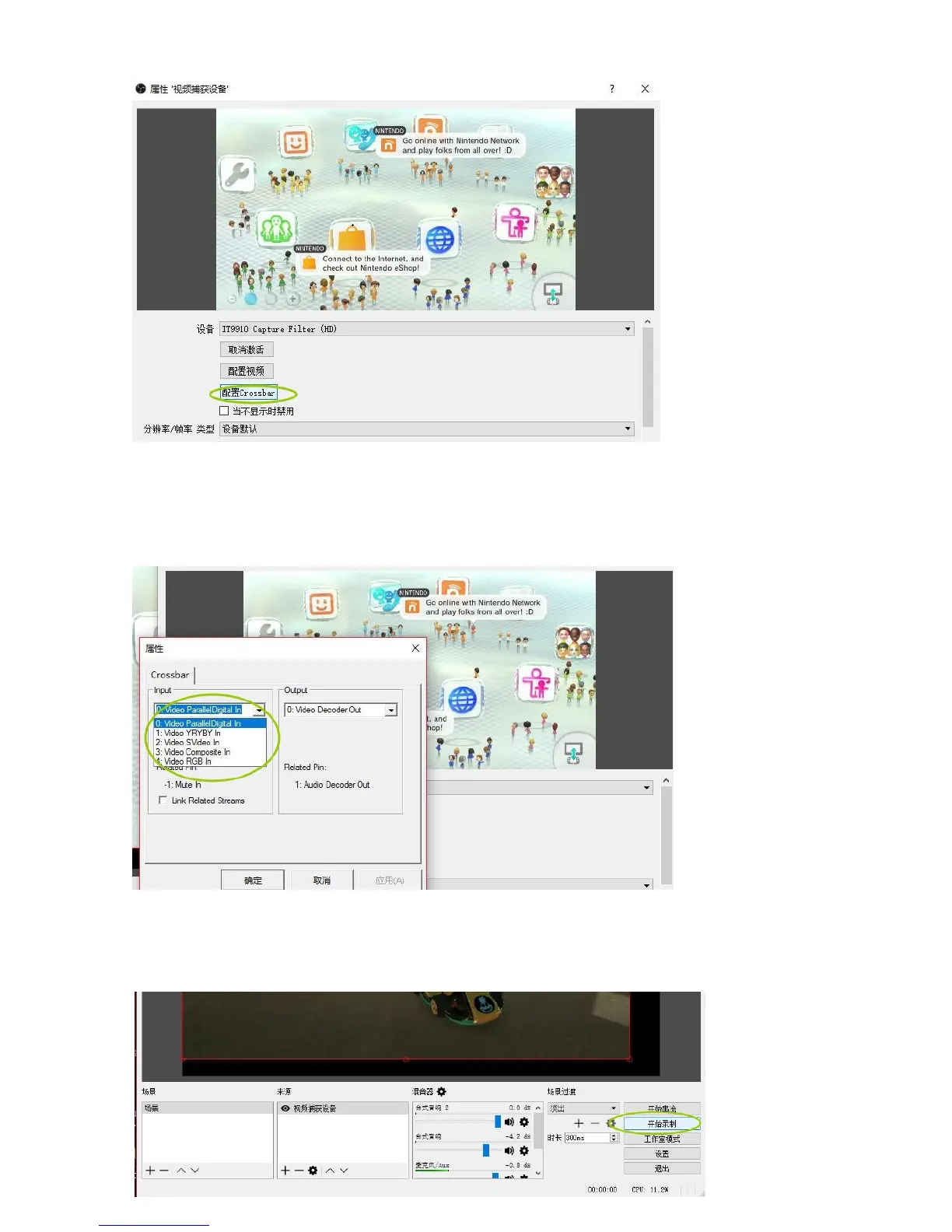
选择对应接
入的视频然后
“
确定
”
,通常情况
下改选输入源后
需要重新启动软件
后才能预览视频
。
0
:
Video Par
allelDigit
al In
对应
HDMI
信号输入;
1
:
YRY
BY
In
对应色差分量信号输入
(
红绿蓝三色端
子
);
3:Vide
o Composite I
n
对应复合同步视频
信号输入
(CVB
S,A
V
,
黄色端
子
)
四,视频录制
:
1,
如上视频出来后,
可以直接点
“
开始
录制
”
就可以录
制视频啦:
43
45
Table of Contents
Main Page
Features/Ports and Buttons
1
Connections
2
Connect with HDMI Input Source
2
PS4 Setting
3
PS3 Setting: for the Component Input
4
Connect with Composite Video Source
5
Remote Controller
6
Record
6
Firmware and Others
7
Edit/Convert Recorded Files
8
Specifications
10
Package Contents
11
Hardware Extra
11
Standards
11
Applications
12
Faq
12
Guide for OBS
15
Driver Installation
15
Download and Install OBS Studio
17
OBS Settings
17
Video Recording
20
Video Streaming
23
Related product manuals
EzCAP 159
3 pages
EzCAP Live Gamer RAW
18 pages
EzCAP ezcap280
24 pages
EzCAP ezcap324
18 pages
EzCAP ezcap295 HD Capture Pro
26 pages


 To Next Page