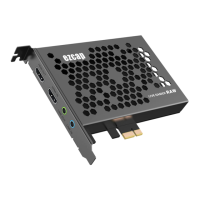
Connect with composite video source (such as PS2, VHS, V8, Hi8, Etc):
1, Connect power with DC adaptor
2, Connect the composite (yellow cable and red white audio cable) to your video source with the
adapter cable come with the package.
3, With HDMI cable connect to monitor
4, Plug in an USB drive.
5, The “LINE OUT” is for connecting to speaker or earphone, it’s not necessary if you don’t need,
cause the HDMI output is also with audio output.
6, Connect a Microphone to the MIC port if you need record speak from microphone, it’s not
necessary if don’t need.


 To Next Page