REMOTE CONTROLLER
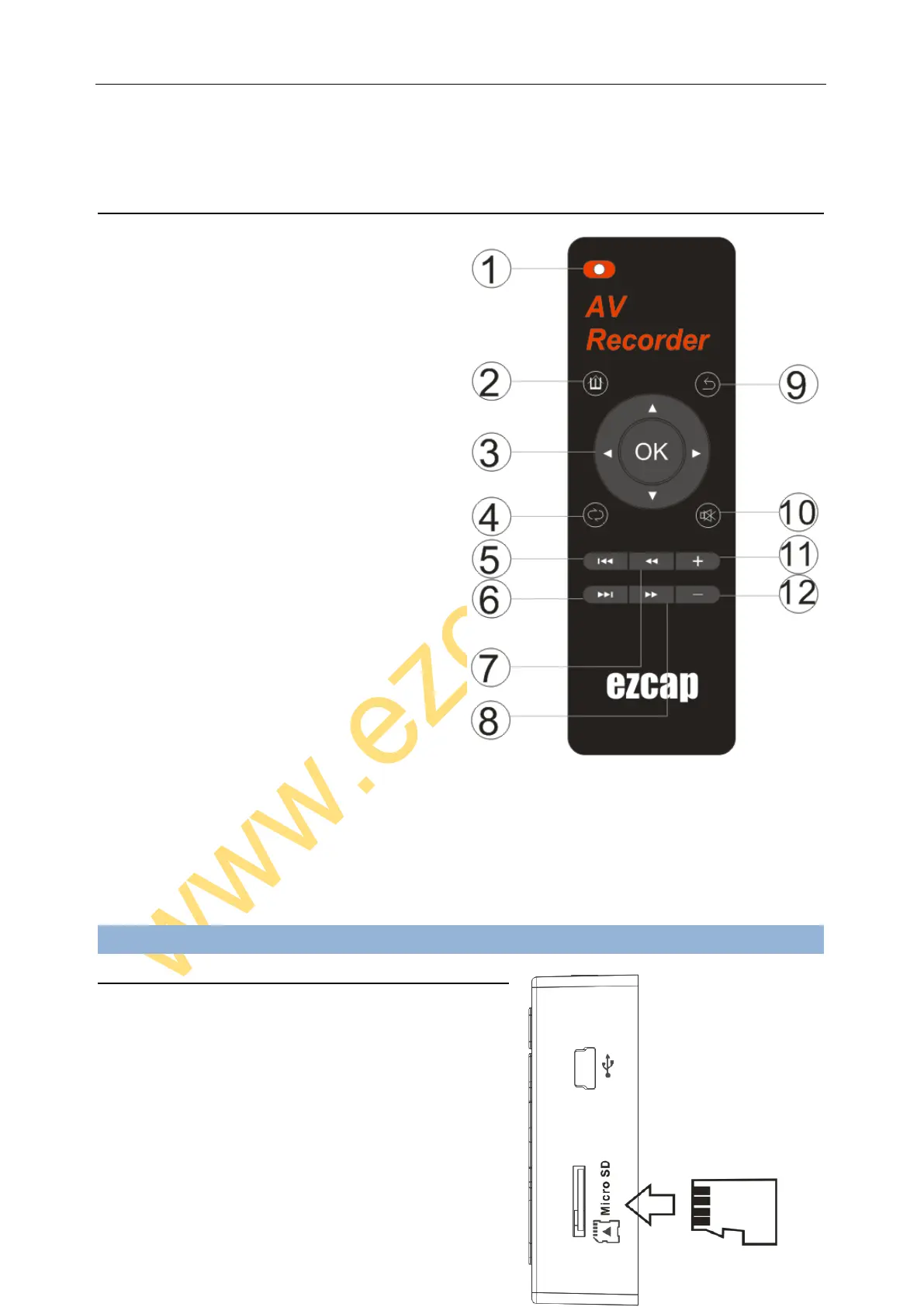
1. Record – In “TV IN” preview the video mode, press
to record video (even without video input), press
again to stop and save file.
2. Home – Return to home menu.
3. Direction and OK button – To operate the menu, and
playback.
4. Audio Play Mode – Switch between 6 different play
mode. (Long press to remind you to delete the
playing file or not when you play video, music or
pictures.)
5. Previously – Play previous video or audio.
6. Next – Play next video or audio.
7. Fast Backward.
8. Fast Forward.
9. Return – Return to superior menu.
10. Mute
11. Audio level up.
12. Audio level down.
Connections
MICROSD CARD
Plug Micro SD card into the slot with right direction as picture, the
screen will show card in when plugged.
For file safety, Micro SD card better be empty and format before
using, support FAT32, exFAT (does not support NTFS), MAX
32GB.
When plug in Micro SD, the media will automatically record to it


 To Next Page