EasyManua.ls Logo

EZCast 5G - User Manual

EZCast 5G
9 pages
Print Icon
To Next Page IconTo Next Page
Loading...
EZCast 5GHz
!
Quick Start Guide
Rev. 1.10
Introduction
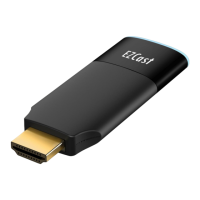
Thanks for choosing EZCast! EZCast 5G is an WiFi
display receiver, which supports a reliable WiFi
802.11ac dual band 2.4GHz/5GHz connection,
providing high speed with lower wireless interference.
The EZCast 5GHz contains the cutting-edge EZCast
technology, and firmware upgrade will be provided
accordingly in order to compatible with latest
devices. The EZCast 5G cooperates with the EZCast
and EZChannel App, and support all popular OS,
such as iOS, Android, Mac, Microsoft Windows, and
etc. Please read the Quick Start Guide below to
setup your EZCast 5G. Happy Casting!
support@iezvu.com
Question and Answer IconNeed help?

Do you have a question about the EZCast 5G and is the answer not in the manual?

Summary

Introduction to EZCast 5 GHz

EZCast 5 GHz Hardware Installation

EZCast 5 GHz Software Installation

Software for Mac and Windows

Download software from EZCast website for Mac/Windows OS.

Software for iOS and Android

Download EZCast and EZChannel apps from app stores.

Setup EZCast Dongle

EZCast App Features Overview

DLNA Media Sharing Guide

EZChannel App Usage

EZCast Settings and Firmware Upgrade

Internet and Connection Settings

Configure WiFi AP connection and network link types.

Default Mode and Device Configuration

Set power-up mode, resolution, SSID, and password.

Firmware Upgrade Procedure

Update the EZCast dongle to the latest version for compatibility.

EZMirror Setup and Usage

FCC Compliance Information

FCC Rules and Operation Conditions

Explains compliance with FCC Part 15 rules and operating conditions.

FCC Radiation Exposure Statement

Details FCC radiation exposure limits and installation guidelines.
EZCast 5G Specifications

General IconGeneral
BrandEZCast
Model5G
CategoryReceiver
LanguageEnglish

Related product manuals