Confidential Page 25
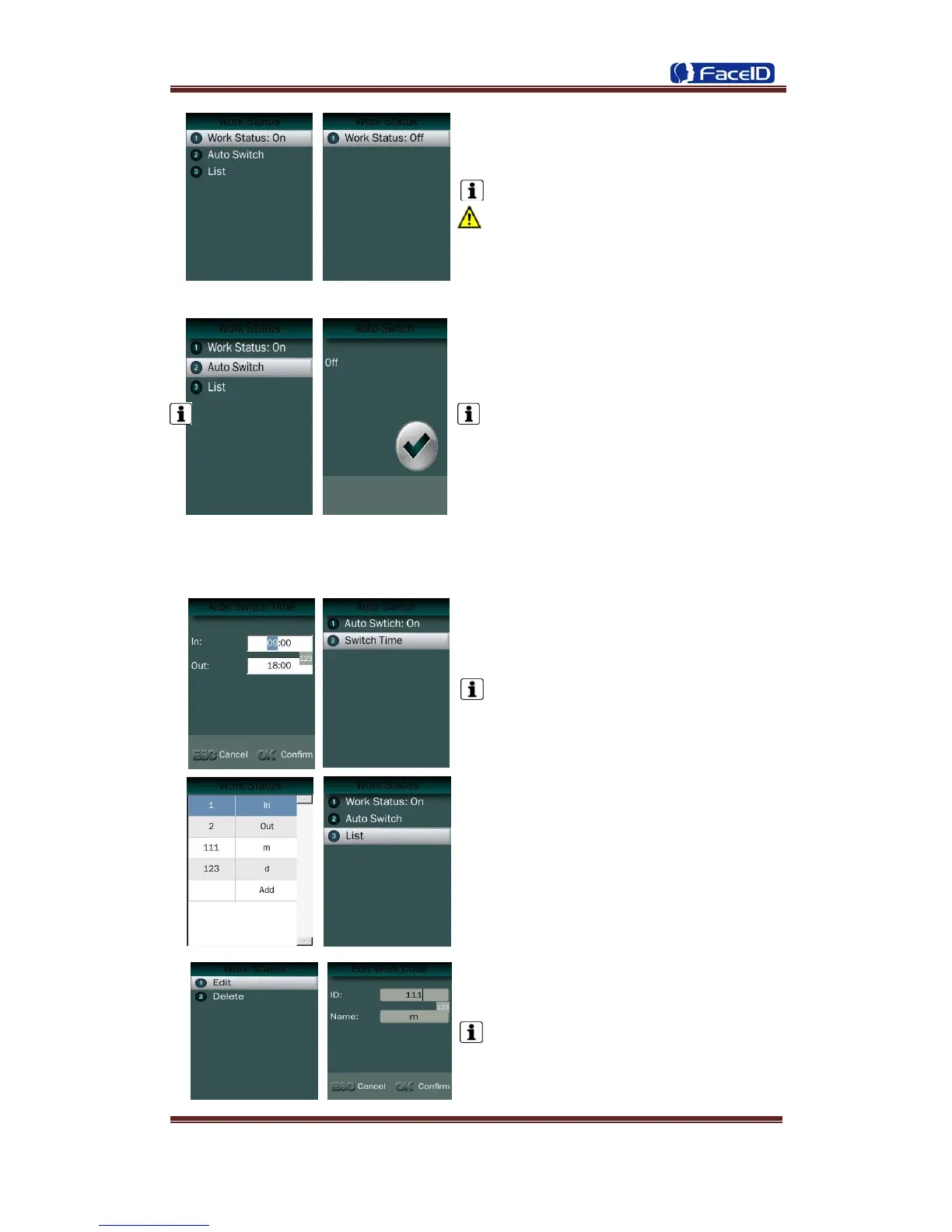
Work Status: It is defined to mark the work
status related to each record such as in, out,
overtime in, overtime out.
The default is off.
If Work Status is on, user could select the
desired work status by pressing down
key<↑/↓> or just finish the verification if desired
work status displaying on screen.
Auto Switch: It is defined to display the
work status automatically according to the time
that set.
For example, if the time of work status “in”
set as 9:00 and work status “out” set as
18:00, the work status “in” will be displayed
automatically when time reach 9:00 till time
reach 18:00, the work status “out” will be
displayed automatically when time reach 18:00
till time reach 9:00 in next day. The default is
off.
Switch Time: User can set auto switch
time.
The default is 09:00 for “in” and 18:00 for
“out”.
List: User can edit or add the work status
on the list by selecting the desired one
then press ok to edit or delete.
Edit and Delete: User could edit the ID
and Name of work status.
The default work status is In/Out and they
can’t be deleted. New added work status could
be deleted.


 To Next Page