FagronLab™ BASIC – User Manual | 3
Quick - Start
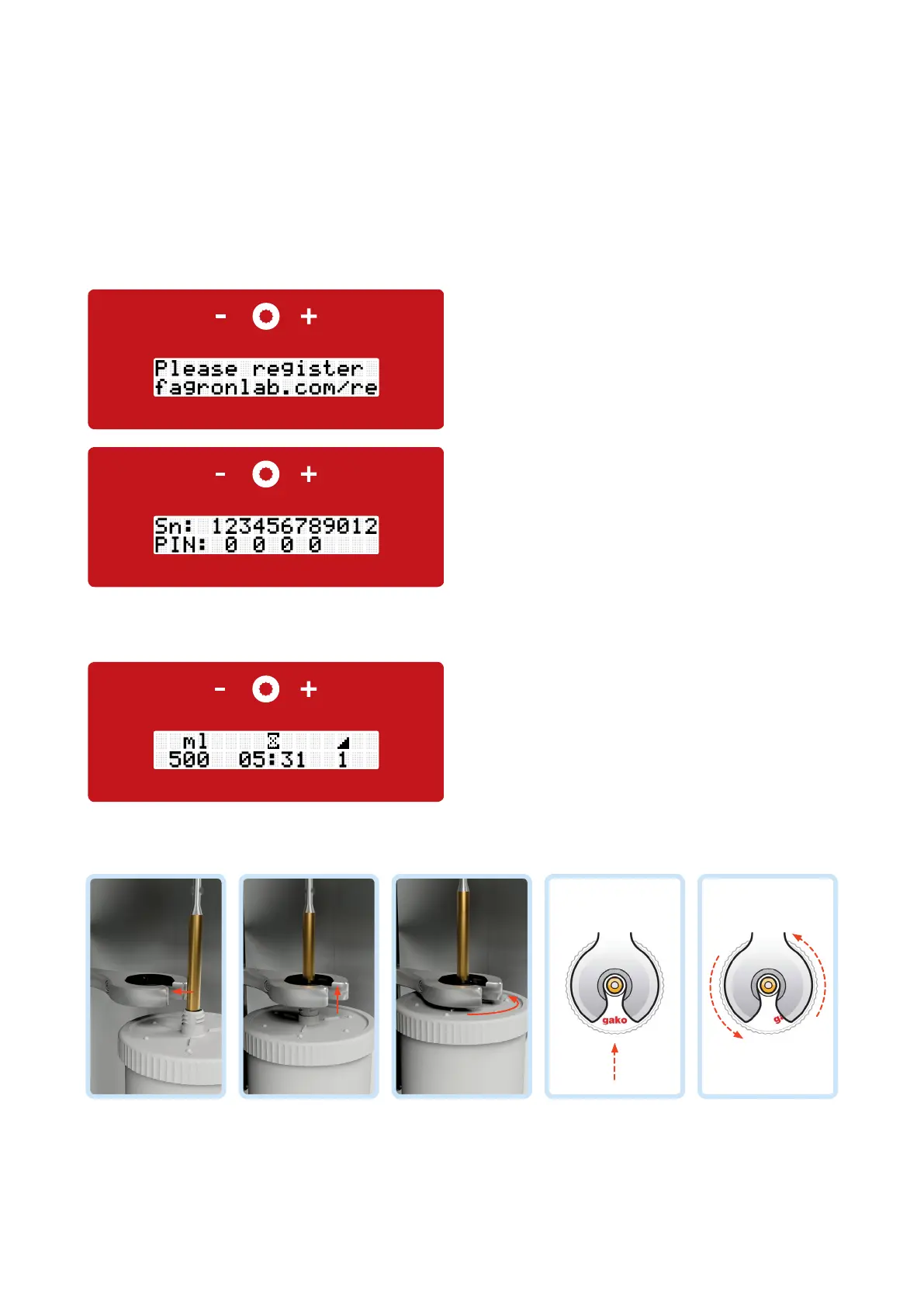
How to register your FagronLab™ BASIC device
• Hold the FagronLab™ logo on top of the jar to the front; insert the mixing shaft directly from the front into the lift arm
• Insert the mixing unit from below
• Apply slight pressure from the top onto the lift arm. Fix the jar with a slight turn counterclockwise (about a quarter turn)
into the lift arm
• Move the mixing unit in the lift arm by hand all the way up and push the compounding button
• Touch panel with:
- Minus button (left)
- Compounding button (middle)
- Plus button (right)
• Start display shows jar size, mixing time and mixing speed
• After pushing the compounding button for two seconds
"Start" appears on the display and the jar can be
mounted
FagronLab™ BASIC
Display handling
Lift arm with integrated quick-lock coupling
• Go to www.fagronlab.com/re
• Enter the 12 digit serial number
• Enter the four digit unlock PIN on your device


 To Next Page