WARNING – SERVICING TO BE CARRIED OUT ONLY BY AN AUTHORISED PERSON
Disconnect from electricity and gas before servicing. Check appliance is safe when you have nished.
32
Set the Governor
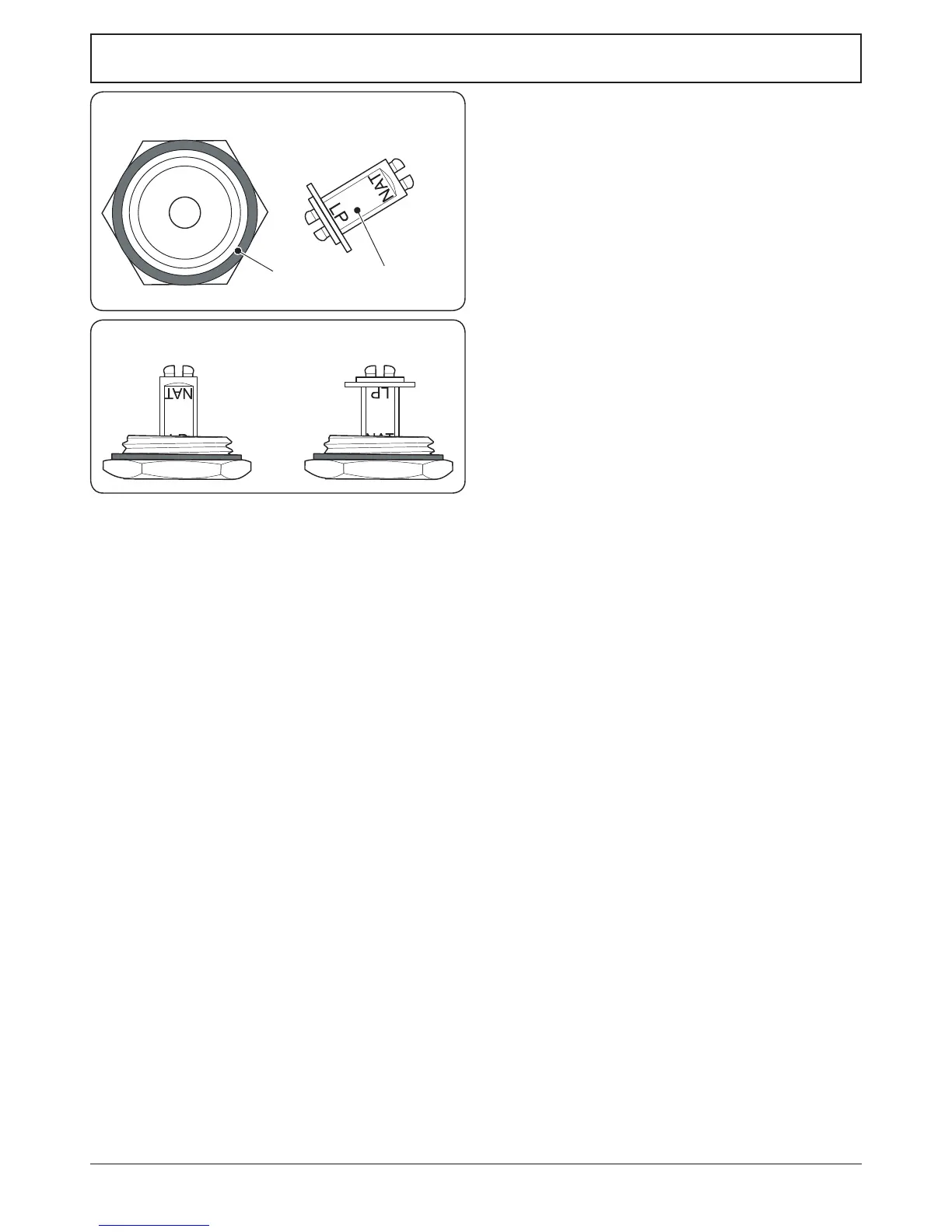
Unscrew the governor’s brass top. In the base of the brass top
is a plastic snap-in converter device (Fig.8-5). To convert the
governor, snap the device out of the top and ret it the other
way round. The snap-in converter device is marked to show
the gas for which it is set (Fig.8-6).
Make sure the device is secure in the top cap and ret the cap
to the governor.
Affix Label
Stick the appropriate gas label over the natural gas part of the
appliance data labels (one on the rear of the appliance and
one in the storage drawer).
Ensure that the appliance is gas sound (refer to
‘Pressure Testing’ in the ‘Installation’ section).
Check the operation of all the burners.
ArtNo.102-0007 - Maxitrol converter device positions
Fig.8-6
ArtNo.103-0006 - Maxitrol cap & converter
Nut
Snap-in converter device
Fig.8-5





 To Next Page