FSC881 QUICK START GUIDE
01
02
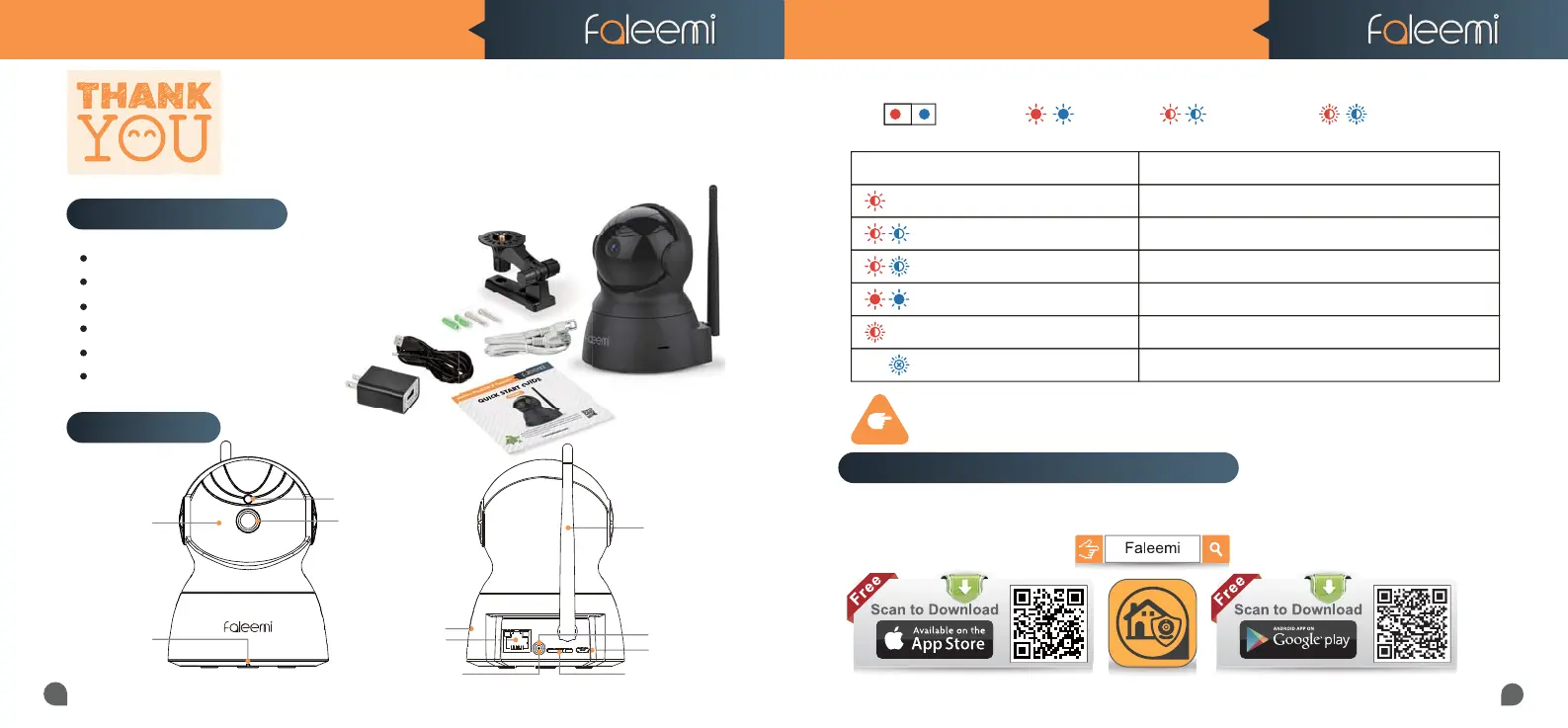
IR LEDs
Lens
Memory Card Slot
WPS/Reset Button
Light Sensor
Built-in
Microphone
Speaker
DC 5V Power
Connections
Dear Customer,
Thanks for purchasing our products. If you encounter any problem while
configuring your camera, or need additional information, please feel free to
contact the Faleemi Support by email/skype: support@faleemi.com.
Or visit the Faleemi website : https://www.faleemi.com/faq.
FSC881 QUICK START GUIDE
DC5V
RST
ETH
ANT
RJ45 10/100M
LAN Port
Status LED
Wi-Fi Antenna
Status LED
*
Solid Light Blinking Quickly
Blinking Slowly
Red light is blinking slowly Power up and activating
Indicator Light Status Device Status
Red and blue lights are blinking slowly The device is ready to connect
Blue light is blinking quickly The device is receiving the wifi signal or connecting to the wifi
Blue and red lights are solid and steady The device is connected to the network
Red light is blinking quickly The device is reset to restore to factory default
Blue light goes off The device failed to connect to the network
TIPS
Download the App (Android and iOS)
Please download the Faleemi APP before doing the setup
First, connect your mobile device to your WiFi and download the App “Faleemi” from the App Store
or Google Play store,or scan below QR code to download it.
What’s in the box ?
Faleemi 1080P Pan&Tilt Wifi IP Camera FSC881
Ceiling/Wall Mounting Bracket
Mounting Screws & Plugs
Power Adapter
Network Cable
Quick Start Guide



 To Next Page