Lumina 71 Set alarm
29
10. Set alarm
10.1 Ingredient
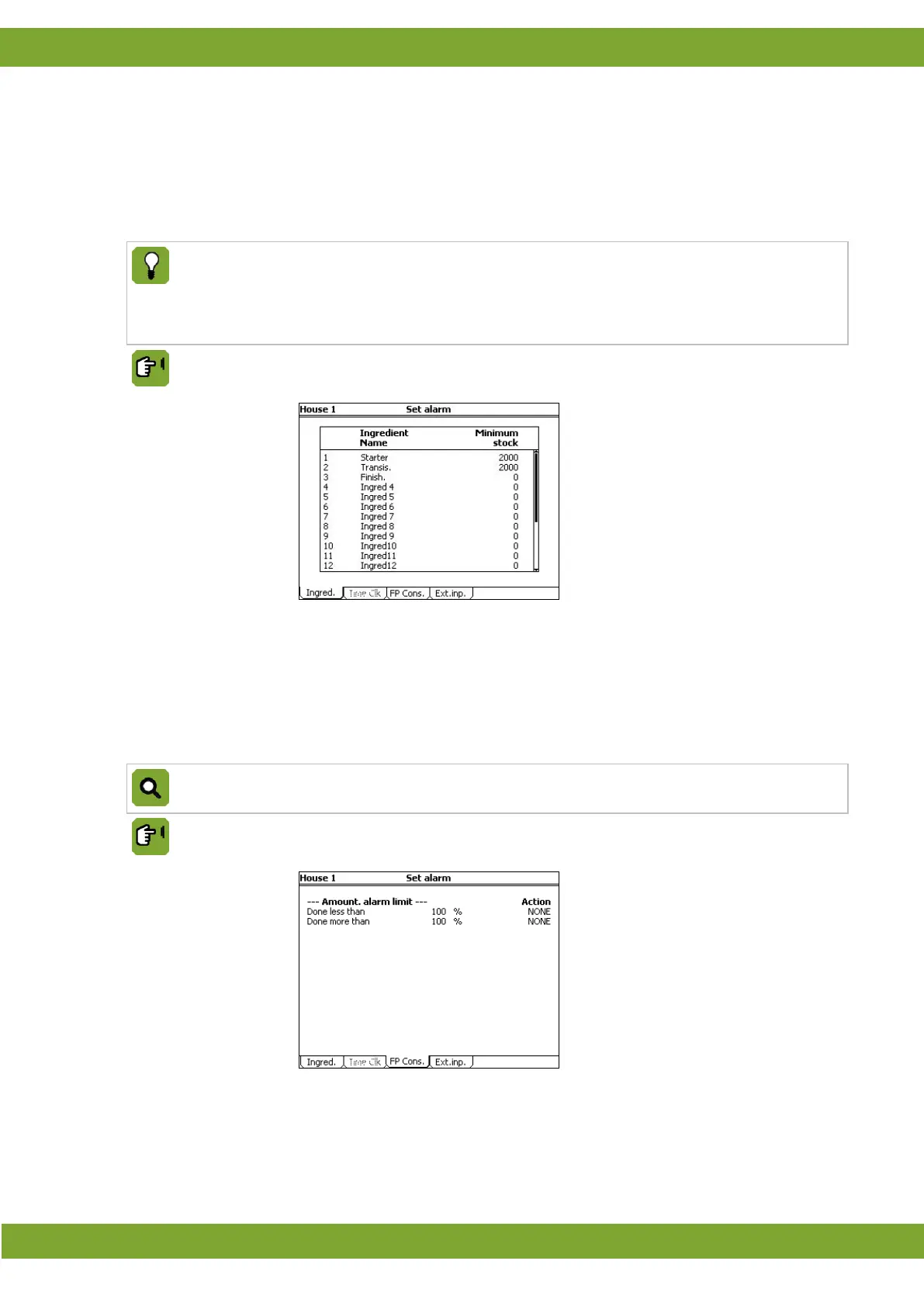
In this tab page the minimum stock can be entered. When stock falls below this minimum, the control computer
gives an alarm.
The control computer checks the minimum stock using the registered feed consumption. The actual
consumption may differ due to the error margin of weighing and dosing-
in equipment. When dosing in, the
control computer always uses the active silos, irrespective of the minimum stock registered by the control
computer. Bulking may have occurred again in the meantime, without this having been entered in the
control computer.
Set alarm tab page Ingred
Ingredient Name
Readout of the name of the ingredient.
Minimum stock
Setting of under which amount (kg) of ingredient the control computer gives a 'Minimum
stock' warning.
10.2 FP Cons.
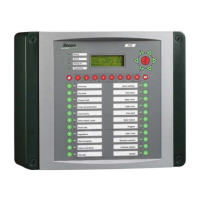
Only available with sensor feeding.
Set alarm tab page FP Cons.
Done less thant
Setting if the control computer gives an alarm if the animals eat less than the given
percentage (NONE/LOUD/SILENT).
Done more than
Setting if the control computer gives an alarm if the animals eat more than the given
percentage (NONE/LOUD/SILENT).



 To Next Page