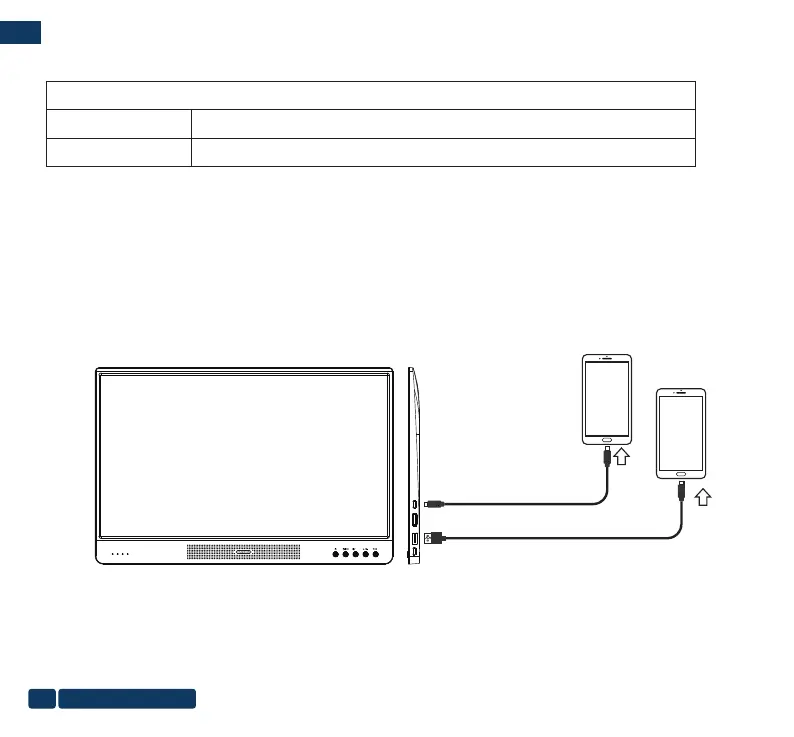
Type-C to Type-C cable
Note:
You need to plug in the power supply and keep it powered on before connecting the Type-C to Type-C cable to the monitor.
If the sequence is wrong, it will cause no input on the portable monitor. At this time, you need to unplug the data
transmission cable, plug it in again and check whether plugged in properly and tight.
DCIN Type-CUSB 1
HDMI
OK
+
2. Mobile phone that support Type-C directly connected
Cable selection:
Option 1
Option 2
AC Adapter, Type-C to Type-C cable
Power Bank, Type-C to USB cable, Type-C to Type-C cable
Connect:
a. Make sure the phone has enough power. If the power is insufcient, you need to connect the portable monitor to the
power supply and keep the portable monitor on.
b. The side of the portable monitor port is marked with the purpose of each slot, please nd the dedicated port for Type-C
charging.
c. Connect the AC adapter(Power Bank) rst and keep it charged.
d. Find the Type-C data transmission interface, use a Type-C to Type-C cable to connect the phone with the portable
monitor, and the image will be copied and displayed immediately.
Type C to USB cable
us-pc@fangor.cn
14
EN


 To Next Page